Latest Post

Want to know how you can become SAP consultant and get a high-paying career? If you have an interest in software, computers, and streamlining the process. Then you might be thinking of becoming an SAP consultant. But how do you know you can be the right fit for this position? How can you become a skilled SAP consultant?

So, to help you in this, we will teach you what an SAP consultant is, how to become an SAP consultant, and many other essential things.

What is SAP Consultant?

SAP consultant is the subject matter expert who contributes to businesses making a relevant decision about using the right software solutions. In general, SAP is the short-term of system, application, and products. Most specialists hold their expertise in one or two fields of SAP modules.

Thus, if the professional belongs to a finance background, they help in functional areas of the business. However, if the professional belongs to an engineering background, then they work closely with SAP software.

What’s The Role of The SAP Consultant?

If you become the SAP consultant professional in a company, your work responsibility will depend upon your expertise. Generally, you will be handling the evaluation, configure and design of the computer system and software. So that it can meet the needs and expectations of the clients or the employer who hired you.

You will also be responsible for optimizing and improving the workflow for the end-user so that they can accurately perform their work. Sometimes you can also feel the need to take feedback from the user and do some necessary updates.

However, these duties are flexible and depend upon the type of SAP consulting you have opted for. Below are some most typical roles and responsibilities of the SAP consultant.

Analyze the computer system of the company to make some relevant improvements when needed.

  • Keep track of inquiry, order, and other billing-related aspects.
  • To streamline the A/R or account receivable of the company, you need to check out the credit management process.
  • Create complete user guides and manuals to help the end-user to use the product efficiently.
  • Automate the process and seek for the need of updates in the F.Y. year and O.S. database migration.

So, now you have learned some of the SAP consultants’ typical roles, so let’s move to our central topic to become a highly-skilled SAP consultant.

How to Become SAP Consultant in India?

How to Become SAP Consultant in India

Below are some of the steps you can adopt to start your path to becoming a skilled SAP consultant.

1. Complete Your Graduation

To become an SAP consulting professional, you need to have at least a bachelor’s degree. And should also have some minor experience in the SAP process.

Thus, before you get hired, first complete your bachelor’s in the field of computer, marketing, finance, or another required field. Your degree is essential as you work closely with the finance department of the company.

2. Research SAP Consulting

When you are in graduation or after but before getting enrolled for the SAP training. You can do in-depth research about SAP and its key modules to learn. You can also check out the other available resources on YouTube and other platforms. Once you have all the fundamental knowledge, you can decide better whether you should continue with this field.

3. Look For a Good SAP Trainer and Get Certified

You need to choose a good trainer to get certified in SAP, but do not look for a good institute. Institute is not going to teach you the professionals, and its trainer will provide you the SAP training. Hence it is always better to look for multiple trainers and take their demo. And choose one of them after 2 to 3 days of the demo, as now you can make a rational decision.

During the training, try to gather all the essential knowledge and specialize in two or three modules initially. Getting additional information in two or three modules will help you choose one core area of your SAP expertise.

4. Now Look For Small Opportunities and Gain Experience

After completing the course, many students wait for significant opportunities that can pay well. But it can take time, and you do not want to waste this precious time just after completing the course. Hence try to get hired in a company to learn more about SAP and its activities.

However, the pay can be low, but it is worth it as you are not sitting and have continued your learning journey in a company. It will help you to get exposure and build your area of expertise.

5. Go For Masters, Yet Optional

Some companies also ask for higher degrees and education, and they pay well too. So it is better to look for your masters as it will help you take your career to the next level. It will allow you to show your experience and educational background to make you an ideal candidate for the position. You can complete your master’s in computer science or administration.

6. Keep Gaining Experience As Significant Will Catch You

Learning is great, but continuing to gain experience is crucial to becoming an SAP consultant. Thus, you should stick to good company with your studies even if the pay is not much. Because when large organizations ask, then you will have a pre-made portfolio.

Salary of SAP Consultant

In starting you can expect to earn Rs2,50,000 to Rs4,50,000 per year with additional Rs10,000 yearly bonus. Thus, pay is sufficient for the fresher point, and it gets higher when you gain experience or work in a large organization.

Conclusion

Thus, in this article, we learned how to become an SAP consultant in India or else. Here we also learned about SAP consultants, their work responsibilities, and the salary package. You can choose this field if you are interested in working as a subject matter expert in business, sales, development, functionality, and other similar terms.

If you think any of these skills or interests match yours. You should look for the SAP consulting field because the pay for such professionals is excellent.

The post How to Become SAP Consultant in India? Skills Required and Salary appeared first on The Crazy Programmer.


from The Crazy Programmer https://ift.tt/3htHDlL

MySQL is a widely used relational open-source database management solution across the world. The history of MySQL goes back to when Monty Widenius in 1979 started working for the small firm named TcX and created the reporting tool that was written in a BASIC and ran on 4 Mhz computer and 16KB RAM. With time, this tool was again written in C & ported to run over Unix. Still, it was just the low-level engine with the reporting front end. This tool was called Unireg. Let us know the complete history of MySQL and how it came into existence:

MySQL History

History Of MySQL Database

MySQL, a Swedish company was credited for being a founder of the MySQL database server. There were 3 engineers: David Axmark, Allan Larsson, and Micheal Widenius, who started their work on the MySQL server development in 1995. They released their first MySQL server on the same date. Another US tech firm named Sun Microsystems took complete ownership once they purchased MySQL AB. Later on Oracle, a US tech giant acquired Sun Microsystems in 2010, and MySQL is today owned by Oracle.

Bing an open RDBMS with the client-server architect, it is a service or software used for creating and managing the databases based on the relational model. Let us now have a look at every term in detail:

1979

  • The MySQL project began when MySQL inventor named Michael Widenius formed their database server named UNIREG that helped to manage databases.

1981

  • Unireg that is MySQL code base of got started.

1995

  • MySQL was started by David, Allan, and Michael.
  • Initially, it was represented commercially by TCX, the company owned by 3 founders.
  • David & Allan were in Sweden and Monty in Finland. 

1996

  • The first version MySQL 1.0 was out only for limited group and then it was followed by the public release.
  • Their initial public release offered just the binary distribution for the Solaris.
  • After one month, source and Linux binary got released.

2000

  • Around half a dozen of alpha & beta versions of this platform got released.
  • All the versions were highly compatible with the major platforms.
  • MySQL then went open source and can easily be accessed & used by everyone. 

2001

  • MÃ¥rten Mickos got elected as CEO.
  • MÃ¥rten was the CEO of several Nordic firms before joining the MySQL team and comes with a sales & marketing background.
  • They achieved 2 million active installations.
  • Raised over €4 million A series from Scandinavian capitalists.
  • MySQL AB & its founders got sued by NuSphere.

 2002

  • MySQL was launched in US headquarters besides Swedish headquarters.
  • Around 3 million active users were achieved.
  • They ended with over $6.5 million in revenue with over 1,000 paying customers.

2003

  • MySQL entered in the partnership with SAP, came with different that were developed in the MySQL with SAP.
  • Raised over $19.5 million from the Benchmark Capital & Index Ventures.
  • Series B pitch is available on the internet.
  • Over 4 million installations and 30,000 downloads daily.
  • They ended with over $12 million in revenue.
  • MySQL enters into a partnership with SAP (that got ended in 2007). Many different features were produced in MySQL 5 with SAP.
  • The next big leap happened in MySQL history and it was the release of 4.0.

2004

  • With its primary revenue arriving from OEM dual-licensing, MySQL moved into an enterprise market and focused on revenue from the end-users instead of licensing fees from OEM partners.
  • They ended with over $20 million in revenue. 

2005

  • A year later, the 5.0 version was stabilized.
  • MySQL launched their MySQL Network and Oracle bought Innobase that is a backend of MySQL’s InnoDB.

2008

  • Sun Microsystems got the rights of MySQL AB for over $1 billion. Michael and David started criticizing Sun publicly & shortly left Sun.

2009

  • Later Sun was acquired by Oracle.
  • MySQL was used to develop back-end server for Sears, which empowered users to manage content & merchandise online.
  • Marten leaves Sun & becomes an entrepreneur at Benchmark Capital.
  • Now Sun has lost their business & spiritual leaders turned MySQL into a big success.
  • Sun Microsystems & Oracle entered into the definitive agreement and Oracle acquired stock if Sun for $9.50 in cash.
  • This transaction was valued at over $7.4 billion.

2018

  • MySQL 8.0 Server was announced that includes NoSQL Document Store, crash and atomic safe DDL sentences & JSON Extended syntax, like JSON table functions, sorting, as well as partial updates.

2020

  • MySQL eclipses Python in the terms of popularity.
  • It became a popular open-source language among the developers

2021

  • MySQL 8.0.26 & 5.7.35 Server was released, and new versions of popular Database Management System were released with 8.0.26 Connector & Component products. 

Final Words

To conclude, clients often emphasize which MySQL GUI must be used. The easier and faster their data management functions are, the more user-friendly and lighter their GUI is. MySQL SequelPro, WorkBench, DBVisualizer, and Navicat DB are some well-known MySQL GUIs. Most of them are free, whereas others are paid; and some are only for macOS, whereas some are compatible with operating systems. Clients must choose GUI that suits their requirements.

The post History of MySQL Database appeared first on The Crazy Programmer.


from The Crazy Programmer https://ift.tt/3tz7MEq

When we talk about modern application development, one name that comes to our mind is MongoDB. If you’re a programmer, you might hear about MEAN or MERN stacks daily. The MongoDB development happened when the organization was putting all force into developing a Microsoft Azure-type PaaS in 2007.

MongoDB History

MongoDB is a document-oriented server that was developed in the C++ programming language. Mongo is a word that is derived from the Humongous. MongoDB and is the open-source server product, which is used for document-oriented storage.

It was a NY-based company called 10gen and later it changed to MongoDB Inc. Their initial development was mainly focused on building Platform as a Service, soon MongoDB came out as the open-source server that was very well- maintained by the organization.

Kevin Ryan, Dwight Merriman, and Eliot Horowitz were the DoubleClick founders, and also MongoDB developers. All three of them experienced relational database scalability issues when developing web applications at their company.

Mongodb history

1995

  • Dwight Merriman & Kevin O’Connor made the popular advertising company online with the name DoubleClick.
  • Later Kevin Ryan joined their team.

2003

  • Eliot Horowitz then joined DoubleClick Research and Development division as a software engineer after his college.
  • Soon he left the company within 2 years to start ShopWiki all along with Dwight.
  • Both realized they were solving horizontal scalability problems again.

2007

  • Eliot, Dwight, and Kevin started the new company and named it 10gen.
  • The company was mainly focused on creating the PaaS solution with their own application & database stack.
  • It was then 10gen got the required attention from a capitalist Albert Wenger and invested over $1.5 million.
  • The new name was MongoDB Inc

2009

  • MongoDB 1.0 got released this year
  • MongoDB was an open-source database, and the company offered commercial support services.
  • Several companies began using the MongoDB database for its amazing functions and features.

2012

  • The company established its offices in Sydney, Reston, Barcelona, Palo Alto, Dublin, and London that includes the west coast.
  • The company was ranked 9th by Wall Street Journal and was called “Next Big Thing 2012.”
  • MongoDB’s excellent features led to the adoption and were used by several companies across the world.

2013

  • The organization was named officially MongoDB Inc.
  • MongoDB was used by the NY Times newspaper for building the web-based app to submit photos.

2015

  • Major releases happened in this year of MongoDB and it was 3.0 that featured WiredTiger storage engine, better replica member limit of over 50, pluggable engine API, as well as security improvements.
  • Glassdoor featured MongoDB as the best working place.

2016

  • MongoDB Inc. had over 500 employees and the database was downloaded more than 20 million times.
  • It was a major achievement by the company.

2017

  • The company was listed on NASDAQ with the name MDB, and public trading of their product started on 20th October 2017, at over $24 IPO rate for each share.
  • Several large & medium scale companies like SourceForge, Craigslist, Foursquare, and eBay are using MongoDB development for the database applications development.

2018

  • MongoDB went for their second acquisition and took over mLab for over 68 million dollars.
  • mLab, at that time, was offering MongoDB as DBaaS on the cloud and had many customers.

2019

  • MongoDB went for their third acquisition this year and took over Realm, it was the cloud-based mobile company for over $39 million.
  • It was quite interesting for the company as they started as PaaS hosting web service and after over 12 years, they were in the same direction.
  • MongoDB 4.2 got released in the same year with the distributed transaction support.

2020

  • MongoDB 3.6 is their latest version that was supported by MS Azure CosmosDB since August 2020.
  • The MongoDB current version of the community server is MongoDB 4.4.

2021

  • Since September 2021, MongoDB Inc has had a market cap of over $32.79 Billion.
  • It made MongoDB the most valuable firm by the market cap as per the data.
  • Market capitalization or market cap is the total value of the publicly traded company’s excellent shares and is used to measure how much the company is worth.

Conclusion

MongoDB is quite magnificent and it is best for the projects that need schema-less data storage as well as can handle vast databases. Their database is well-suited to create CMS platforms, data analytics, blogging platforms, document storage portals, e-commerce portals, location-based apps, and Metadata storage.

The post History of MongoDB appeared first on The Crazy Programmer.


from The Crazy Programmer https://ift.tt/3nvBTvs

In this article, you will find some best free HTML cheat sheets, which include all of the key attributes for lists, forms, text formatting, and document structure. Additionally, we will show you an image preview of the HTML cheat sheet. 

What is HTML?

HTML (Hyper Text Markup Language) is a markup language used to develop web pages. This language employs HTML elements to arrange web pages so that they will have a header, body, sidebar, and footer. HTML tags can also format text, embed images or attributes, make lists, and connect to external files. The last function allows you to change the page’s layout by including CSS files and other objects. 

It is crucial to utilize proper HTML tags as an incorrect structure may break the web page. Worse, search engines may be unable to read the information provided within the tags.

As HTML has so many tags, we have created a helpful HTML cheat sheet to assist you in using the language. 

5 Best HTML Cheat Sheets

HTML Cheat Sheets

Bluehost.com

Bluehost’s website provides this informative infographic with some basic HTML and CSS coding information. The guide defines and explains the definitions and fundamental applications of HTML, CSS, snippets, tags, and hyperlinks. The graphic includes examples of specific codes that can be used to develop different features on a website.

Link: https://www.bluehost.com/resources/html-css-cheat-sheet-infographic/

cheat-sheets.org

This cheat sheet does an excellent job of summarising numerous common HTML code tags on a single page. There are tables for fundamental elements such as forms, text markups, tables, and objects. It is posted as an image file on the cheat-sheets.org website, making it simple to print or save the file for future reference. It is an excellent resource for any coder who wants a quick look at the basics.

Link:  http://www.cheat-sheets.org/saved-copy/html-cheat-sheet.png

Codeacademy.com

The HTML cheat sheet from Codecademy is an easy-to-navigate, easy-to-understand guide to everything HTML. It has divided into sections such as Elements and Structure, Tables, Forms, and Semantic HTML, making it simple to discover the code you need to write just about anything in HTML. It also contains an explanation of each tag and how to utilize it. This cheat sheet is also printable if you prefer a hard copy to refer to while coding.

Link: https://www.codecademy.com/learn/learn-html/modules/learn-html-elements/cheatsheet

Digital.com

The Digital website’s HTML cheat sheet is an excellent top-down reference for all key HTML tags included in the HTML5 standard. The sheet begins with explaining essential HTML components, followed by ten sections on content embedding and metadata. Each tag has a description, related properties, and a coding sample that shows how to use it.

Link: https://digital.com/tools/html-cheatsheet/

websitesetup.org

This basic HTML cheat sheet is presented as a single page that is easy to understand. Half of the data on this sheet is devoted to table formatting, with a detailed example of how to use these components. They also provide several download alternatives for the cheat sheet, including a colour PDF, a black and white PDF, and a JPG image file.

Link: https://websitesetup.org/html5-cheat-sheet/

I hope this article has given you a better understanding of what an HTML cheat sheet is. The idea was to provide our readers with a quick reference guide to various frequently used HTML tags. If you have any queries related to HTML Cheat Sheets, please let us know in the comment section below. 

The post 5 Best HTML Cheat Sheets 2021 appeared first on The Crazy Programmer.


from The Crazy Programmer https://ift.tt/3E3YepR

In this article, we will have a look at the difference between Entity and Attribute, which form the core principles of the Entity-Relationship Model in Database Management System. We will look at the description of each in detail with examples and compare them for a clear idea.

Entity

An Entity is defined as any object which has a real-time existence. Moreover, an object is only considered as an Entity if it is easily identifiable among all other objects. In the context of DBMS an entity typically represents data in an RDBMS. It is an object about which we store or retrieve data from the database. Now, the entities that share the same set of properties coalesce into an Entity Set.

We represent an entity set as a relation or a table in Relational Database Management System. So, Each row in a table represents an entity and the table itself represents an entity set. Therefore, to maintain integrity and avoid ambiguity, it is essential that all entities (rows) are unique and must not be replicas of each other.

Entity Types

There are in general two types of entities:

  • Strong Entity: A Strong Entity is an entity that does not depend on another entity. In the context of RDBMS, a Strong Entity contains the Primary Key of the Table. In ER Model we represent a Strong Entity via a Rectangular box.

  • Weak Entity: A Weak Entity is one that always depends on another entity or parent entity. Hence, it has no Primary Key to uniquely identify it in the table. A doubly rectangular box usually represents a Weak Entity in ER Model.

Now, let us understand the above-discussed points with some examples.

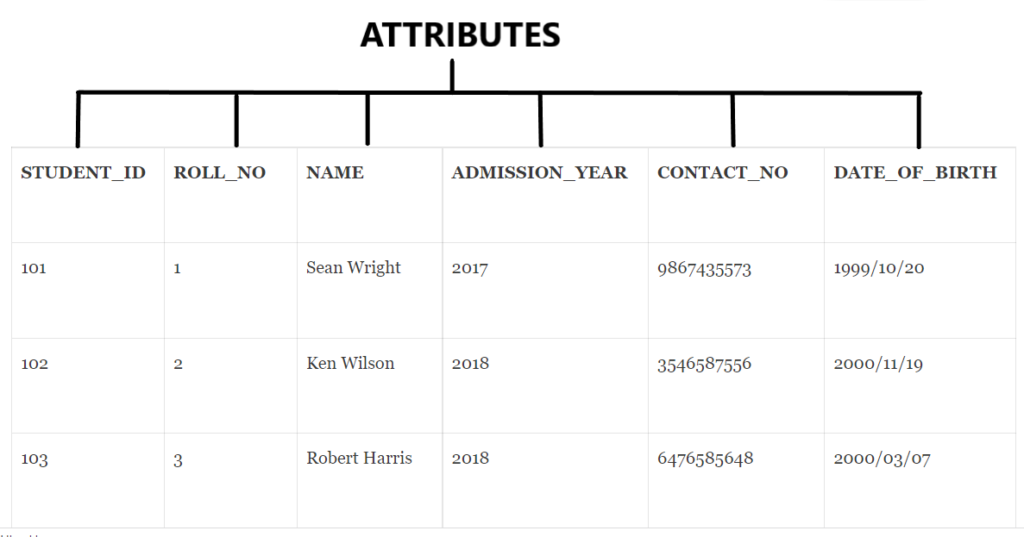
Suppose we have a table Student which contains the following records:

STUDENT

_ID

ROLL

_NO

STUDENT

_NAME

ADMISSION

_YEAR

CONTACT

_NO

DATE

_OF_BIRTH

101 1 Sean Wright 2017 9867435573 1999/10/20
102 2 Ken Wilson 2018 3546587556 2000/11/19
103 3 Robert Harris 2018 6476585648 2000/03/07

Explanation:

Here each record in the Student Table represents a Student Object or Entity which exists in real-time. All the records together represent an Entity Set i.e Student Table. So, we see there are 3 entities in the above table. We see for the Student Entities with names ‘Ken’ and ‘Robert’ the ADMISSION_YEAR is the same but they are uniquely identifiable because of their STUDENT_ID and ROLL_NO. Hence, this makes the Student Table a Strong Entity Set.

Now, a Weak Entity is dependent on another entity. So in databases, we represent weak entities that reference other tables or parent tables. In simpler terms, a weak entity has a key that refers to the primary key of another table to exist. Such keys are called Foreign Key.

Attribute

An attribute describes the characteristics or properties of an entity. Like all entities combine to form an Entity Set, similarly a fixed set of attributes combining define an entity type. For each entity, certain properties describe them and even help to uniquely identify the entities. For Example, In the above Student Table, each column or value like the STUDENT_ID, ROLL_NO, STUDENT_NAME, etc are the attributes that define each Student Entity. Each attribute in a table accepts a set of values over a certain domain. In an entity, each attribute is allowed to have only one value which could be a number, text, date, etc. (defined in respective SQL Database Server )In simpler terms, every column header in a table is an Attribute.

Attribute Types

Hence, there are different types of attributes that define an entity:

  • Simple Attribute: This attribute cannot be divided any further into its subtypes. These attributes can contain Null values. Ex: In the above table, STUDENT_ID and ROLL_NO are simple attributes.
  • Composite Attribute: Composite Attributes are a combination of more than one attribute or simple attributes. Ex: In the Student Table the STUDENT_NAME Column can be subdivided consisting – FIRST_NAME, MIDDLE_NAME, LAST_NAME that can collectively form a name of Student. Similarly, there can be an Address Column for a Composite Attribute having City, Street, and PinCode Columns.
  • Single Valued Attribute: These attributes allow only one or a single value. These attributes are different from Simple Attributes and usually form the key or Primary Key which uniquely identifies an entity. For an entity, there cannot be multiple values for this column or attribute. For Ex: STUDENT_ID and ROLL_NO are unique and Single Valued attributes in Student Table.
  • Multi-Valued Attribute: These attributes can contain more than one value at a time. It can be a composite attribute. Ex: The CONTACT_NO Column in Student Table has only one value for each entity, but it can be Multi-Valued as a student can have more than one Contact Number.
  • Derived Attribute: The derived attribute are those attributes that may or may not exist in the physical database. Its value gets derived from other attributes, or we can say that it depends on other database attributes for the data. Ex: In the Student Table we have Column DATE_OF_BIRTH through which we can derive an Attribute AGE by getting the current date. So AGE can be an example of a Derived Attribute. distinguish

Difference between Entity and Attribute

Now, let’s summarize the key differences between an Entity and an Attribute.

Criteria Specification Entity Attribute
Definition It is a distinguishable object having a real-time existence. It is the property that defines the elementary structure of an entity type.
ER Model Representation In ER Model we represent an entity in a Rectangular Box. In ER Model we represent an Attribute in an Oval Bounded Region.
Table Representation Each row or record in a table is treated as an entity. Here, each column header defines an attribute.
Types Entities are generally of two types: Strong Entity and Weak Entity. Attributes are generally of 5 types: Simple, Composite, Single-Valued, Multi-Valued, Derived.
Use A group of entities defines an Entity set, represented in the database using tables. A group of attributes identifies an entity and usually forms the Key in the table.
Functionality Entities represent the main objects of the RDBMS. Attributes represent the characteristics or standards to define an entity.

So, that’s all about the article we had a detailed look at each topic and summarized the key differences between them.

You can leave your suggestions/doubts in the comment section below.

The post Difference between Entity and Attribute appeared first on The Crazy Programmer.


from The Crazy Programmer https://ift.tt/3tnt8Vn

In this tutorial, we will discuss various methods to append vector to vector in C++.

Using insert Function

We use the insert() function to add multiple elements in a vector. It is a built-in function.

There are 3 arguments that need to be passed in the insert function the first argument determines where another vector is going to be added, the second argument determines the starting of another vector and the third argument determines the ending of the vector.

Insertion at End of Vector:

#include<iostream>
#include<vector>

using namespace std;

int main() {
    vector<int> vec1{15,45,60,84};
    vector<int> vec2{22,56,79,91};
    
    cout<<"Size of vector 1 before adding the vector 2 :"<<vec1.size()<<"\n";
    cout<<"Elements in the vector 1 before adding: "<<"\n";
    
    for(int i=0;i<vec1.size();i++) {
        cout<<vec1[i]<<" ";
    }
    
    vec1.insert(vec1.end(),vec2.begin(),vec2.end());
    
    cout<<"\nSize of vector 1 after adding the vector 2 :"<<vec1.size()<<"\n";
    cout<<"Elements in the vector 1 after adding: "<<"\n";
    
    for(int i=0;i<vec1.size();i++) {
        cout<<vec1[i]<<" ";
    }
    
    return 0;
}

Output:

Size of vector 1 before adding the vector 2 :4

Elements in the vector 1 before adding: 

15 45 60 84 

Size of vector 1 after adding the vector 2 :8

Elements in the vector 1 after adding: 

15 45 60 84 22 56 79 91 

Insertion at Beginning of Vector:

#include<iostream>
#include<vector>

using namespace std;

int main() {
    vector<int> vec1{15,45,60,84};
    vector<int> vec2{22,56,79,91};
    
    cout<<"Size of vector 1 before adding the vector 2 :"<<vec1.size()<<"\n";
    cout<<"Elements in the vector 1 before adding: "<<"\n";
    
    for(int i=0;i<vec1.size();i++) {
        cout<<vec1[i]<<" ";
    }
    
    vec1.insert(vec1.begin(),vec2.begin(),vec2.end());
    
    cout<<"\nSize of vector 1 after adding the vector 2 :"<<vec1.size()<<"\n";
    cout<<"Elements in the vector 1 after adding: "<<"\n";
    
    for(int i=0;i<vec1.size();i++) {
        cout<<vec1[i]<<" ";
    }
    
    return 0;
}

Output:

Size of vector 1 before adding the vector 2 :4

Elements in the vector 1 before adding:

15 45 60 84

Size of vector 1 after adding the vector 2 :8

Elements in the vector 1 after adding:

22 56 79 91 15 45 60 84

Using for Loop

We can use the for loop and iterate over vector 2 simultaneously adding its elements in vector 1.

#include<iostream>
#include<vector>

using namespace std;

int main(){
    vector<int> vec1{15,45,60,84};
    vector<int> vec2{22,56,79,91};
    
    cout<<"Size of vector 1 before adding the vector 2 :"<<vec1.size()<<"\n";
    cout<<"Elements in the vector 1 before adding: "<<"\n";
    
    for(int i=0;i<vec1.size();i++) {
        cout<<vec1[i]<<" ";
    }
    
    for(int i=0;i<vec2.size();i++) {
        vec1.push_back(vec2[i]);
    }
    
    cout<<"\nSize of vector 1 after adding the vector 2 :"<<vec1.size()<<"\n";
    cout<<"Elements in the vector 1 after adding: "<<"\n";
    
    for(int i=0;i<vec1.size();i++) {
        cout<<vec1[i]<<" ";
    }
    
    return 0;
}

Output:

Size of vector 1 before adding the vector 2 :4

Elements in the vector 1 before adding:

15 45 60 84

Size of vector 1 after adding the vector 2 :8

Elements in the vector 1 after adding:

15 45 60 84 22 56 79 91

Comment down below if you have any queries or know any other way to append vector to vector in c++.

The post C++ Append Vector to Vector appeared first on The Crazy Programmer.


from The Crazy Programmer https://ift.tt/3zUJdnZ

GCC stands for GNU Compiler Collection, as the name suggests it is a collection of compilers and it can be used in many operating systems starting from Windows to Linux. GCC is free software written by Free Software Foundation (FSF) and it compiles C & C++ languages.

G++ is a compiler command which compiles and links the source code of C++ files. We can easily compile using g++ by writing this command:

g++ code.cpp -o myoutput

Here code.cpp is the name of the original file which we are compiling and myoutput is the output file.

Difference between GCC and G++

GCC G++
GCC compiles c program files and they will be treated as C and C++ program files. All files will be treated as c++ files therefore it compiles only c++ program files.
GCC doesn’t link object files. G++ automatically links to the object files
GCC has fewer macros in it. G++ has more macros in it.

So these were the differences between gcc and g++. I hope it has cleared all doubts related to this topic, comment down below if you have any queries.

The post Difference between GCC and G++ appeared first on The Crazy Programmer.


from The Crazy Programmer https://ift.tt/2WNTy6u

The servers are the devices that work as the data processing systems in the public and the private sector. Whether you want to work in an IT company or any other firm related to digital technologies, you must have sound knowledge about servers. In this article, I will be discussing servers and their types. So, if you are also seeking the same information, keep reading this post until the end.

What is Network Server?

Servers are the devices used to store and process data of companies, people, and other users. The servers can exist in hardware or virtual form and keep extracting data and storing extracted data in its storage unit. It can be explained as the computer devices that share and keep the data, resources, services, and any program to the other computer. These devices can be of any type; all they need to store the data and share the same when they get the required command. The servers can be small in size and can also grow as an extensive database. Nowadays, there are plenty of cloud-based or virtual servers that offer a significant amount of storage space.

10 Different Types of Servers

Types of Servers

There are many server types you need to know. Some of the crucial types of servers are mentioned below.

1. Web Server

Web server is the open-source server and gives access to WWW or the world wide web. So, to access the required information available in the public domain by the public domain tool. These servers are connected with the computers, even those you are using. Its primary purpose is to serve the ideal user by offering web-based content. This information is re-collect with the help of an HTTP code and sent to the user’s browser. Web server is the standard type of server, and most people already know about it.

2. Application Server

Application servers are also called middleware; these servers connect the client to any tool or software application using the virtual model. With the help of this server, the client can get access to download the application tool on their computer device. These servers also hold a vast database; therefore, they can handle many clients at a time, making them ideal server types for businesses.

Also Read: Difference between Web Server and Application Server

3. Mail Server

Mail server is solely responsible for storing and sharing emails for the clients with the help of an email service providing platform. These servers offer a real-time update about the emails; whenever the client or individual gets an email in the software, it immediately informs them. Therefore, the user isn’t required to use another system to get updates on their device.

4. Database Server

Database servers deal with a large set of data and huge storage space. These servers manage many platforms and organize these data in a significant manner to meet the required need. A database server can also run independently, such as MySQL, Microsoft SQL, Oracle Database, and SQL.

5. File Server

The file server is another server type, and it is also different from the FTP server type. It is considered one of the modern server types, and it can do mapping of networked files or data. Using this server, the user can share and download the necessary file to control all these activities. This server type has a presence in the Linux environment and the windows active directory environment.

6. DNS Server

Most of you may already know about this type of server because it is one of the common types we listen to. The Domain Name Service (DNS) is the server used to translate the domain name into related IP addresses.  This type of server takes the request from the user and finds the searched term, and then delivers it back to the user who searched the term.

7. Proxy Server

A proxy server is a server that fills the gap between host and client-server. And when a user searches for the term, the proxy server delivers the searched query’s result from the site to the computer’s IP address. It is a virtual server that ensures the added security level as the requested answer will be transferred from the proxy server. If it finds any harmful virtual elements which can affect the user’s computer. Then it removes them before it sends the data.

8. FTP Server

File transfer protocol server or FTP server is the type of server that takes place when it needs to relocate or transfer the file from one place to another. The uploaded file can move from the computer to its destination, and the extracted file can download from the server to the user’s computer. This server also enables security by connecting one computer to another and makes the process more stable.

9. Print Server

This server connects locally from a computer to the printer using the network. By using this server, businesses and users can easily print essential documents from their printers. Nowadays, many printers in the market have already developed the prebuilt server, making the other process easier.

10. Collaboration Server

Businesses and people often need to share a platform with others to discuss some topics or collaborate virtually for specific needs. In this case, the collaboration server comes into use, allowing users to share files, tools, and other data types and let the user store the same.

Conclusion

Servers are essential technologies as they let the user enjoy searching, collaborating, file sharing, data storing, and various other types of activities that happen through networking. So, in this post, we discussed what servers and types of servers, where we learn about some of the server types like proxy, web, file DNS, and various other servers.

Nowadays, servers are getting used in our day-to-day life. If you need to build a career in the IT sector or any industry in the digital world, you should know about the servers. I hope that after reading this post, you will have some foundational knowledge about server types. If you assume, one of your known needs to learn about the same, then share this information with them.

The post 10 Different Types of Servers in Networking appeared first on The Crazy Programmer.


from The Crazy Programmer https://ift.tt/3zpGfHD

Getting more for less – these four words describe the main reason why companies opt for hiring remote developers. But since you’re here, you don’t need convincing – you’ve already made up your mind.

Now, it’s time for the tricky part: choosing the right people to get the work done. And it is tricky, so don’t let anyone convince you otherwise.

First of all, in-person meetings are off the table. You’ll have to rely on video conferencing – both for the screening process and day-to-day management later on. Plus, there’s a bunch of other widespread concerns: cultural differences, legal protection, etc.

So, how do you hire dedicated development team you won’t regret working with down the road? Here are seven time-tested tips to help you make the right decision.

7 Effective Tips on Hiring Remote Software Developers

Know What You Need in Perfect Detail

In the absolute majority of cases, not knowing (or misunderstanding) what you need at the recruitment stage is what causes the later-on dissatisfaction with the dedicated development team.

If you aren’t 100% certain about your needs and requirements, you’re guaranteed to overspend or make a bad hire (or both).

The good news is, the solution is relatively simple – assess your needs in detail and put your requirements into writing.

Easier said than done, right? Yes, it’s not as easy as snapping your fingers. But it’s not impossible, either. Here are nine questions that can be your roadmap at this stage:

  1. What is your product vision?
  2. What are the tech specifications, deliverables, and goals?
  3. What’s your timeline? Is it realistic?
  4. What are your budget constraints? Is it realistic?
  5. How many (and what kind of) specialists would it take to get this project done?
  6. What skills, both hard and soft ones, should they possess?
  7. How are you going to communicate with your dedicated developers?
  8. How would you like your project to be managed (in terms of tools, methodology, etc.)?
  9. What are your company’s values and corporate culture?

Prioritize Quality Over the Price Tag

As mentioned in the introduction, cutting costs is the main reason why companies hire remote dedicated developers. And while the financial gain is important, let it take a backseat for a while. Instead, focus on quality and talent – and factor in the costs later on.

Yes, you can opt for the cheapest option available (compared to the local market’s average). But software development is the industry where cheaper almost always means:

  1. Bad code that’s impossible to maintain.
  2. Missed deadlines and overlooked goals.
  3. Poor communication – or lack of it altogether.

Don’t Rush It

Of course, sometimes, you need something to be done now – or even yesterday. Then, you don’t have time to shop around for the best dedicated developers possible. Or so you think.

Even if it’s urgent-urgent-very-urgent, don’t make rash decisions. You know what’s on the table, right? You’ll be paying twice if you choose poorly – someone will have to rewrite the bad code and fix all the bugs eventually. No one will do that for free – leave alone the time you’ll lose in the process.

Plus, most likely, you’re looking for a long-term partnership. In this case, rushing the process means you risk ending up stuck with a signed contract even though you’re not satisfied with the results.

Check Out Their Experience, Portfolio & Reviews

This tip isn’t exactly unheard of, but it’s still worth mentioning. Portfolio and reviews are key to understanding whether the developer:

  1. has had experience working with other businesses in your industry;
  2. specializes in your kind of projects;
  3. has a history of problematic cooperation in the past or any red flags worth considering.

If you’re looking for a development company, go to platforms like Clutch and GoodFirms to read trustworthy reviews. Don’t rely that much on the reviews posted right on the company’s website.

Assess Both Tech Expertise & Soft Skills

Knowing what kind of tech expertise you need is a must. But to assess it right, you’ll need someone who has the relevant background. Find that someone to give you a second opinion.

As for the soft skills, they’re sometimes even more important than the tech expertise. That’s because they determine how well the dedicated developers collaborate between themselves, use their tech skills in a real-world setting, and communicate with clients.

Here’s a list of the five most essential soft skills you should pay attention to:

  • communication and interpersonal skills;
  • collaboration and teamwork;
  • out-of-the-box thinking;
  • problem-solving;
  • research and critical thinking.

Bonus tip. Ask about the most common challenges of remote work your candidates encounter – and how they overcome them.

Consider Your Compatibility in Terms of Culture & Values

This selection criterion is often overlooked, but it shouldn’t be. If you and your development partner have different corporate cultures and values, you’re more likely to run into misunderstandings. And misunderstandings can turn into financial losses.

But how do you check if you’re compatible or not? It’s not like there’s a certification process, after all.

The best way to do it is by asking how they would act in a hypothetical situation during the interview. The reaction, the thinking process behind the answer, and the answer itself will give you an idea of what kind of partner you’d be dealing with.

By the way. If you’ve decided to outsource to another country where English isn’t natively spoken, take note of any signs of the language barrier, too.

Discuss the Contract, NDA, and IP Head-On

Unscrupulous developers stealing their client’s intellectual property isn’t just a hypothetical scenario. Unfortunately, it can happen if you don’t cover your back before your cooperation takes off.

Here are four legal things you should discuss beforehand:

  1. Contract. Make sure the payment details, responsibilities and obligations of each party, and penalties are clear. It’s also a good idea to include grounds for terminating the contract before it runs out.
  2. Non-disclosure agreement (NDA). Signing an NDA (also known as the confidentiality agreement) is a must. It’ll legally bind your development partner(s) not to share any sensitive data with any third parties.
  3. Non-compete agreement. In essence, it obliges your partner not to compete with you for a fixed period of time. Be careful, though: signing it with individuals will make you liable for employment taxes and benefits.
  4. Intellectual property rights. You should be the sole owner of the final product – and of all the code and designs, too. Make sure that it’s explicitly stated in the contract you sign.

7 Effective Tips on Hiring Remote Software Developers

Final Piece of Advice: Getting the Hire Done Is Just the Beginning

Making the right choice is crucial, but keeping your hand on the pulse is no less important, either. If you just go with the flow and leave the team dedicated to your project on their own, it’s a sure recipe for a disaster.

That’s not to say that you have to micromanage developers’ every step, of course. Yet, there are several things you’ll have to invest your time into to make sure the cooperation goes smoothly:

  • Check in on their progress regularly. Whether you communicate only with the team lead or have decided to keep project management in-house, regular communication is key.
  • Facilitate knowledge transfer. Once the NDA is signed, make sure the developers know everything you do. Provide access to the market research you’ve done, any wireframes if you have them, and so on.
  • Prioritize video calls over messengers. Nothing beats face-to-face interaction, even online. That’s because you’ll be able to read the non-verbal cues, too.

The post 7 Effective Tips on Hiring Remote Software Developers appeared first on The Crazy Programmer.


from The Crazy Programmer https://ift.tt/3y661z5

I remember the day Apple’s Steve Jobs announced the iPhone. Steve was a genius of presentation. He was P. T. Barnum incarnate, reimagined for the digital age. He said “I am announcing three products today; a widescreen iPod, a revolutionary phone and a break-through internet device… and we are calling it the iPhone”. It was a superbly ‘Steve’ performance, dripping with the braggadocious drama he was so good at and peppered with pregnant pauses to give the audience time to applaud and to let the import of what he was saying sink in. That event, accompanied by a soundtrack of excited whoops, was a genuine inflection point for the tech industry; a truly capable hand-held computer was being launched. The fact it was a phone seemed almost secondary. Had it been anyone else other than Steve Jobs would it have been the success it became? We will never know, but it’s hard to imagine the same stratospheric launch taking place to the more monotone vocalizations of the financially successful but decidedly less svelte Bill Gates.

The development world turned upside down

This was definitely the future. Here, in my palm, was a device which seemed like what the industry had been searching for. It was compact, comparatively powerful and it had been graced with the design genius of Jony Ive shaped by Job’s legendary ascetic minimalism and impeccable eye for infinitesimal detail.

The years immediately following that very first iPhone launch was a blur of iterative improvements to the mobile phone industry. The app store launched itself on the development community. The premise -and implied promise – was that this was an obviously innovative direction, fulfilling what we had all been led to believe would be the future of computing by the likes of Star Trek, Dr Who and almost every futuristic predictor there was. The iPhone was the beginning of what would surely become Captain Kirk’s hand-held communicator and Dr Spock’s tricorder made real.

Other companies thought so too and quickly tooled-up to emulate the iPhone’s sleek looks and ‘it just works’ interface. Desktop would be gone, quickly too. Google panicked a little and then joined the party with their own Android O/S.

If you don’t go mobile, you’re finished?

As developers, we were given stern advice that we should prepare ourselves for a near future where mobile devices would dominate. Then tablets turned up and the iPad joined in with such eye-watering success that even the mighty Microsoft wobbled fearfully, believed the end of the desktop was nigh and frantically started to redesign their beloved Windows O/S so that it could be shoe-horned into a mobile phone. Except that “Windows Phone” turned out to be a bridge too far. Those that used it loved it but the devices suffered from an apparent lack of conviction from inside Microsoft.

Accompanying that frenetic whirl of activity was a loud chorus that we developers really ought to be designing for mobile first. The perception, in some part led by the hype and seemingly non-stop succession of mobile device product launches, was that mobile was the future and the desktop was a dead end.

The app store gold rush

Apocryphal tales wafted around of indie developers – one or two person startups – who had made shockingly large amounts of cash off the back of a mobile app they had churned out after pulling three straight all-nighters fueled by little more than industrial-strength caffeine drinks and ramen noodles.

Everyone with a budget who wanted to be a ‘serious player’ in the development industry jumped on board.

But the initial buzz of gung-ho excitement faded and a little bit of reality set in. The realization of what even the most expensive mobile devices couldn’t do trumped the heady excitement of being able to sit in a bar and Google whether Die Hard was really considered a Christmas movie.

People wanted to do actual useful things beyond using their expensive phone as a torch in dark parking lots.

The broken break-even point

Coupled with this was the fact that creating mobile apps turned out to be a race to the bottom for profits. The average price for a stand-alone mobile app was between 99c and $4.99 USD. To understand what that means to the viability of a career as a mobile app developer take your monthly household bills, rent or mortgage and taxes. Add them all up and then divide that number by $5.00. Now reduce that number 1/3 to allow for Apple’s cut of the app price. The resulting number is how many apps you will have to sell every single month to meet your outgoings. Even with the vast exposure of the Apple and Google Play stores you have an uphill struggle to fame and riches simply by charging for someone to purchase your hard work for use on their phone.

Very quickly the software as a service business model and carrying in-app advertising became the obvious way to turn a profit. Meanwhile desktop apps sustained – and still do – a price point an order of magnitude more than the average mobile app.

Subscriptions and advertising as a viability proposition

Things started to happen. Twitter, Instagram, and Facebook all made sense on mobile devices. Maps became a killer app. Suddenly, we could navigate with unerring accuracy thanks to the invention and inclusion of cost-effective GPS location hardware into your mobile phone or tablet.

This mapping, combined with the ubiquitous internet which had evolved under the pressure of consumer demand for their portable devices to continuously connect them with the outside world, also meant that other new services and applications could spring into life.

All at once Uber zoomed into our phones and in the process almost dealt a death blow to a traditional taxicab industry who had snoozed at the end of their landline telephones.

It really did look like that rectangular plastic desktop computer was being edged out to the sound of mobile alerts, Crazy Frog ringtones and the swish of swipe to unlock gestures.

Except that’s not the reality.

Slick advertising and venture capital

Oh, sure, if you listen to the schmoozing of a cell phone advertisement and allow yourself to be drawn in by the mellifluous honey-dripping voice-over which oozes soft words in an effort to convince you your life is currently ruined by your use of last year’s device which is now so cruelly sub-par then it’s very hard to believe that your mobile phone will not offer a solution to every task that can be put to it. In fact, the sunk cost fallacy means that the more we pay for our expensive mobile devices the more we really feel we ought to do with them.

But don’t believe it for a minute. Desktop still rules the roost when it comes to business – both small and large.

Let’s take, for example, Uber, who we mentioned earlier. They have been phenomenally successful with their mobile app. The design, targeted squarely at a hand-held mobile cell phone, is succinct, has no fat to trim in the flow of the screens and works extremely well. Their entire business model is rooted in the existence of reliable, ubiquitous mobile devices.

Like many strongly-funded companies of its ilk Uber helps attract and retain its office staff – people who work on the business of making Uber work at the company administrative level as opposed to drivers – through a mixture of competitive remuneration and cultural niceties. Helpfully they have public YouTube videos and images of what a great place it is to work there. But take a second to look at the pictures of the smiling Uber worker faces and you’ll notice that beyond the cool tech surroundings there are a whole bunch of screens. Desktop screens. A whole sea of screens. Modern, flat-panel with thin bezels but desktop screens nonetheless. Granted, many laptops too – but the fact is that Uber, the mobile success story that it is, still uses desktop devices to get the work done.

Desktop First UX Summit 2021

Interested in how you can start putting the desktop first? Desktop UX Summit is offering free tickets.

>>Get yours today!>>

Your mobile app company thrives on desktop devices

Don’t get me wrong, I am not singling out Uber or in any way being critical of them, quite the opposite. This preponderance of high-end desktop displays is played out again and again at almost every mobile app or blue-chip company you wish to examine. Instagram, trend-setting doyen of photography as a statement, was born and lives on mobile devices of increasing camera resolution. Yet, make a brief web search for “Instagram office culture” and you find many hundreds of pictures of what a gloriously avant-garde place it is to work, where you will be overlooked by beautifully arty neon signage and couch-sized fluffy clouds – and many MANY desktop screens and laptops. TikTok, just the same: desktops and laptops everywhere; just take a look at their careers page.

The business of the mobile app business takes place on desktops and laptops, even if you are a mobile app developer who lives and breathes the nuances of cell phone notification SDKs.

This is why the iPhone is not the only Apple product

Even though Steve Jobs knew that the iPhone was a Really Great Idea he went on to draw out a famous four box matrix: professional, consumer, desktop and portable. From that came the MacBook Pro and the iMac. He knew the two facets of the business had different design paradigms and those two complementary opposites had a suitability for differing uses.

When considering your app design remember this truism; design for desktop does not equal design for mobile. Also, don’t make a mobile app which tries to shoe-horn in every single desktop feature – this is an antipattern which will end in an unsatisfactory experience for the end user and an app which will ultimately flounder. If you don’t believe me, try viewing a spreadsheet of anything more than a simple column of numbers on your mobile phone – not going to happen, trust me.

If mobile devices are going to be the future then why is it there is an undeniable trend for desktops to have multiple screens and for those screens to be flatter and thinner each iteration but also taller, wider and with an exhilarating number of pixel resolutions? Clearly, we want more information packed onto our workhorse computers, not less.

When mobile device screens boast of increased pixel depths it’s usually to emphasize that the tiny text on the screen will be crisper and not that there will be more information shown. Even laptops can commonly support multiple external screens; some even have a slightly incongruous second screen built in as a pull-out flap. For those laptops which are gracing desks rather than laps it’s common for there to be docking stations to make the compromises of a portable design aesthetic less of an inconvenience when function is foremost.

Laptops are not mobile devices

Laptops are becoming more powerful but they are essentially creating a mobile desktop for a road warrior, not a mobile device per se.

Where do we draw the distinction? When does a device become a mobile device and what does that even mean?

A modern mobile phone is getting lighter and less cluttered, with fingerprint sensors and other biometrics built into or under the screen itself. But those are additions which suit the use case of a mobile, not a fixed-place device. Even though it is an economically insignificant cost, most desktops do not include biometric devices such as a fingerprint scanner and it’s also uncommon to find a desktop machine with a hardware GPS sensor built in.

The increase in processor power for the mobile device is spurred on by a few factors: advances in miniaturization and technology, cost economy due to scale and the need to drive those larger screens and must-have always-on internet connection. That extra mobile processor grunt still does not grant you, the app developer, the same kind of freedom to design sprawling memory hungry apps which have a lifespan that extends into days like it does on a desktop. Your typical mobile app does not have an expectation of a runtime which is longer than minutes.

Desktop apps, unfettered by battery and miniaturization concerns, harness gigabytes of free physical memory and can expect to find huge swatches of screen real-estate, increasingly over multiple screens, on which to display their data. Processing can occur on multiple CPU cores, both virtual and actual. Desktop background services can easily be written to provide essential additional functionality such as updates – on your own schedule, not Apple or Google’s – and, if installed directly from your site there’s no commission to pay to an app store owner.

Autocorrect exists because our fingers are too big

If you still think you can design an app for mobile first and then translate that to desktop, consider for a moment the difficulty you have typing long emails into a mobile phone. You may be a master at the touch keyboard but I bet you’re faster and more comfortable on a full size QWERTY keyboard.

Microsoft’s Outlook App is an example of the contrast between mobile versus desktop design. The Outlook desktop app is almost certainly the communications tool of choice for most corporations. Love it or hate it Outlook, or a near clone, is used to send and receive billions of emails a day, schedule meetings and keep track of essential contacts. It has a powerful rule processing engine and can embed or incorporate all sorts of essential data. The Outlook mobile app? It’s a weedy shadow of its desktop brethren and with good reason: it’s doing exactly what it needs to do and is appropriate to do on a mobile device – and no more.

Have you ever wondered why swipe left is still hard to do with a mouse?

You can’t swipe in the Outlook desktop app, unless you are using a touch tablet like the Surface Go and even then it’s a non-obvious thing to do. Instead, you point with your ‘pointing device’ whether that is a mouse, trackball or touchpad.

You tap things on phones, you click things on the desktop.

You can choose the look and feel of your desktop app, have menus that make sense to you and a navigation capability which works for those mice and clicks – not one prescribed by Apple or Google or even Microsoft if you really want to go off into the app design wilderness on your own. Microsoft may not like it and changes to Windows or Linux may make your app unusable but you get to plough your own artistic furrow without fear of reprisals from an app store submission reviewer who places your hard work into a sin bin until you comply with their ever-increasing app store ‘guidelines’.

If we lived in an alternate reality

Would Outlook have been as successful if it had been a topsy turvy world where mobile devices came first? With its quite capable but limited feature set: email (no rules or filters), calendar and just a search tab – would it have been a driving force behind Microsoft’s business sector profit center? I doubt it.

And what of Microsoft Outlook mobile – what does it do? It connects you to your email. The email, which is also on your desktop, where all your documents are, where your accounts program lives unconstrained from mobile CPUs which are still too puny to multitask to good effect.

You cannot phone your customer and read out the contents of an email to them on the same device at the same time.

If you’re smart, then the approach is to design for desktop AND mobile. One is an adjunct to the other and both have very different design goals and user stories.

For us, with Delphi, this means to find the back-end commonality and functionality. Separate and ‘decouple’ your interface from your implementation. In real terms this means that you adopt the sound approach that is almost imposed on you by the RAD Studio IDE: model-view-model and controller. The Delphi language has the tools to make this kind of thing happen and the RAD Studio has multiple capabilities to smooth the process and get your great ideas in front of customers with the fastest possible development times of any tool I know.

This is going to sound like the things you’ve heard before – but this is because it’s good advice.

Do these things to increase code sharing between desktop and mobile apps

To get technical for a moment; code to interfaces (and by that I mean IInterface) instead of concrete classes. The user interface for the desktop should not be the same project as the one for the mobile app. Both can share the interfaces. They can also both share common classes. They might even share some kind of database middleware, with caution.

But the database fetching and updating for a mobile device is a whole different game to that of a desktop. The desktop can often assume the database source is likely to be around. The mobile app should best assume that not only might the source of the data be unavailable but that even if it is the amount it can pull in and cache is limited.

Graphic resources, fonts, connectivity, hardware – all look and work differently between mobile and desktops and even individual implementations such as iOS and Android. Lifespans – when the app’s host device might power off or update – are totally different.

Even the rules of what you can show in terms of advertising links and in-app on-boarding of new users can be constrained on mobile by quite heinously restrictive rules.

So, desktop first means business first

Your desktop might be a laptop or a hybrid device like the Microsoft Surface and it may be running macOS or Linux instead of Microsoft Windows but it’s still not a mobile device like a phone or dedicated mobile tablet. Let me know how you get on with that nine page sales spreadsheet on your smart watch.

Desktop first doesn’t mean immobile. It just doesn’t mean a mobile, first.

Did I pique your interest? Then join me, for free

If this article has raised in you some thoughts on desktop-first as a strategy for business-first and on how to generate and sustain profitability as a software developer then why not join me at the upcoming Desktop First Conference? It’s completely free and I will be presenting there along with some really great authors, speakers and developers who will cover this and other related topics at all levels of experience.

>>Head over and get your free ticket to the Desktop UX Summit!

The post Desktop First UX Summit 2021 – Learn UI & UX from Industry Experts for Free appeared first on The Crazy Programmer.


from The Crazy Programmer https://ift.tt/3j0SXXv

In recent years, DevSecOps has risen in popularity to an extraordinary extent. It has changed the way in which developers approach security and creating code for applications. It has led to projects being secured from start to finish and has increased productivity among developers.

This post covers some of the reasons why DevSecOps has become so popular. It could give you a better indication about the benefits of incorporating it if you aren’t already, as well as why developers may prefer a DevSecOps approach to working on projects.

What is DevSecOps?

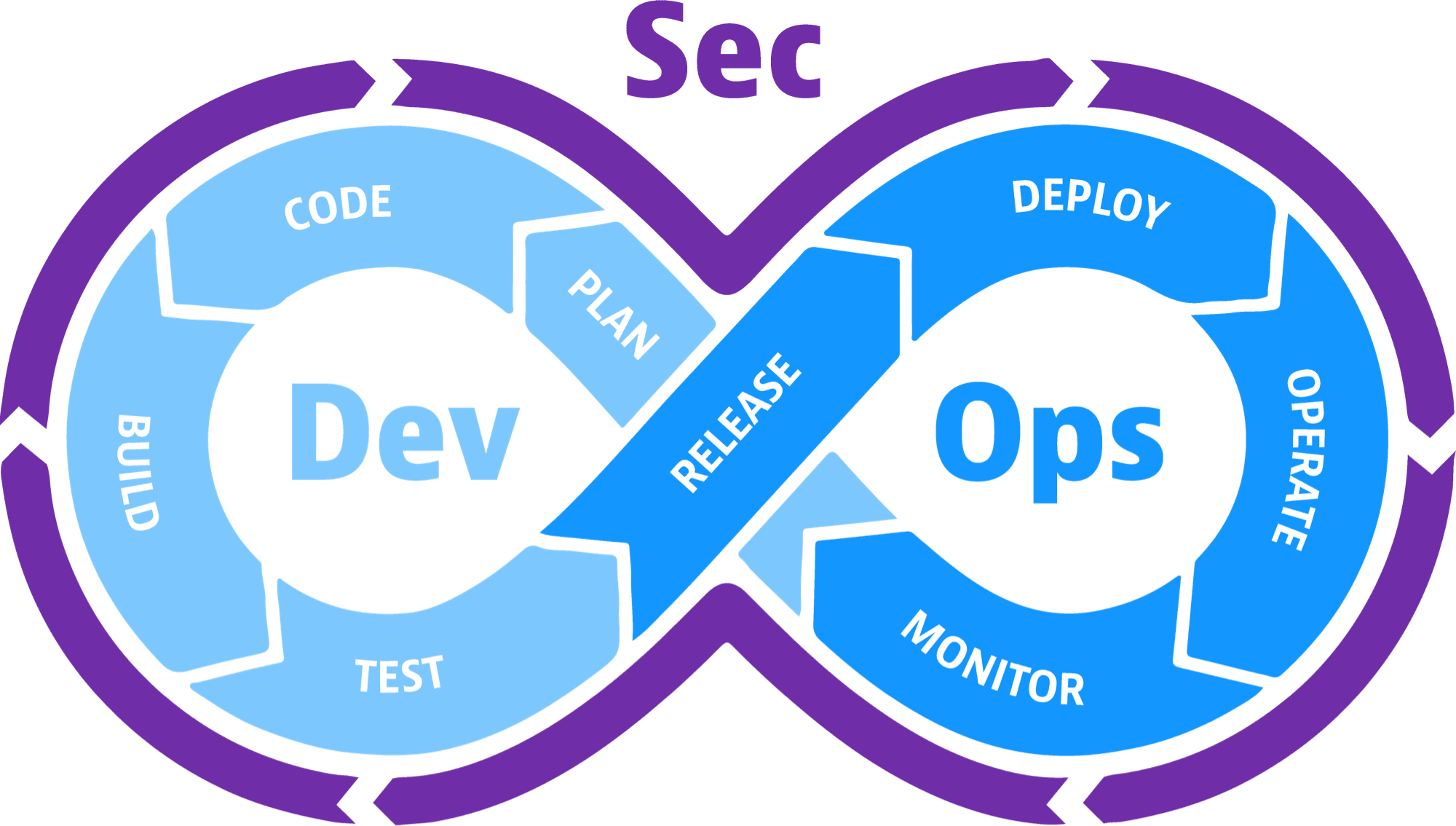
DevSecOps stands for Development, Security, aWhat is DevSecOps? Why Is It So Popular?nd Operations. It involves automating the process of implementing security throughout every stage of software development. This means that security is taken seriously from the beginning design stages, all the way through to the deployment and delivery stages.

This approach to developing and deploying software has helped organizations keep their applications safe. It has also enabled developers to work more productively.

Nowadays, companies are looking to deploy new software more regularly, which created more pressure on developers to work faster. This caused security to become an afterthought and too many vulnerabilities were being exploited by hackers.


There are several important reasons why DevSecOps has become so popular. So, let’s take a look at what some of these reasons are below.

Better Integration

One of the biggest benefits to DevSecOps is how it can be so easily integrated. As a result, organizations have an easier time implementing DevSecOps and keeping their security risks to a minimum.

Development teams are also able to work more productively due to how easy DevSecOps is to integrate. This can help them create more secure code faster. Using DevSecOps helps companies complete various tasks across various teams so that they can collaborate better with each other.

Initially, it may seem challenging to make the move to a DevSecOps approach. However, most organizations find that the benefits of doing so weigh out the challenges involved with making the move.

Nowadays, developers are used to working with a DevSecOps approach as a standard way to develop code.

The Cloud

The introduction and widespread use of the cloud has been a big factor in why DevSecOps is so popular. When it comes to managing and developing software within cloud environments, you’ll find that developers are now accustomed to using the cloud.

Developers often prefer developing and managing projects in the cloud due to how it’s more transparent and comes with many services that can be integrated easily with it. In the beginning days of the cloud, developers were wary of how difficult it would be to transition to a cloud service whilst keeping it all secure.

However, the cloud is now used so commonly that developers have secure ways of creating code and releasing applications. DevSecOps is one of the approaches to using the cloud that developers have been liking.

Microservices

Microservices are among one of the more technical elements that have led to developers using DevSecOps more. The change to DevSecOps means ditching large service procedures to smaller elements.

Containers are the components that handle deploying applications and these are geared towards microservices rather than larger servers that are centralized. As long as developers and security teams practice good security habits whilst using DevSecOps measures, they can work more efficiently.

Kubernetes

The popularity of using containers within cloud environments has led to further developments in DevSecOps and caused more organizations to implement Kubernetes.

Kubernetes are the elements that create the base for providing developers with more control over how they develop and deploy applications with containers. It’s common for DevOps teams to let newbies in their teams make bigger alterations to software than before due to how the software is within a container that implements DevSecOps processes.

As a result, it’s always being monitored and teams are provided with notifications of any anomalies that require their attention. As a result, teams can find problems, fix them, and move on much quicker.

Malware

With more organizations making the transition to cloud environments and microservices, DevOps teams have been provided with more freedom when managing and developing software.

Whilst developers can work more efficiently, this transition has also led to increases in security threats. One of the main ones being malware. APTs are commonly used to launch malware into software development lifecycles.

Some companies find that malware can be sent into their software without them being able to properly detect it. This is commonly the case when it comes to using third-party software. Other types of malware have the ability to steal data that is being transferred within your cloud environments.

A DevSecOps approach mitigates these problems as it involves making sure that the process of transferring data and securing software from malware is carefully planned. This brings security teams and development teams to work together as one to boost security and work productively.

DevSecOps only works if security is made to be a high priority from the very beginning of a development lifecycle. Teams work on the assumption that every piece of software they work on contains malware.

This enables them to take the correct steps to discover evidence of malware and coming up with remediation processes to remove the malware before continuing with development.

Flexibility

DevSecOps allows developers to work with more flexibility. Having a higher level of flexibility whilst developing software creates a great infrastructure that large organizations have been implementing.

Teams can work together and organize large projects better and more people with different attributes can be added to projects that require their skills. Developers and security teams are now using DevSecOps to create ways to work with more flexibility whilst also remaining safe.

Conclusion

After reading through our post about why DevSecOps has become so popular, we hope that you’re able to put this information to good use within your own company. DevSecOps helps developers and security teams collaborate better with each other to ensure that your software remains more secure whilst still enabling developers to work quickly.

Be sure to consider the reasons as to why DevSecOps is so popular if you were hesitant about making the move yourself. There are many great benefits to a DevSecOps approach and your organization could be reaping the rewards.

The post What is DevSecOps? Why Is It So Popular? appeared first on The Crazy Programmer.


from The Crazy Programmer https://ift.tt/3zTRmsr

MKRdezign

Contact Form

Name

Email *

Message *

Powered by Blogger.
Javascript DisablePlease Enable Javascript To See All Widget