The Internet is not that much easy as we think. It is a vast and massive bunch of hardware devices interconnected all over the internet. These devices are assembled in groups and then these tiny groups are connected with each other, and then these massive groups are connected with each other and the cycle goes on. Each device has its own specialty and role. If in any case any one of the devices started malfunctioning, it will affect the whole network. Sometimes these malfunctionings are self occurred and sometimes the protocols force these devices to start malfunctioning.
Network flapping is a kind of malfunction that is generated due to an extra advanced mechanism of traffic control in the network.
Let’s discuss it in detail:
First, understand the word Flapping. Its simple meaning is unexpected or randomly switching between two choices. Like if we wanted to choose an option between two options such as A and B, then the system shows that Option A is better and then suddenly says that option B is better, and when we select B then again its shows that A is better. This event can irritate us and we can’t select any one option.
Network Flapping
In a network, routers are used, whose main responsibility is to find and allot the best route between client and host for broadcasting. These routers are mainly divided into two types Static and Dynamic.
Statice routers always carry just one route for all transmission instead of Dynamic routers which provides the choice of more than one better path.
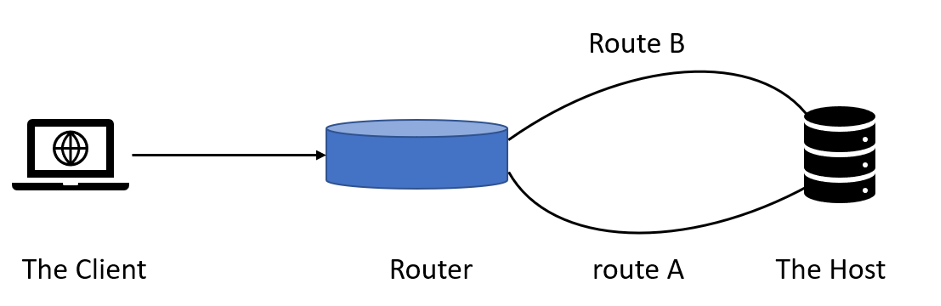
Network flapping occurs in these Dynamic routers. In this flapping situation, the dynamic router switches between two different routes for a similar host for transmission.
Figure 1
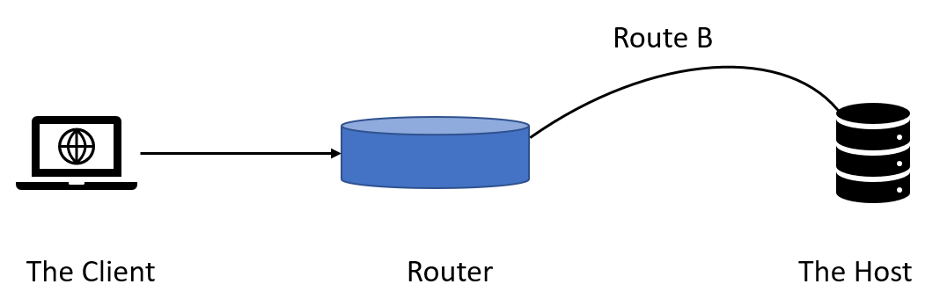
As we can see in the above diagram the router has two routes to reach a similar Host. According to the network protocol in normal situations, the Router should use only one route for transmission like the below diagram:
Figure 2
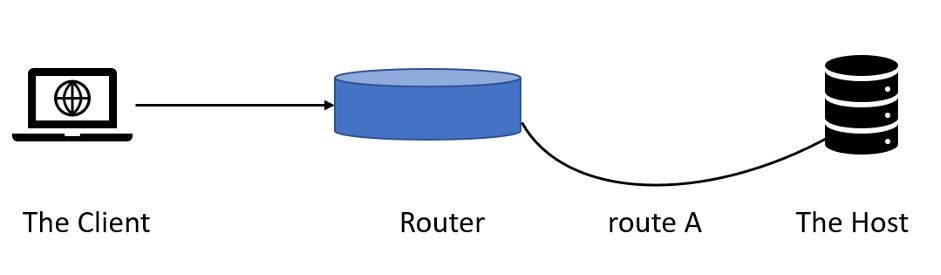
Or vice versa
Figure 3
In special cases like heavy traffic, the dynamic router can use the alternate or both routes for transmission as shown in figure 1. Every time the dynamic router chooses a route it updates the routing table about the transmission and the route provided. This is a little bit complex and time-consuming process but it ensures 100% successful transmission asap.
So, what’s the issue here?
When the dynamic routers alternate between available routes even in a normal situation or not required condition, then it creates havoc. Every time the flapping occurs the dynamic router updates the routing table. So, when it alternates randomly during a broadcast of a single data item, then extra pressure puts on the network due to unnecessary routing traffic. And if the dynamic router continuously repeats the thing, then the overall network may be disturbed.
These types of dynamic routers are known as flapping routers.
Let’s take an example.
Suppose you are standing at a crossroads during a red signal. You need to go straight and you have a clean road, but the traffic controller forced you to use the alternate way saying it is the best route. As responsible citizens, you obey the traffic controller and started to move in that direction but suddenly the traffic controller stops you and says to use the old route saying it is the best route. Now it’s a little irritating but you obey the rules and started to move in the old direction, but suddenly the traffic controller stops you again and says to use the alternate way saying it is the best. Now just think what will happen.
You get frustrated because the controller actually stops you to use both ways. You will not reach your destination and your time is wasted.
And at the same time, the traffic behind you is increased due to you standing between the road as an obstacle for the followers.
So, what we can conclude:
We can’t go anywhere.
Our time is wasted.
The traffic is created and increased continuously.
The overall crossroads is full of traffic and soon the connected crossroads will be overcrowded too.
Just one unwanted situation created this havoc.
And you know what, what is the best part when we need to clear this all traffic, this will take a lot of time and effort. So, the best solution to this problem is to prevent this situation.
In a similar way when a flapping dynamic router started unwanted flapping, the actual data packets are stuck in between the transmission and unable to reach their destination. Due to this, the group of data packets is stuck in a traffic-like situation. This kind of blockage in the network can impact the whole network.
Route Summarization
For the Prevention of network flapping the Route Summarization technique is used. In Route Summarization, all the routes connected to a Router are arranged in such a systematic way that it does not need any alternative route. All the routers connected are arranged in a similar way.
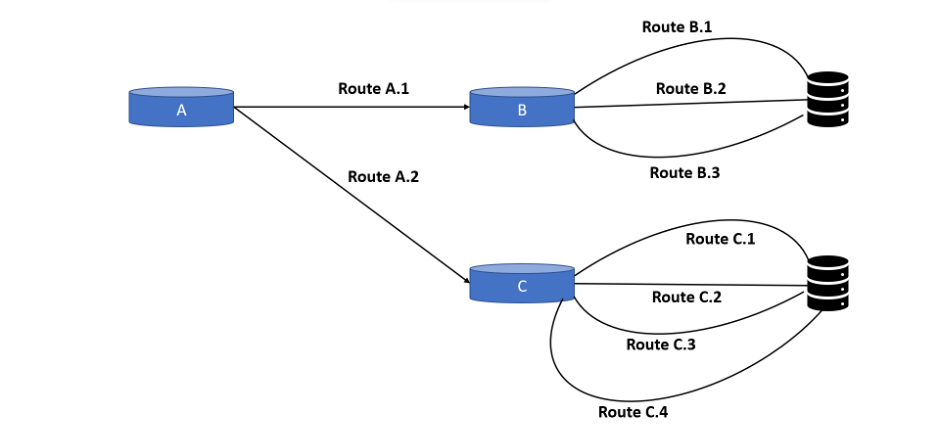
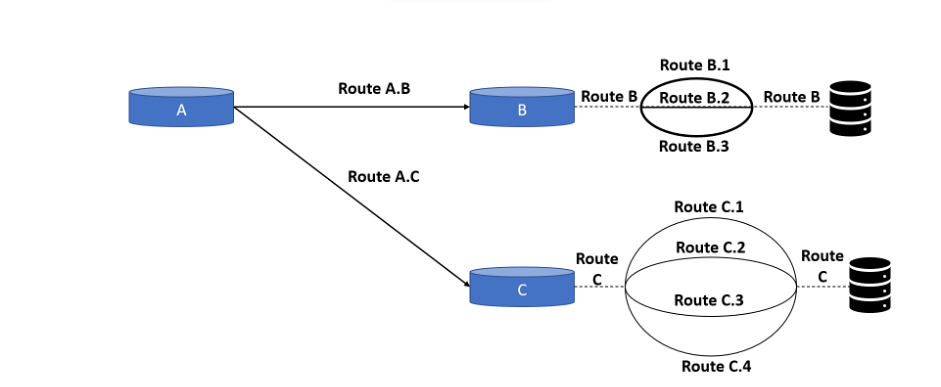
Figure 4Figure 5
Here figure 4 shows a network without route summarization, and figure 5 shows the route summarization.
In route summarization, all available routes with different IDs are masked with a common ID. As we can see in figure 4 at router B, we have three different routes with different IDs such as B.1, B.2, and B.3, but in figure 5 all these separate routes are masked as Route B. At the broadcasting time, no matter which route (Such as B.1, B.2, B.3) is used between Router B and the server, the routing table always shows Route B only. So, if router B doing flapping, still it shows only path B. The internal flapping will not affect routers A and C.
This is called Route Summarization.
Network flapping is a good mechanism for traffic control, but sometimes the router is unnecessarily configured to load-balance, thus they started unwanted flapping. Route summarization can be helpful in this.
Computers are necessary devices that we use on the daily basis. Here we will discuss the overview, definition of the generation of computers, historical context, importance, objective, and more. The evolution of computer systems is usually discussed in terms of the evolution of different generations. The generation of computers differentiated on the basis of the advancement of computers.
Let’s discuss the development of computer technology in different generations.
First Generation
The 1st generation computers were developed in the late 1940s to mid-1950s. Their primary electronic components were vacuum tubes or thermionic valve machines. The first-generation computers were big, slow, and consume a lot of power compared to modern computers. They were also costly and needed specialized technicians to maintain them. Their input was based on punch cards and paper tape and they worked on the binary-coded concept.
ENIAC (Electronic Numerical Integrator and Computer) was the most famous first-generation computer which was used for military calculation and scientific research.
UNIVAC (Universal Automatic Computer) was the first commercial computer, which was used for data processing applications.
Second Generation
2nd generation computers were developed in the year 1956 to 1963. In the second generation of computers, they used vacuum tubes as the basic components for computation and used mechanical switches by replacing the wires of first-generation computers. They were developed by using the technology of transistors. The second-generation computers were smaller and had less time taken than first-generation computers. They also had magnetic core memory which increased the storage capacity.
The concept of machine-independent programming languages COBOL and FORTRAN made it easier for people with no technical background to use computers. Second-generation computers were used in large corporations, government organizations, scientific simulations, etc.
The second-generation computers represented a great leap forward in the development of computing technology and paved the way for the development of third-generation computers.
Examples: IBM 1401, IBM 7094, and IBM 7090, etc.
Third Generation
3rd generation computers were developed from the mid-1960 to 1970. They have marked a valuable shift from previous generations in the terms of performance, technology design, and more. The use of integrated circuits (ICs) replaced the bulky and unreliable transistors that were used in second-generation computers. Third-generation computers were much smaller, more reliable, and more affordable than earlier generations. They were also easier for commercial use.
It also improved the devices such as keyboards and monitors which helped people to interact with computers easily. The third generation introduced the minicomputers which were less in size and cost than mainframe computers. It made computers more accessible to small businesses and individuals.
Fourth Generation
The fourth-generation computers were developed from 1971 to 1980 and marked a major turning point in the development of computers. Microprocessors and VLSI (very large-scale integration) were used as the main electronic components in fourth-generation computers. A microprocessor is an integrated circuit that contained all the components of a computer CPU on a single chip. It made computers more affordable, smaller, and faster.
Fourth-generation computers introduced the operating system which allowed multiple applications to run on a single computer at the same time. In terms of storage, it used floppy disks and hard drives and expanded the amount of data that could be stored. The computer became an essential tool in many aspects of life such as businesses, homes, schools, and more. The innovation of this time continues to shape the computer industry nowadays and has made computers an essential tool in our modern world.
Fifth Generation
The fifth-generation computers were developed between 1980 till now. The parallel processing method and ULSI (Ultra large scale integration) are used as the main electronic component in fifth-generation computers. The fifth-generation computers are more powerful, have huge storage capacity, and have higher speed. Their sizes are also smaller and portable. The computers of the fifth generation are categorized on the basis of hardware and software both.
There are advanced technologies of fifth-generation computers such as quantum computation, artificial intelligence, parallel processing, and more.
Building a website can be an exciting prospect for businesses and individuals alike. However, it can also be a daunting task, especially if you don’t have the necessary technical expertise.
Many challenges exist, from designing the site to ensuring its functionality and security, which is where outsourcing website development comes in.
Outsourcing website development allows you to avoid the headaches and challenges of building a website yourself. Whether you’re a small business owner or an individual looking to establish an online presence, outsourcing can provide you with access to technical expertise, cost savings, and more.
This article will explore why people outsource web application development and how it can help you overcome common pain points associated with website building.
1. Access to Expertise and Technical Skills
Outsourcing website development allows businesses to tap into professional developers’ expertise and technical skills. These developers have the knowledge and experience to create functional and visually appealing websites that meet the client’s specifications.
They also have access to the latest technology and tools, ensuring the website is optimized for performance and functionality. When outsourcing website development, businesses can benefit from the specialized skills of professional developers with the technical know-how to create a website that meets their needs.
Businesses can then use the saved time and resources to train their in-house team or hire additional staff to fill the gaps. Moreover, professional developers have experience working on various projects, making them better equipped to handle complex development challenges.
2. Cost-Effective Solution
Outsourcing website development can also be a cost-effective solution for businesses. In-house website development requires significant time, money, and resources. This includes hiring and training staff, acquiring the necessary equipment and software licenses, and setting up a development environment.
On the other hand, outsourcing allows businesses to develop their website without making a substantial upfront investment. Outsourcing website development also allows companies to save on ongoing maintenance and support costs. Professional developers will ensure that the website is developed in a way that is easy to maintain and update, reducing the need for ongoing support.
Additionally, outsourcing eliminates the need for businesses to invest in expensive hardware and software upgrades to keep up with technological advancements.
3. Time-Saving Solution
Outsourcing website development can be a time-saving solution for businesses that want to focus on their core operations. Building a website from scratch requires significant time and resources, which can divert attention away from other important business activities.
Outsourcing website development allows businesses to delegate this task to a team of experts, freeing up valuable time and resources to focus on other critical business areas.
Additionally, outsourcing allows businesses to accelerate the development process. Professional developers have experience working on similar projects, so they can quickly and efficiently develop a website. This enables companies to launch their website faster, giving them a competitive advantage in the market.
4. Access to Scalable Resources
Outsourcing website development allows businesses to access scalable resources based on their needs. For example, companies can scale up or down their development team based on their project requirements, meaning they won’t have to worry about overstaffing during slow periods or understaffing during peak periods.
On top of that, outsourcing allows businesses to access a wide range of specialized resources that may not be available in-house. This includes access to technical tools and software, which can be costly to acquire and maintain in-house.
Outsourcing also allows businesses to tap into the expertise of professional developers with experience working on similar projects and can provide valuable insights and recommendations.
5. Quality Assurance
Quality assurance is a crucial aspect of website development that ensures the final product meets the client’s requirements and specifications.
These QA testers use various tools and methodologies to detect bugs and other issues that could impact the website’s user experience. They also provide valuable feedback on the website’s design, functionality, and overall user experience, helping businesses improve their online presence.
Professional QA testers have the knowledge and experience to identify issues early in development, reducing the risk of costly delays and rework. Moreover, outsourcing QA testing ensures that the website is thoroughly tested across different browsers, devices, and operating systems, which can improve its overall quality and user experience.
Outsourcing: Expedite your Business’ Success
Web development outsourcing has become a popular option for businesses of all sizes looking to save time, money, and resources. From accessing technical expertise to improving the quality of your website, outsourcing offers many benefits that can take your business to the next level.
In addition to the benefits discussed, outsourcing can help businesses scale their operations, reduce the risk of project failures, and provide access to a larger talent pool. It is important, however, to choose the right outsourcing partner and clearly communicate your expectations to ensure that your project is completed on time and within budget.
Look for a company with a proven track record of success, a team of experienced developers, and good communication skills. It’s also important to clearly define your project requirements and establish a timeline and budget.
Many people think you need A’s in math to program. That’s a misconception. Programming is more about logic and creativity. For example, you and your friends jokingly come up with an excellent smartphone game. You can wait for some company over the ocean to release it or make it yourself. You decide how this game will work and what the rules, interface, and functions will be. With programming skills comes the opportunity to create a product from scratch or implement an idea – an application, a website, a program – the way you need it.
2. It Pays Off
A simple truth: the more skills you have, your services are more expensive. For example, each paper writer who can design simple HTML-pages, accountants, or managers who can automate Excel or Access with the help of code cost more than their colleagues with only a basic set of skills.
Large companies are increasing and are looking for new ways to optimize. Hiring a team of developers and paying each $2,000 to $3,000 monthly is expensive. Hiring a person who will write articles, layout, and even think of ways to improve the mobile version of the site is a profitable solution.
Such specialists have a better chance of getting into a significant company.
For example, in The New York Times, more than half of the journalists already know how to program. When the publication changed its strategy and emphasized the development of the web and mobile version – trained in programming the employees who are responsible for digital content.
Asking a developer to write a program in Ruby because you read yesterday that it is a new and cool language is a bad idea. To be able to do joint projects, understand how to set tasks, make changes, and what language to use when talking to programmers, you need at least some understanding of the code yourself. Even the heads of companies and owners of startups help learn how to program. For example, personally conduct an interview and adequately assess the candidate’s level to find a good specialist on the market.
4. It Saves Time
How many times have you sighed when you have to do a chore? For example, you’re a journalist writing for a popular science publication. You need to research which countries most often get struck by lightning and figure out what those regions have in common. This will take more than a day. Programming will speed up this process: you will spend 30-40 minutes on code to help you quickly analyze the data and make a report.
5. It Develops Beneficial Habits
Programming is a painstaking process. You can’t read a textbook at your leisure, watch a YouTube video or attend a few lectures. You have to sit down and start learning the language, digging into the code, and practicing all the time. For example, to write Python, you must practice 2-3 hours daily for a few months.
It’s disciplined and helps you think structurally and strategically.
6. It’s Good For Your Health
There’s a popular rumor that programmers are better thinkers even in old age. Jokes are jokes, but there’s some truth to them. For example, in 2014, scientists from the University of Passau analyzed brain scans of people while they were doing programming. The results showed that the same brain parts that work when learning foreign languages are active. And this reduces the risk of developing Alzheimer’s disease.
Are you planning to start a career in the field of cyber security? If so, this article is what you need to read! An expert in cyber security serves the same purpose that a guard dog does in the physical world. Experts in cybersecurity are often employed by private companies and public institutions to safeguard the integrity of the latter’s computer networks and the confidentiality of sensitive data.
The primary responsibility of a cybersecurity specialist is to keep an eye on the organization’s computer networks and to report any security flaws or other problems that they find to higher management. In addition to this, they are obligated to anticipate possible risks and provide direction for how to deal with them.
What May Encompass the Field of Cyber Security?
It’s possible for a cybersecurity specialist to be required to fill a variety of responsibilities, depending on the nature of the company or organization they work for. Experts in cybersecurity, as their name indicates, are the individuals to turn to for assistance and education on the most up-to-date digital best practices. They are the people to go to.
The expertise that a cybersecurity professional has in a particular vendor’s product could be complemented by other skills in areas such as the creation of mobile applications or computer operating systems such as CISCO Systems, which develops networking and IT solutions. A person who maintains the security of an organization and teaches coworkers the most up-to-date best practices is one definition of a cybersecurity expert. In its most basic form, the role of a cybersecurity expert may be summed up as follows:
It is common for data breaches to originate from inside an organization, either intentionally or accidentally; hence, this job is essential.
Following are 3 mandatory steps you need to follow in order to be a cyber-security specialist:
1. Formal Education
It is common practice in the cybersecurity industry, as well as in many other cyber-related fields, to require candidates to have a college degree. However, since cybersecurity expert jobs include a wide array of tasks and responsibilities, it is possible to get one of these roles after completing a number of other courses related to the sector.
If you want to put this another way, if you complete a cyber security course or bootcamp, you will be qualified to work as a professional in the field of cybersecurity. Many of the cybersecurity experts working in the world today got their start in the industry after receiving a degree in a subject that is closely linked to it, such as computer science, engineering, or mathematics, and/or by exhibiting relevant professional experience.
2. Necessary Industry Credentials
The second step is to get the necessary industry credentials and/or clearances; this is a common practice across a wide variety of various sorts of employment in the field of cybersecurity. When looking for work, it is wise to give some consideration to the qualifications that are desired by employers and those that will help you stand out from the crowd in order to maximize your chances of being hired.
A few examples of the many various kinds of certifications available in the field of cybersecurity include the following:
Anyone who works in the area of information security should, at a minimum, get the CompTIA Security+ certification since it is universally acknowledged as an essential credential. One of the topics that will be discussed is the management of risks as well as the identification of possible hazards.
CompTIA further provides training for Network +. This certification is concerned with the foundation of a network as well as the procedures that are used to maintain it, as the name indicates. This qualification is often considered to be necessary.
It is strongly recommended that cybersecurity professionals with at least five years of experience in the industry take the Certified Information Systems Security Professional (CISSP) test. The certification covers a wide range of professions, including architecture, engineering, and management, to name just a few of them.
Because applicants for the Certified Ethical Hacker (CEH) certification often need to have a significant amount of professional experience under their belts, this credential is also considered to be of a higher level. Learning to spot and prevent possible threats before they materialize is a fundamental component of getting training to become an ethical hacker.
As you can see, there are practically hundreds of different kinds of certifications that may be obtained in the field of cybersecurity. If you are looking for a job in the area of cybersecurity, it is a good idea to keep an eye on the kind of certifications that are most valued by possible employers in the industry of cybersecurity.
If you are interested in working as a cybersecurity specialist, one of the questions you should ask the potential employer is whether or not they would pay for your professional certifications and other types of ongoing education.
3. Job Experience Is Required
Thirdly, having the right kind of job experience is very necessary in order to acquire a career as a cybersecurity specialist. This might take the shape of an internship or some other kind of formal hands-on learning experience; alternatively, it could be in a separate line of work connected to the primary field.
It is important to remember that it is always a good idea to be on the lookout for new ways to broaden one’s professional Network. Numerous cybersecurity professionals have joined together to create clubs and networks with the express intention of educating their members about employment openings and training opportunities. This information-sharing mission is the driving force behind the formation of these clubs and networks.
What Precisely Do Professionals in The Field of Cyber Security Do?
Those who work in the field of cyber security are responsible for designing and carrying out exhaustive security tests that cover all elements of a system’s hardware and software. They ensure that the systems function as designed and are protected from disturbance from the outside world.
There are times when the job of a cybersecurity specialist seems like nothing more than a routine. To put it another way, it is their responsibility to ensure that all of the software and hardware running on networks and computers is up to date and protected against any security flaws.
In addition, security professionals are liable for ensuring that other workers are kept up to date on the latest security best practices. This responsibility may require them to take on the role of a trainer or an advisor. In addition to this, one of the responsibilities of a cybersecurity specialist is to design and implement firewalls and other security measures to ensure that data and proprietary networks are protected as required by contemporary standards.
In addition to this, professionals in the field of cybersecurity are tasked with monitoring all systems and networks very closely for any strange behavior and documenting any findings they come across.
The Necessary Skills Possessed by These Professionals
A company that is protected by a cybersecurity professional has a special place in that company. When hiring for this position, candidates are typically evaluated based on their technical proficiency as well as their soft qualities. Technicians working in the field of cybersecurity need to have strong interpersonal and communication skills, as well as the ability to work effectively in groups. Additionally, they need to be able to work independently.
Teaching and mentoring other employees on safe practices to implement in the workplace is a significant part of this role. When a crisis or tragedy strikes, anytime there are issues with networks or data systems, or any time there is a need for cybersecurity specialists; they are often sought out. Therefore, it is indispensable to have the ability to thrive in situations that are classified as “emergencies.”
Finally, as a professional in the security industry, you may be required to push the members of your team to make use of the most recent and cutting-edge security software. The vast majority of people, on the other hand, are reluctant to change their behavior, especially when doing so requires learning a new procedure or workflow. It is essential to not just understand how to communicate the change to others but also to have empathy for their fears.
Final Words
To be successful in the field of cybersecurity, professionals need to be versatile and adaptive. The duty of a cybersecurity specialist is to determine what kinds of information and skills will be required to protect against the ever-changing digital attack vectors and strategies that are now in use.
This often requires a dedication to continuous education throughout one’s working life, you can find resources to learn cybersecurity at Know it Get It.whether it is in the form of formally earned certifications recognized by the relevant industry or by less formal means, such as keeping up with current trends and discussing them with coworkers. Someone who wants to be successful in this role will need to have a diverse skill set and be able to overcome a variety of obstacles.
Are you preparing for a tech interview? Kudos on taking a step towards securing a promising career in the tech industry. But with the high competition for tech jobs, it is crucial to stand out and make a lasting impression during the interview.
In this article, we’ll walk you through how to prepare for a tech interview to increase your chances of landing the job. From researching the company and role to practicing interview skills, we’ll cover everything you need to know to be fully prepared. Read on to gain a competitive edge and ace your following tech interview.
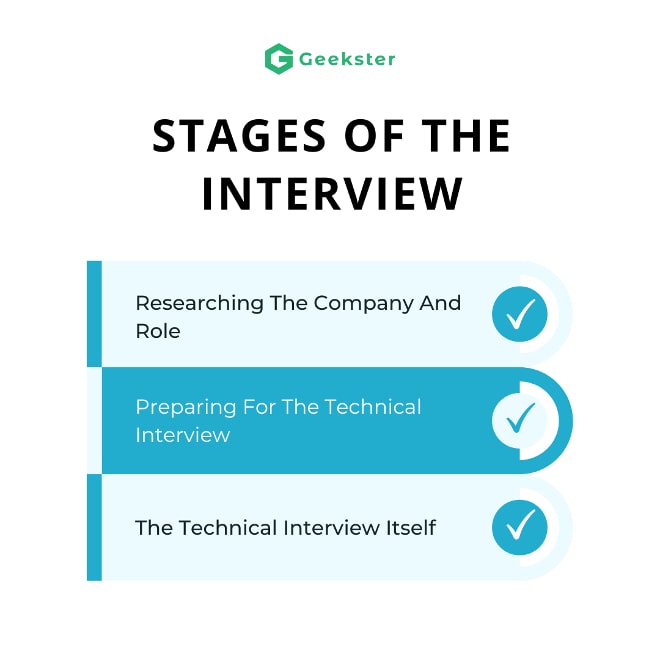
Stages of the Interview
The technical interview process typically includes several stages. These may include:
1. Researching The Company And Role
Before diving into the technical aspects of the interview, it is essential to research the company and the role you are applying for.
Learn about company culture, mission, and values from the company’s website or presentation and align your answers with them. You can also talk to people working in the company, using your network.
Read the Job Description carefully to understand the roles and skill sets needed. You can use this information to prepare for any technical questions that might be asked during the interview.
For example, Java developer, ReactJs Interview Questions for React developer, AngularJs Interview Questions for Angular developer and more.
After going through the above step you’ll be able to understand if the role is right for you, prepare for the role, and set yourself apart from other candidates.
2. Preparing For The Technical Interview
Let’s first understand what exactly is a technical interview.
Tech interviews, in contrast to other interview types, include tasks and challenges. They resemble exams more than the standard question-answer-based format of an interview.
In a technical interview, the interviewer is there to assess your problem-solving ability and expects you to be able to communicate the solution properly and not just tell.
It is essential to brush up on your technical skills and knowledge. This includes reviewing computer science fundamentals like DBMS, Operating Systems, practicing data structures and algorithms (DSA), front-end languages and frameworks, back-end languages and frameworks, system design, database design and SQL, computer networks, and object-oriented programming (OOP).
3. The Technical Interview Itself
Now, this is your final step where all the preparation you’ve done will come to the test. The interviewer will ask you a series of technical questions primarily based on their requirements and your resume (don’t lie about your resume). Generally, the interview tone is set by you during the introduction, and you’ll be demonstrating problem-solving skills and technical knowledge.
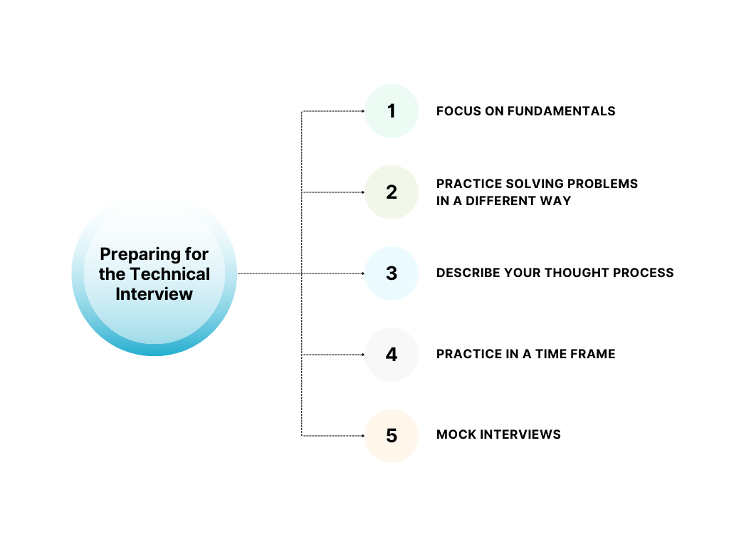
Preparing for the Technical Interview
1. Focus on Fundamentals
Know your topics inside and out. You are expected to know both in detail and be able to relate them to the problem you solved during the interview.
If you applied for Java developer know the basic and advanced concepts of that language. For example, is Java purely object-oriented language? Or Can we perform multiple inheritances in Java?
Apart from language, know the fundamentals of Computer Science i.e. Operating System, depending on the company to company some companies may ask you to design a system e.g. Design a social network.
Then comes Software Development Life Cycle (SDLC) knowing the different types of models and steps in SDLC.
You should be able to code and express the thought behind an algorithm solution you are pitching along with its Time and Space complexities.
2. Revise and Practice
Make sure to revise and practice the key topics that are typically covered in technical interviews.
Data Structure and Algorithms (DSA) which is most often asked in online assessments and your first round of technical interviews. Data Structures from Arrays, Multi-dimensional arrays, Stack, Queues, Linked Lists, Trees (Generic Tree, Binary Tree, Binary Search Tree, AVL, etc), HashMap, Graph, etc. and their algorithms like Sliding windows, DFS, BFS, Searching and Sorting techniques, Recursion, Dynamic Programming are must-have.
Front-end languages and frameworks – depending on the company you are interviewing for you should be able to comfortably discuss HTML, CSS and Javascript at least. Apart from these must-haves learn about at least one front-end framework like React or Angular.
Back-end languages and frameworks – For the back end there are endless languages to choose from, some of the top languages are Java SpringBoot, JavaScript Nodejs, Python, C#, etc.
There are plenty of resources available on the internet from where you can learn and practice technical skills. And if you are on a tight schedule it is suggested to go for a guided course path like Full Stack Web Development Program and for working professionals [LINKS] Advanced Web Development Program.
Object Oriented Programming (OOPs) – In almost every technical interview OOPs concepts are a must-have. Many interviews start with the question “What do you understand by Object Oriented Programming (OOPs)?” with follow-up questions on four pillars of OOPs i.e. Inheritance, Polymorphism, Encapsulation and Abstraction. Know how to achieve abstraction, interfaces, runtime and compile time polymorphism, overriding vs overloading, types of inheritance (for more such last minutes questions visit)and sometimes the interviewer can ask you to code a class for a specific condition.
Database Management System (DBMS) – One of the essential topics for the technical interview is DBMS. In this, you can be asked to design a Database along with various questions around fundamentals of DBMS like the difference between MySQL vs SQL, Normalization, SQL queries and more. Have a look at Top 30 DBMS Interview Questions 2023
System Design – Many Big Tech companies and startups like Google, Amazon, Microsoft, Atlassian, Meta, CRED, CureFit etc ask questions based on System Design to test your solution design from architecture to coding. You should know basic concepts like Load Balancing, Indexes, when to use SQL vs NoSQL databases, Distributed systems, Caching, etc. At the low level, it deals with OOPs, relationships between classes, and coding practices like SOLID principles. System design interviews don’t have a single particular solution you will be communicating with the interviewer to understand the requirement and come up with a solution.
3. Practice Solving Problems in a Different Way
The preparation in itself is a major step that prepares you to shine in a tech interview, there are some tips you should follow:
Don’t memorize the solution instead understand the problems in depth and ask questions, seek answers the more you understand how a particular algorithm works better than the other, the more will be your confidence during the interview and you’ll be able to come up with better and innovative solutions.
Try to come up with a brute force solution first, then make it better and finally showcase your skills with the optimized approach.
Give a set time for the solution then take hints and try again. Looking at a solution should be the last step and even so try to code it yourself.
Consistency is the KEY TO SUCCESS.
4. Describe Your Thought Process
An interview is a two-way conversation between you and the interviewer. It is important to come up with a solution but to also be able to explain your thoughts clearly and how you arrived at a particular solution. This skill comes with practice, so find a code buddy it can be a friend who is also preparing, your mirror, or simply recording yourself. There can be many more ways for practising. Find what works best for you.
5. Practice in a Time Frame
During the interview, you’ll likely be given a time limit to solve a problem. Practicing solving problems within a specified time frame can help you to build confidence and be more efficient during the interview.
6. Mock Interviews
Conduct mock interviews with friends or reach out to services providing mock interviews with professional interviewers to get an idea of what to expect during the real interview. Seeking feedback and continuous learning is the key.
Remember these points:
Ask for clarifications – Ask questions for classification it is better to take some time and attempt the question properly rather than making silly mistakes later on.
Interviews can be lengthy so practice mock interviews to get the experience.
Practice problem-solving daily, and make it a habit this will help you manage your cool during the interview.
Refrain from lying in your resume as you should be able to speak about the tech mentioned in your resume.
Practice the infamous question “Tell me about yourself”, try to mention missing points on your resume, add personality and end it on the topic in which you feel comfortable.
Bonus Tips to Prepare for Your Technical Interview
So far we have covered a lot on the technical part of preparation. It is time that we talk about some other important things that an interviewer checks even during the technical rounds.
Yes, we are talking about soft skills
An employer does not want an employee who cannot collaborate and communicate with the other team members. An employer wants someone to take responsibility, be accountable and take initiative to drive a better output at work. You can check this blog for an in-depth understanding of soft skill requirements during technical interviews
Usually, a candidate is judged on the following parameters
Communication skills: To be able to present your ideas, defend your approach and be able to talk without losing your calm even when criticized.
Culture fit: A lot of companies ensure that the candidate is fit for the company culture. It takes years for companies to build a culture where the employees thrive, bring productive solutions to work, and stay motivated. Thus, they seek traits in a candidate who can continue to build and maintain the same culture after joining.
Ability to execute: Execution ability is another trait that companies look for in a candidate. Ability to execute ideas, develop them, enable teams to perform, and most importantly build good bug-free products.
Integrity: Integrity and honesty is another fundamental trait that employers look for. This is critical to building the company culture. They access you on this trait to ensure that they can implicitly trust you with their company secrets, goals, and work.
Questions that access you on the above-mentioned traits:
Q: Tell us about the most significant problem you solved at your workplace?
Q: How do you feel about working in a team spread across different time zones?
Q: How would you approach teaching new concepts to your team members? Or How would you implement a new work methodology in your team for example OKR?
Q: What was the most difficult decision you had to take at work?
Q: How do you deal with criticism?
Q: Have you ever performed a task for which you did not have the relevant skills? How did you do it?
When you prepare for an interview, no amount of preparation is enough and no preparation is less. While these most things, you also must check these questions to ensure you did not miss anything. If you are confident in your ability to prepare well, you can join Geekster’s Full Stack Web Developer Course for guidance from experts.
Conclusion
Preparing for a tech interview is a multi-step process that requires research, technical skills, soft skills, and practice. By doing the steps mentioned in this blog you’ll be well on your way to making a lasting impression during your interview.
Remember to stay confident and focused, and don’t hesitate to seek feedback from mentors or others who have gone through the process.
A successful tech interview is within reach if you take the time to prepare.
Computers play a vital role in all possible fields. Currently, there is hardly any field in which a computer is not being used. Even we can not imagine our life without using computers nowadays. Currently, Managers, Lawyers, Stockbrokers, Accounted, researchers, doctors, and architects, everyone using a computer. From education to healthcare, farming to sending satellites into space, etc computers have discovered their way into almost every aspect of our life. The application of computers has increased accuracy, efficiency, and accessibility.
Here we will explain some of the most general and effective applications of computers and how their rapid advancement technology has changed how we live and work.
Business
After the application of computers in businesses, various processes are automated in an easy way, such as data entry, record keeping, and reporting. The automation of processes increased efficiency and accuracy in businesses. Computers have changed data analysis and management allowing businesses to gain insights and make data-driven decisions. Online shopping, e-banking, and e-commerce are the easiest ways for transactions in business. Using computers we can analyze the investment, sales, expenses, and other things involved in businesses.
Education
Computers are widely used in the education field. It is delivering education through e-learning such as online courses, educational videos, online examinations, e-books, and other study material. Research became more efficient and accessible through computer online research. Computers are able to search and analyze huge amounts of information quickly and easily. They help to improve understanding and learning.
Healthcare
Computers are playing a vital role in the healthcare industry. Medical imaging such as CT scans, MRI scans, and X-Rays are possible only by using advanced technology of computers. The use of computers in medical imaging revolutionized the medical field by providing more accurate, quick, easy, and detailed data. There are many other uses of computers in the Medical field such as managing patient data, medical records, test results, and treatment plans. Nowadays surgeons also use robotic surgical devices that are controlled using computers.
Entertainment
Computers have revolutionized the entertainment industry. From writing scripts to making movies there are many uses of computers in movie production. Computers have changed the industry of entertainment to provide new ways to create and consume entertainment content. Computer’s advanced technology helped in the creation of new forms of interactive gaming experiences. Youtube, Netflix, Spotify, and other online platforms have changed the way people enjoy entertainment.
Computers are also used in virtual reality. It allows people to interact with the virtual world. By using software applications on computers we are doing various tasks such as video editing, music production, and graphic design.
Science and Research
Scientists use computers to collect, organize and analyze a huge amount of data in different scientific fields. Computers are used in scientific simulations such as biological processes, chemical reactions, weather patterns, natural disasters, etc. They are used in creating models and simulations in different scientific fields comprising biology, physics, and chemistry. Topographic images can be made through the computer. AI can help scientists in making predictions discover patterns and more. Computers have become necessary tools in the field of science and research.
Transportation
Computers play an important role in the field of transportation. It can be used in route planning, optimization, and taking into account factors like vehicle capacity, schedule, etc. By using computers it’s easy to manage traffic flow. Computers have provided a new and innovative way to manage transportation systems. GPS and mapping software is helping people to find their way.
Communication
Computers provided a new way to communicate with each other by instant messaging, texting, or chat application. They have made it easier for people to stay connected to each other regardless of location and time. Online collaboration such as sharing documents, communicating with each other, and working together on a project is easier after using of computers.
Facebook, Twitter, Instagram, and other social media platforms are helping people to share information, photos, and videos with friends and followers.
Conclusion
Computers have largely improved the efficiency and effectiveness of many processes. They have also opened up a new path for communication, collaboration, creativity, and more. The application of computers is transformed the way we live, work and communicate with each other. Overall computers have enough positive impact on our world.
Alan Mathison Turing was a British computer scientist, Mathematician, and Logic philosopher. He was born on 23 June in the year 1912 in Maida vale London, England. Alan’s father’s name was Julius Mathison Turing. His mother’s name was Ethel Sara. Ethel was the daughter of Edward Stony, chief engineer of Madras Railway. His father was a civil servant. And his grandfather had been a general in Bengal Army.
He completed his schooling at a top private school. In the year 1926, he entered Sherborn school, an independent boarding school in Sherborn. Alan was naturally too good in mathematics. To study mathematics Alan entered the University of Cambridge in the year 1931. He got his Ph.D. degree from the department of mathematics at Princeton University in the year 1938.
Relation with Marcom Christopher
Alan and Christopher were friends from school at Sherborne and were described as Alan’s first love. In the year 1930 Christopher died because of bovine tuberculosis. After this event, Alan went into deep sorrow. To reduce his grief he worked hard on the topics of Mathematics and science. Even after Christopher’s death, Alan remained in contact with his mother through letters.
Breaking Enigma Code
At the time of the second world war, Alan was the main participant in breaking German Enigma ciphers at Bletchley Park. Bletchley Park was the British government’s wartime HQ. Asa Briggs a historian and wartime codebreaker once said that Alan was a genius.
Enigma was more like a typewriter, battery-powered and highly portable. It combined electrical and mechanical components. It was a cipher device developed by a German engineer in the 1920s after world war 1st. It was used by all branches of the German military in world war second.
In the year 1938, he worked on government code and Cypher school, the British codebreaking organization. He and Dilly Knox, a senior codebreaker were engaged in the Enigma cipher machine used by Nazi Germany.
Personal Life
Alan proposed marriage to his colleague Joan Clarke in the year 1941. She was a mathematician and cryptanalyst working at Hut 8. When Alan admitted that he was homosexual their engagement broke. After this event, Alan decided that he could not go through this relationship.
Sexuality and Conviction
Alan started a relationship with Arnold Murray in the year 1952. At this time Alan’s age was 39 and Arnold was 19 years old. Alan met him outside the Regal cinema and invited him for lunch. Alan’s house was burglarised on 23rd January. Murray admitted that he and the thief were cognizant. After knowing it Alan reported it to the crime police. In this investigation, he accepted the sexual relationship with Arnold. At that time homosexual acts were a crime in the United Kingdom. Alan and Arnold were charged with gross indecency under section 11 of 1885. On 31 march 1952, the case Regina vs Alan and Arnold was brought to trial. Alan Turing was convicted, and after that, he was given the choice between imprisonment and probation.
He chose probation, his probation was conditional on his agreement to go through chemical castration. He accepted having an injection of a synthetic estrogen called stilboestrol. All these things were continued for the course of one year. Consequently, this treatment rendered Alan impotent, and breast tissue formed in his body.
Death
Alan Turing died on 8 June 1954 at his house. His housekeeper first saw him dead. Alan died one day before his birthday because of Cyanide poisoning.
Slider is a very important part of any website or web project. Here are some simple image slider examples that I handpicked from various sites. These are built by different developers using basic HTML, CSS, and JavaScript. Some are manual while others have auto-slide functionality. You can find the source code for each by clicking on the code button or on the image.
Charles Babbage was a great Mathematician, Inventor, and Mechanical Engineer. He originated the big idea of a digital programmable computer. Charles is considered “The Father of Computer”. Charles invented the first Mechanical computer.
Early Life and Education
Charles Babbage was born on 26 November 1791 in London, England. His father’s name was Benjamin Babbage and his mother’s name was Betsy Plumleigh. His family moved into the old Rowden house in East Teignmouth in the year 1808. Charles was sent to a country school in Alphington when he was only eight years old. After some time he joined the 30-student Holmwood Academy. This academy had a library that motivated Charles toward mathematics. When Charles was 16 or 17, he returned home to attend Totnes school. Later he went to Trinity College, Cambridge in the year 1810. Charles’s wife’s name was Georgiana. He had eight children’s but only four survived childhood. And his wife also died on 1 September 1827.
Name
Charles Babbage
Father
Benjamin Babbage
Mother
Betsy Plumleigh
Birthdate
26 November 1791
Death
18 October 1871
Wife
Georgiana
Known for
Difference Engine
Awards
Gold medal of the Royal Astronomical Society
In 1812 or 1813 first time he thought about mechanically calculating mathematical tables. Charles was a member of The Ghost Club investigating supernatural phenomena. Charles arrived at Peterhouse, Cambridge in the year 1812. After some time he made a calculator. This calculator could do mathematical computations to eight decimals.
Difference and Analytical Engine
After some years he got support from the government to design a Difference Engine with approx 20 decimal capacity. This device was a digital device. It had data storage also like modern computers. To develop Mechanical Engineering techniques Babbage devoted himself. From 1828 to 1839, he worked as a maths professor at the University of Cambridge. In the year 1833 all designs and constructions ceased because Joseph Clement, the machinist refused to work due to some reason.
In the middle of the 1830s, Charles planned to develop an Analytical Engine. He imagined this device as capable of doing complex arithmetical operations depending upon instructions given by Punch cards, a Memory unit to store numbers, Sequential control, and some other elements of modern digital computers. As in the case of Difference Engine, this project was also very complex.
Later in the year 1843 Ada Lovelace friend of Charles translated the french paper about Analytical Engine and gave her own explanation, and published how it could perform calculations. It was the first computer program. However, Analytical Engine was never completed.
In the year 1937 babbage’s unpublished notebook was discovered. Difference Engine no.2 was built by British scientists in the year 1991 according to Charles’s specifications. And also built a printer for the Difference engine in the year 2000.
Death
Charles Babbage died at the age of 79, on 18 October 1871 at 1 Dorset Street, Marylebone. He lived and worked here for over 40 years.
Kenneth lane Thompson was born on 4th February 1943 in New Orleans Louisiana, U.S. He is a computer scientist. Thompson worked for a long time at Bell Labs. He designed the original Unix operating system and also implemented it while working at bell labs. Thompson was the co-winner of the Turing award in 1983. He is famous for his work on Unix operating system.
Education and Personal Life
Thompson completed his bachelor’s in 1965 and master’s in 1966 from the University of California, Berkeley. He received bachelor’s and master’s degrees in electrical engineering and computer science.
Ken Thompson is married and he has a son also.
Name
Kenneth lane Thompson
Birth
4th February 1943
Birthplace
New Orleans Louisiana, U.S.
Education
Bachelor’s degree in Sciences (1965) and Master’s Degree (1966)
Nationality
American
Fields
Computer Science
Career and Research
Thompson started work in Bell labs in 1966. Thompson and Dennis Ritchie worked together on Multics operating system at Bell labs. At that time Thompson created a Programming language named Bon. Space travel (a video game) was also created by him. Multics operating system is funded by Advanced Research Projects Agency and developed by researchers at the Massachusetts Institute of Technology including Bell labs and General electric co. Later the parent company (AT & T Corporation) of Bell labs withdrew from the Multics project.
He started developing a more flexible operating system for PDP-7 a mini-computer. After a few months, Thompson and Ritchie created Unix. Unix’s name was suggested by Brian Kernighan. In 1970 Thompson invented the B Programming language for Unix with some help from Dennis Ritchie.
Thompson and Robb Pike developed UTF-8 together in 1992. Thompson continued research with Ritchie at Bell labs. Thompson retired from Bell Labs in the year 2000 and started work at Intrisphere. Now Thompson working at Google as a renowned engineer.
When someone asked him how he learned to program then Thompson said that he was always fascinated with logic and even in grade school he had worked on arithmetic problems in binary.
Awards
Thompson was elected to the National Academy of Engineering for making Unix (An operating system) in
the year 1980.
Thompson was elected the Member of the National Academy of Science in 1985.
Thompson was the co-winner of the Turing Award in the year 1983.
Thompson received the IEEE Richard W. Hamming medal from the Institute of Electricals and Electronics Engineers in 1990.
Thompson and Ritchie got the National Medal of Technology in the year 1999 for inventing the
Unix operating system and C language.
Ken Thompson received Tsutomu Kanai Award from the Institute of Electricals and Electronics Engineers in 1999.
Thompson and Dennis Ritchie were awarded the Japan Prize for Information and communication in the year 2011 for developing the Unix operating system.








 it can be a friend who is also preparing, your mirror, or simply recording yourself. There can be many more ways for practising. Find what works best for you.