Latest Post

Have you ever wondered how a multitasking processor handles too many processes simultaneously, and when you go back to any context, it starts from the same point where it was left?

This is because Context Switching in operating system helps store the context of a process, thread, or state, which can be accessed at the same point when reloaded. Besides, it allows multiple processes to share the same CPU at a single given point of time, making it a multitasking feature.

Let’s take a scenario!

There are situations where the operating system’s mechanism is to be restored to some other state, such as a ready state or a waiting-block state. When a particular I/O operation is to be done during the operating phase, the process must be withdrawn and placed in the I/O queue.

The method may also use a round-robin algorithm, where the process must return to the ready state after any set quantum of time. This method transition is achieved using Context Switching.

Context Switching in Operating System

Context Switching in operating systems allows a single CPU to be shared by multiple processes. It helps in storing each process’s task status so they can be resumed back from the state where they were left. 

In simpler words, it is a process that involves switching between processes by a CPU and returning to those functions with the same state.

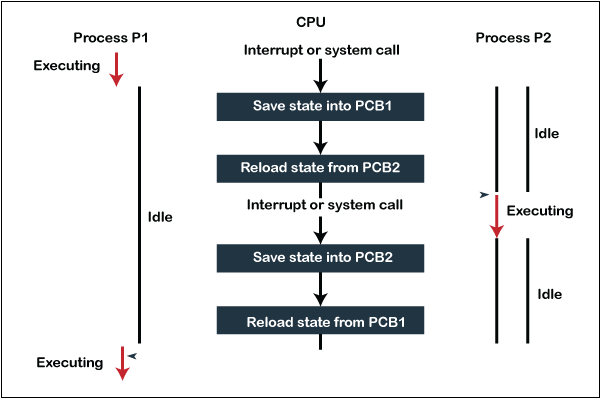
How is Context Switching Performed?

context-switching-in-the-operating-system

Image Source

When switching between multiple tasks takes place, a system does the following: 

  • The system stores the state of the previous running process in registers and assigns the CPU to a new process.
  • During the runtime of a new process, the system makes the previous one waiting in a ready queue.
  • When it is required to resume the implementation of the past process, the CPU opens it at the same time when it was interrupted by another process. 

If the CPU does not save the process’s state, its execution will start from the first stage. However, Context Switching allows the OS to switch between processes, store and reload them, and carry out tasks as and when required.

Context Switching Triggers

Following are the three significant triggers in Content Switching:

  1. Multitasking: Multiple processes can be executed in a multitask environment from the CPU. This preserves the status of the old process and loads the new process’s status. Besides, the scheduler on a protective device turns off processes.
  2. Interrupt Handling: Context Switching is required when the CPU interrupts in a process to get data from the disk read.
  3. Kernel/User Switch: It helps in switching between the Kernel mode and User mode.

Video Demonstration

Conclusion

To multitask, i.e., multi-programming and time-sharing, context switching is used. Multitasking gives users a feeling that more than one task are carried out concurrently. However, technically, only one task is performed by a processor at a particular time. In this case, the context switching is so fast that the CPU executes multiple processes simultaneously, making users feel like multitasking. 

Cheers to multitasking!

The post Context Switching in Operating System appeared first on The Crazy Programmer.


from The Crazy Programmer https://ift.tt/36YKhdN

In this article, we look into the delay() function in C++. There can be many cases where we need to create a delay in our programs before exiting out of execution. We can use a delay for this purpose in our code which is used to delay the program’s exit time. We can call the delay () function when we want to exit our program after a given time. This is just one of the extra features provided in the older versions of C/C++. This function is declared in the “dos.h” header file, we need to import this file in C/C++ program.

Note: The “dos.h” header file is only available in Turbo C3 Compiler so the program must be compiled in Turbo C Compiler or your compiler must have “dos.h” header file in it.

Syntax:

void delay (unsigned int)
  • void: The function has no return value.
  • unsigned int: Permissible Range of values: 0 to 4,294,967,295 (Positive Number).

The function accepts values in milliseconds format. So, if we want to create a delay of 1 second, we pass 1000 as a parameter. The following program is compiled and executed in Turbo C++ Compiler.

C++ Program to Demonstrate delay() Function

#include<iostream.h>
#include<dos.h> // to import delay function
#include<conio.h>

void main ()
{
        clrscr(); //clears screen
        cout<<” Hello” <<endl;
        cout<<” This program will exit in 5 seconds”;
        delay (5000); 
        cout<<” This line will not be printed”;

}

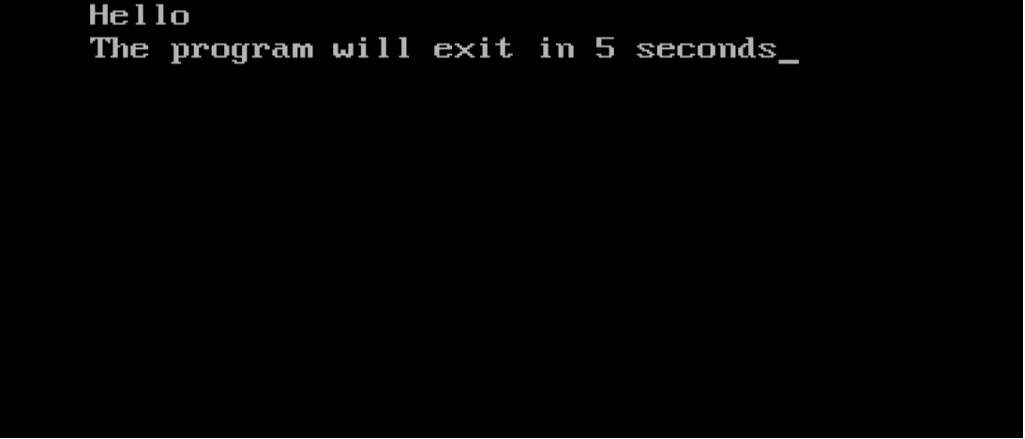
Output:

C++ Delay Function

Explanation:

In the above example, we used delay() function after line 7 and gave it a parameter value of 5000 i.e., 5 seconds to show that the program will stop its execution and exits the terminal after 5 seconds. So, we added a print statement at line no. 9 to show the working. As it is evident, in the output line no.9 is not printed and the program after printing “The program will exit in 5 seconds” terminates. So, this is delay() function you can try it out please read the Note carefully.

Comment down below if you have any queries related to C++ delay() function.

The post C++ Delay Function with Program Example appeared first on The Crazy Programmer.


from The Crazy Programmer https://ift.tt/2LxUS85

Today computer courses are becoming a new trend in contemporary times. Such kinds of short-term courses are very popular for the 10th & 12th class students since after appearing in the respective Board exams, students can squeeze in the best computer courses to improve their odds of employability. These computer courses are really good for the 10th & 12th students since after their exams they have two to three months until the starting of their next class.

Suppose you have completed your 12th with an exciting domain ‘Computers’ or have any interest in this field, then there are a lot of short-term courses that will lead you to an ideal job. Here, we have searched the best Computer courses after the 10th or 12th, continue reading to find the complete list here, and select the right course for you.

10 Best Computer Courses After 12th in India

10 Best Computer Courses After 12th in India

1. Data Entry Operator Course

The most basic and short-term computer courses that students can choose after 12th, is designed to sharpen the student’s computer typing & data entry skills that is a process to enter data in the computerized database or spreadsheet.

This particular course is appropriate for students who don’t seek or want advanced knowledge of computers; it will help you to get entry-level data entry or typing jobs in the companies.

The duration of the course is generally for 6 months but can vary from one institute to another.

2. Programming Language Course

The programming language is known as the base of the IT world. You can do nothing without Programming. You may select any language as per your choice & understanding like C, C ++, PYTHON, JAVA, HACK, JAVASCRIPT, NET, ASP, RUBY, PERL, SQL, PHP, and more. After doing the course, you will get a job as a software developer or Programmer.

But, if you learn at an advanced level, then you can create your software or game. Learning the programming language is the best computer course that students must consider after graduation for the Engineering graduates and person who will jam up with the lines of codes and create something really good in the terms of software & web applications.

Also Read: BCA vs B.Tech – Which is Better?

3. MS Office Certificate Programme

MS Office is a three month to a six-month program where students will be taught about the prominent apps of Microsoft Office such as MS Word, MS Excel, MS Powerpoint, and MS Access. Students will learn to use the applications on a regular basis.

Students after getting the certificate or diploma in the Microsoft Office Certificate Programme will become efficient at the workplace too. Certificate or Diploma holders are well suited for the front-end jobs where the computers are used such as shops, restaurants, hotels, and more.

4. Computer-Aided Design & Drawing or CADD

Students with a technical background may opt for the CADD short-term course. This course helps the students to learn about different CAD programs & Softwares such as Fusion360, Infraworks, AutoCAD, and more. The short-term and best computer course, just like CADDD will improve the know-how of an Engineering graduate while ITI degree or diploma holders may easily land on drafting related offers after their course completion.

5. Computer Hardware Maintenance

There are some students who are very much interested in hardware than software. Suppose you do not want to go for the above fields, then this is one amazing option. The course of computer hardware maintenance is done after your 12th Computer. This course teaches you about hardware maintenance and other technical details.

6. Animation and VFX

The part of designing, Animation, and VFX courses are quickly becoming the most popular computer course that students consider after 12th when looking for the field of specialization. According to the report, the animation industry in India is predicted to grow by 15 to 20% to touch USD 23bn by 2021. Most of the cities in India provide diploma courses in this field of Animation and VFX with a duration of 6 months to 2 years.

Thus, if you like to draw and allow your imagination to go wild on paper, then you are well suited for the course.

7. Digital Marketing

Students who are looking to make their career in the field than doing the digital marketing course will be the best thing after the 12th. Digital marketing today is the most growing career. There’re over 4 lakh jobs accessible in the Marketing domain. Most business owners need the help of the digital marketing team for promoting their brands and services.

The digital marketing industry is predicted to generate over 2 million jobs by an end of 2020. Thus, the future in this industry is quite promising. No matter whether it is a big player or a small start-up, companies want to invest hugely in digital marketing activities. They’re looking for people who will be able to develop & implement the digital marketing campaigns as per their needs.

8. Tally ERP 9

It’s the best computer course to consider after 12th commerce, but not just for the commerce students, but any stream students may join the course.

Tally Enterprise Resource Planning or Tally ERP is the software that is used to maintain accounts in the company & ERP 9 is the latest version. It’s the certification and diploma computer course where you may learn financial management, taxation, account management, and more.

After the course completion, you may work as the tally operator or assistant where GST and Income tax returns are filed, and as a fresher you need to do some basic works like the purchases & sales entries and more.

9. Mobile App Development

Mobile phones or Smartphones today are an indispensable part of everybody’s lives. Right from indulging in online shopping to food ordering and playing games, there’s an app for everything nowadays. It is a trend, which has made mobile app development the fastest growing career paths.

The mobile app developer is generally responsible for designing & building impactful mobile applications for organizations that are looking to better the customer engagement practices.

These short-term courses after 12th typically have a duration of 6 months, although this might vary from one institute to another.

10. Graphic Designing

Joining the Graphic Designing computer course after your 12th will provide you with an amazing platform to display your creative talent. With the onset of computers, the stream of design can be used everywhere & has got multiple applications in different fields.

After the completion of this computer course, the student has an option to pursue many career options liked to design that include;

Corporate or Agency Graphics designer

  • Graphics designer (Freelance or independent)
  • Brand and Visual Identity manager
  • Graphic designer (with magazines or websites or media or publishing firms)
  • Printing specialist
  • Creative director

Wrapping Up

So, these are some of the highly preferred computer courses by the students after the 10th and 12th. Hope the list of courses has helped you to know your course selection after the 12th. Make sure you choose the best computer course and most of the institutes are now offering online classes due to the current pandemic. Best of Luck!

The post 10 Best Computer Courses After 12th in India 2021 appeared first on The Crazy Programmer.


from The Crazy Programmer https://ift.tt/3ayqvqu
Engineering is one of the highly recognized professions in India. As there is a lot of competition, most of the engineers go for something much more than the BTech degree for giving themselves a push over their competitors. But, many who loves machine can opt for the masters. Then, they have to make a tough choice between MS & M.tech. This is what we are going to discuss in today’s article difference between MS and M.Tech.

Most of the students go for the PG programs through the GATE Exam. Many IITs and other Institutes provide different kinds of PG Programmes such as MS, M.Tech (M.E), Ph.D., and MSc. The most basic difference between both the form of degree is M.Tech is the course centric program mainly focused on the Industries & M.S is the research-centric program.

Also Read: How to become a Software Engineer in India?

Here, we will look at certain things that will help you make the right choice.

Master of Technology is the professional postgraduate master’s degree program given to the candidates after their completion of 2 years of their study in this discipline of engineering. The degree will be predicated in the specific engineering branch.

The MS or MTech degree is awarded across different specializations. The specializations include Computer Science & Engineering, Civil Engineering, Electrical Engineering, Chemical Engineering, Mechanical Engineering, VLSI, Electronics & Communication Engineering, and more.

Let us say you have made your decision of doing masters. Suppose you do not want to burn your pockets, then Mtech is an option for you. In India, it is a road that everybody takes. With huge competition in today’s job market, lots of Btech graduates are enrolling for Mtech.

It’s a 2-year postgraduate degree course that allows engineering students for doing specialization under a particular engineering branch. The course enables you to go a bit deeper into the subject & get industrial knowledge.

MS vs M.Tech – Difference between MS and M.Tech

Difference between MS and M.Tech

As mentioned above, the key difference between the Master of Engineering and Master of Technology is in the terms of the practical impact, orientation, and course material.

MS MTech 
MS a research-centric program MTech. is a course centric program.
MS is knowledge oriented. MTech. is skill-oriented.
MS is generally designed for students who are planning for employment on graduation & who are in this engineering workforce. MTech. is to produce the Research Engineers who will get the position of the “Technologist” in industries & research institutes.
MS emphasizes in-depth concepts and facts clarification. M.Tech. emphasizes over practical exposure of the conceptual knowledge.
MS is preferred by the private universities and self-affiliated colleges, like IIT. M.Tech. is generally offered by the colleges affiliated by different universities.
MS is a conventional term mainly used for theory-based study. M.Tech. involves technology & other aided stuff.

 M.Tech Course Module

It’s the course based & time-bound degree program for the higher engineering studies

Duration: 2 years

Offering Institute: The majority of the prestigious institutes of Engineering offer this course.

Admission Procedure: Generally direct admission based over GATE Score in the core discipline & multi-discipline and non-core based over GATE Score and interview. Generally, candidates require a good GATE Score and top ranks for getting in their desired Institute and course of choice.

Stipend or Scholarship: GATE Qualified students will be provided a stipend of INR 12400 monthly for HTTA for two years.

Course curriculum: MTech/ME students generally have a little more credits for the courses & they have to study a little more subjects and project (generally 6 to 9 months)

Future scope: As the design of the course is about learning the advanced subjects of discipline & less towards the core research, candidates mainly opt for the industrial job during the campus placement. People who are very keen to enter the research field may opt for the Ph.D. in India and abroad but the candidates who want to emphasize on the project work.

Pros: As it is a time-bound course, many students in India select this as their first priority considering the better job after masters.

Cons: In the course, students will be focused on getting more credits on the course work, and less exposed to the research work.

MS Course Module

MS is a research-based program & time duration for completion varies based on the thesis completion.

Duration: Generally, it takes 2 to -3 years to complete the program and a few cases it takes a bit lesser and more too.

Offering Institute: Most of the IITs, IISc & Few NITs offers this course

Admission procedure: Admission is totally based on the GATE Score & follow up written/interview to the specific area. More weight-age will be given to the interview and a good GATE Score has to be there for written & subsequent interviews. The good GATE Score holder will get in the course based on the performance during their interview.

Stipend or Scholarship: GATE Qualified candidates are provided the stipend of INR 12400 monthly over three years. At times stipend will be more if it’s funded by the industrial project.

Course curriculum: For MS there’re fewer credits for the course work and the focus towards thesis is more. Generally, students have to complete their course credit in the first semester and the second semester onward has to work over the agreed research thesis in the designated guide. The degree will be awarded based on the thesis completion and there’s a higher scope of publishing conference & journal papers during the research. Most of the students get the chance to attend the national and international conferences for displaying their work, traveling, or other expenses that will be funded by the Institutes.

Future scope: As the course is made from the research viewpoint. Candidates have got a good scope of working in the R&D industries that do core research. Most of the students convert the thesis to Ph.D. & obtained an integrated degree (MS and Ph.D.). They have simple chances of getting into the Ph.D. courses. They’re equally entitled to getting a seat in the campus placement.

Pros: The candidates who are pursuing this course have got a bright future in the research-oriented field and good scope for pursuing a Ph.D. abroad.

Cons: Candidates pursuing this course have to be focused & dedicated to finishing thesis work. Any type of negligence can increase the course duration & bring frustration to a lot of candidates. In a few cases, selected guides aren’t supportive or research in the chosen area might not get in the desired direction, thus before choosing the area of research & guide complete checks have to be done.

Basic Eligibility for MS/M.Tech Program Admission

  1. Students who completed their BE or BTech degree with a valid or high score in GATE will be eligible for the MS/MTech degree course.
  2. Students who completed a 5-year course program in Applied Sciences and resulting in an award of the MS degree are eligible for the Master of Engineering program.
  3. Admission will be based on the rank obtained in an entrance test given for MS./MTech.

I hope this article will help you to understand the basic difference between ms and mtech. You can ask your queries in the comment section below.

The post Difference between MS and M.Tech appeared first on The Crazy Programmer.


from The Crazy Programmer https://ift.tt/36sqRhn

Most new C++ programming students are taught to add “using namespace std” in the global scope after introducing the headers needed for their programs to compile successfully. As a result, students grow accustomed to engaging in this practice without realizing how bad it is. Including ‘using namespace std’ in the global scope is bad practice. Some programmers are simply unaware of this, while others find it less demanding to add that statement in the global scope.

With online learning becoming increasingly prevalent, especially for aspiring programmers, it’s easy to learn bad coding practices because there’s no way to understand the author’s skill level. In other instances, people do know what to do but prefer the easy option. However, there are many downsides of adding this simple statement while coding. It’s worth finding out why so that you do not end up like me and run into a more experienced supervisor who frowns at its use.

This article provides information about “using namespace std” and why it is a bad idea to add it in the global scope. It also proposes better alternatives that can be adopted in its stead.

What is using namespace std?

I remember rolling my eyes while reading a blog post some time ago after seeing someone write code that read like this:

std:cout << “you” << std:endl << std::lcm(2, 2) << std::gcd(3, 7) …ad infinitum;

In my head, I was thinking “Pftt! I mean who does this? I hope you know that you can simply write ‘using namespace std’ instead of engaging in this tedious, repetitive, boring task.” I probably also laughed at the ridiculousness of it. Well, who would have thought that I’d be here writing an article about why you should try to write code in the same way? Definitely not me.

So, what is ‘using namespace std?’ Someone less experienced (like the version of me that existed two weeks ago) might define it as the statement one must add to their header file if they want to avoid encountering certain really nasty, headache-inducing errors. On the other hand, a more experienced programmer might begin to break it down to aid understanding like this: “first, std is short for standard, and the keyword ‘using’ specifies that the standard namespace should be used whenever possible. The keyword ‘namespace’ helps distinguish between different identifiers, and its use is supposed to prevent name collision. Hence, it is important to make use of namespaces in your program so that you don’t run into compile errors. With ‘using namespace std’ however, if an identifier is not found in the global scope the compiler will look in the standard library scope instead. This has its downsides and should be avoided at all costs.”

In short, it will be wise to listen to the second, a more experienced programmer who has his head screwed on straight.

Why you should avoid using namespace std in the global scope?

When ‘using namespace std’ is added to your code, the compiler will look for identifiers in the std:: namespace if it can’t find them in the global namespace. The maintainability of the program will decrease after making this inclusion since the whole content in the directive might not be needed and it can lead to confusion. This action is referred to as namespace pollution. Additionally, if anyone chooses to make use of the code you have written by including your header into their program, they will also inherit this ‘using’ behaviour, which is very likely not what they desire and may cause code breakages.

One key consequence of making this choice is that you might encounter name collisions in your program. To put it simply, name collisions occur when compilers can’t differentiate between identifiers. An example is when an identifier is added more than once. Let’s assume you write this code:

namespace std1 { 
        int someFunction(int) 
        { 
                /* Does something */ 
        } 
}

And you have another namespace written by someone else that also has the same function name. Somehow this code is imported into your program:

namespace std2 { 
        int someFunction(long int) 
        {
                /* Does something different*/ 
        } 
}

Finally, you add the following code to call the function.

using namespace std1; 
using namespace std2; 

int main() 
{
        someFunction(6); 
}

This will inadvertently lead to an issue because one function might be used in place of another. To make things worse, the compiler will not warn you, and it will be difficult for you to locate what the issue is. Talk about inducing headaches! Thus, it is better to make the effort to avoid this confusion. The better thing to do will be to specify which function is being referred to by writing std1::someFunction or std2::someFunction.

Better Alternatives for ‘using namespace std’

In this section, some alternatives that can be used in place of ‘using namespace std’ will be discussed. Embarcardero’s C++Builder will be used to show the different alternatives.

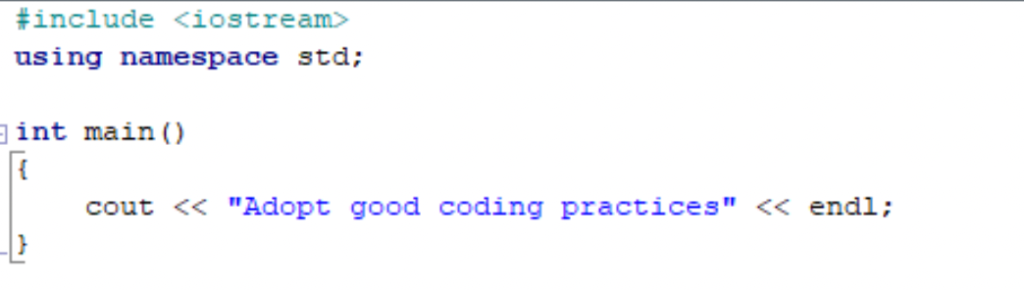
Instead of writing code in this manner:

namespace std 1

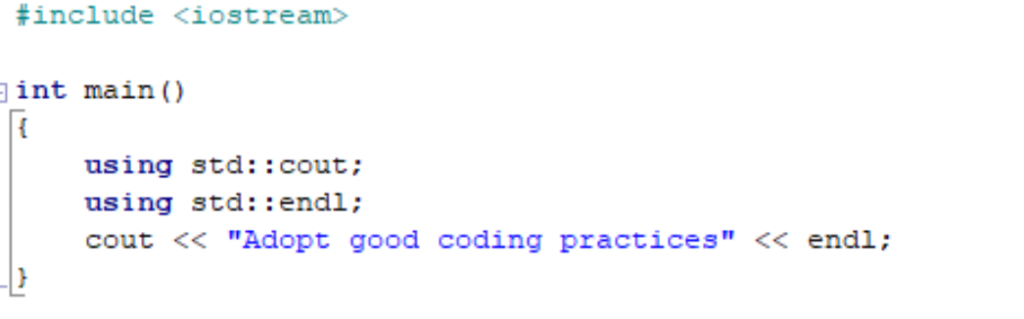
You can add only the directives needed in the local scope by doing this:

namespace std 2

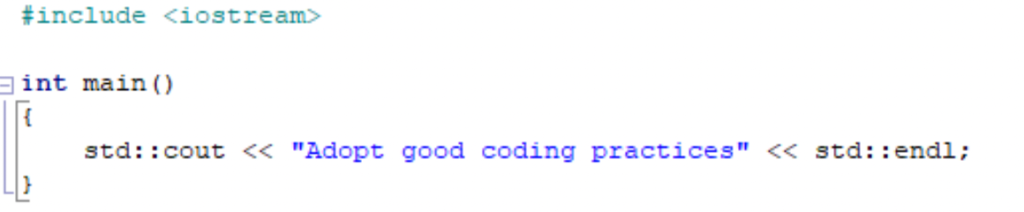
Another common way is shown in the snippet below. Although it is a bit tedious, it is still a better way of writing code, and your supervisor will appreciate you for doing so:

namespace std 3

Conclusion

In conclusion, you should make an effort to use one of the methods shared above. It will not only prevent you from encountering name collisions and contributing to namespace pollution; it will also make you a better programmer. For some final parting words:

namespace std 4

This post is sponsored by Embarcadero, creator of the C++Builder, the powerful C++ IDE for multi-platform development focusing on database access and excellent UI design for all your platforms.

The post Better Alternatives for ‘using namespace std’ in C++ appeared first on The Crazy Programmer.


from The Crazy Programmer https://ift.tt/3r72hul

Hello everyone, In this article, we will see different ways by which we can check if a particular key exists in a map or not. Let’s first go through what a map is:

C++ map stores information in <key, value> pairs and we can access the value field from the key in O(logn) time. Now the problem is to check if there exists a particular key in the map or not.

Method 1: Using map::find

We can take the help of the standard library function find for map. map::find returns an iterator to the <key, value> pair if the key exists or it points to the standard iterator end in the map. So if for any particular key if find is returning an iterator pointing to the standard operator end then we can say that map doesn’t have that particular key. Here is the code: 

#include <bits/stdc++.h>

using namespace std;

int main() {
        map<int, int> mp = {      
                                                        {1,1},
                                                        {2,4},
                                                        {3,9},
                                                        {4,16},
                                                        {5,25}
                                                };
        
        if(mp.find(2) != mp.end()) {
                cout<<"Key found. Value is: "<<mp[2]<<endl;
        }
        else {
                cout<<"Key not found.";
        }
        
        if(mp.find(7) != mp.end()) {
                cout<<"Key found. Value is: "<<mp[7]<<endl;
        }
        else {
                cout<<"Key not found.";
        }
        
}

The time complexity to check is the same as map::find function which is O(logn).

Method 2: Using map::count

We can also make use of the c + + count method which returns 1 if the particular key is present otherwise returns 0. Here is the code illustrating the same:

#include <bits/stdc++.h>

using namespace std;

int main() {
        map<int, int> mp = {      
                                                        {1,1},
                                                        {2,4},
                                                        {3,9},
                                                        {4,16},
                                                        {5,25}
                                                };
        
        if(mp.count(2) > 0) {
                cout<<"Key found. Value is: "<<mp[2]<<endl;
        }
        else {
                cout<<"Key not found.";
        }
        
        if(mp.count(7) > 0) {
                cout<<"Key found. Value is: "<<mp[7]<<endl;
        }
        else {
                cout<<"Key not found.";
        }
        
}

The time complexity for the above code is O(logn) as well. This is widely used to check if a key is present or not.

Note: If the particular key is not present and if somewhere we use it then the key will be created in the map and initiated default value (0 for int. “” for string) will be created. So never check a key exists or not with the below condition:

if(mp[key] == 0) {
        cout<<"Key doesn't exist";
}

Check the below code for better understanding: 

#include <bits/stdc++.h>

using namespace std;

int main() {
        map<int, int> mp;
        cout<<mp[0]<<endl; // Prints 0
        
        map<int, string> mpp;
        cout<<mpp[0]<<endl; // Prints ""
}

The post C++ Map Check if Key Exists – 2 Ways to Check appeared first on The Crazy Programmer.


from The Crazy Programmer https://ift.tt/2NBBJmh

Streaming services and streaming various contents is now a crucial part of life. So how can you get a piece of the action? Here we are going to show you things to put in place before building your streaming app.

Although streaming is synonymous with movie and music content, this is not the only option for streaming. There are diverse ways where streaming would help boost the business, such as movies, yoga, education, cooking services, and many more.

Streaming app development is a complex process requiring different steps in the actualization of your platform. These steps are:

  1. Technical
  2. Monetization
  3. Aesthetics

To start-up, let us examine the three steps involved in the building of a streaming service.

Factors to Consider Before Developing An On-demand Streaming Platform

Image Source

Technical

The technical aspects in setting up a streaming service include the following:

Security and Encryption of data: the customer’s data, streaming contents, and platform safety all need detailed security measures to prevent breaches and failures.

Cloud Hosting: this inter-connected service between physical and virtual facilities provides you the ability to store then distribute your contents to your clients. The advantage of cloud hosting to the regular hosting service is that the cloud offers a wide range of networks where your contents are stored and not on just one server. Therefore, the disruption of one server does not affect the streaming of your content.

Video Quality: Your viewers’ internet connection significantly impacts their viewing experience. Therefore, your streaming should possess different video quality that will cater to different internet speeds. Video quality from 360p to 4K is a suitable range as the minimum speed for streaming video is 2Mbps.

Monetization

Revenue is a vital aspect of any venture. Consequently, implementing a monetizing model on your streaming platform is crucial. You can achieve this through the following means:

Subscription: this is a popular method streaming services adopt, where users pay a stipulated amount to access the platform, and it is usually in different stages such as basic, premium, and sometimes family plans.

Advertisement: the streaming platform may have an Ad placement at different positions during streaming. The ads serve as revenue for the service. An example of this is YouTube’s smart utilization of ad placement, where an advertisement is a huge revenue income.

Pay-Per-View: pay-per-view works for special events (live events) and regular viewing instead of a monthly subscription. However, this is usually considered an inferior option to a monthly subscription plan.

Aesthetics

Aesthetics deals with the look and feel of your streaming platform, either website or mobile apps.

Home Page: this is the first page a viewer sees. Usually contains the sign-in/ sign up page. On this page, there will be a search bar, pricing, and subscription options.

Audio and Video Playback: all streaming services dealing in audio or video contents should provide add-ons such as rewind and fast forward by 10 seconds, playback memory, subtitles, etc.

Content Download: providing an option for downloads on your platform will add an advantage to your streaming platform. As your users will be able to download videos or audio content even when there is no internet connection.

The post Factors to Consider Before Developing An On-demand Streaming Platform appeared first on The Crazy Programmer.


from The Crazy Programmer https://ift.tt/3cdbHAb

Hello everyone, In this article we will see how string trimming can be done in C++. Let us first understand what is trimming and where it can be of importance.

Trim: Trimming is a string operation where we remove extra whitespaces from the start and end of a string and if some spaces are present in between the string those won’t be removed with the operation.

For e.g. “ Hello world  “ will become “Hello world”.

Now where and how trimming a string can be useful?

Trimming is done in forms where user type some information which is then sent to servers. So if your email address is abc@xyz.com and you mistakenly typed a space at last that should be removed before sending it to the server.

C++ String Trim – 3 Ways to Trim String

Method 1: Writing Own Trim Function

We can write our function for trimming a string, we just have to identify the number of spaces present at beginning before any non-space character and same from the end. The function to do the same is illustrated below: 

#include <bits/stdc++.h>

using namespace std;

string trimfnc(string str) {
        
        // Initialize considering no trimming required.
        int atstart = 0, atend = str.size()-1;
        
        // Spaces at start
        for(int i=0;i<str.size();i++) {
                if(str[i] != ' ') {
                        atstart = i;
                        break;
                }
        }
        
        // Spaced from end
        for(int i = str.size()-1;i>=0;i--) {
                if(str[i] != ' '){
                        atend = i;
                        break;
                }
        }
        string fistr = "";
        for(int i=atstart;i<=atend;i++) {
                fistr += str[i];
        }
        return fistr;
}

int main() {
        string str;
        getline(cin, str);
        cout<<trimfnc(str);
}

Output:

C++ String Trim

This method works well for normal cases but there can be times in real world application where there are many different encodings will be followed there it may feel, so it’s better to go with standard functions provided by c++ libraries.

The above method will only remove whitespaces (normal spaces) but there can be various different whitespaces as below: 

\t: Horizontal tab

\v: vertical tab

\n: new line

\r: carriage return

\f: form feed

These all look like spaces but are different so these need also need to be removed.

Mehod 2: C++ Standard Library 

#include <bits/stdc++.h>

using namespace std;

string trimfnc(string str) {
        const char* typeOfWhitespaces = " \t\n\r\f\v";
        str.erase(str.find_last_not_of(typeOfWhitespaces) + 1);
        str.erase(0,str.find_first_not_of(typeOfWhitespaces));
        return str;
}

int main() {
        string str;
        getline(cin, str);
        str = trimfnc(str);
        cout<<str;
}

Here we are using the find_last_not_of and find_first_not_of functions from the string library.  It takes in an argument where we have specified the characters which we have to exclude. It will return us the first index where these characters are not found front the beginning and end. The type of whitespaces are explained as above.

Method 3: C++ Boost Library

#include <bits/stdc++.h>
#include <boost/algorithm/string.hpp>

using namespace std;

string trimfnc(string str) {
        boost::trim_right(str);
}

int main() {
        string str;
        getline(cin, str);
        str = trimfnc(str);
        cout<<str;
}

In this case you will need the boost library available for your compiler, it can be found here: https://www.boost.org/

All the above methods work in linear time and all of them can be made to work in no extra space (in-place) if we pass the reference of the string instead of a copy of it. For understanding purpose it is passed by reference in examples.

The second method is widely used because of short code, no extra library requirement and clean solution.

The post C++ String Trim – 3 Ways to Trim String appeared first on The Crazy Programmer.


from The Crazy Programmer https://ift.tt/3o6GjFH

For years, technology enthusiasts have used tools such as extreme injector to create DLL libraries to carry out specific jobs or processes. The main purpose of these types of libraries is to hijack the software it is being used on. Many gamers who want a competitive edge use these DLL injection tools to alter certain parts of the game to make it easier to win. If you are a software or game developer, you need to find ways to avoid DLL hijacking and the problems it can cause.

While this may sound like a relatively easy process, it is anything but. The tools that hackers use to infiltrate software and wreak havoc changes constantly. This is why you have to stay on the cutting edge of technology when trying to keep your games and software safe and functional. Below are some things you can do to keep your software safe from DLL hijacking.

How to Keep Your Software Safe From DLL Hijacking 1

Understand Phantom DLL Hijacking

Cyber attacks cost the global economy more than $600 billion a year. The key component of preventing any type of digital attack is to educate yourself. The more you know about the methods used by hackers to bring a piece of software to its knees, the easier it will be to secure your own software. If you use a number of legacy systems on your personal computer, you are vulnerable to phantom DLL hijacking.

This hijacking method takes control of rarely used DLLs in a Windows-based startup application. These attacks generally involve labeling the malicious DLL as something similar to one of your legacy application libraries. The malicious DLL library is then put into the relevant search path, which means the application will find it. The best way to avoid these types of attacks is by creating absolute paths for your DLLs. These paths will have to be featured in your software’s code.

Firewalls and Intrusion Detection Systems

How to Keep Your Software Safe From DLL Hijacking 2

Whether you are the developer of a piece of software or just a loyal user, it is your responsibility to create a secure environment for your technology. Having the right digital security tools in place can help you keep your software and sensitive information protected. Making sure your firewall is updated and functional is also very important. Most OS manufacturers such as Windows provide firewalls that are fairly strong. Do not ignore routine software updates to your OS, as you will become vulnerable to DLL hijacking and a host of other issues.

You also need to invest in a comprehensive and easy-to-operate intrusion detection program. With this tool, you can identify unfamiliar networks and hosts attempting to gain access to your information. These systems also provide you with the ability to control access to parts of your network. Many modern intrusion detection programs also have the capability to monitor network traffic and provide helpful analytics.

With these analytics, you can get a breakdown of who is accessing your network and the software on it. Finding and implementing tools to prevent DLL hijacking will not always be easy. If you have limited knowledge of cybersecurity, then reaching out to IT professionals for assistance is crucial. These professionals will help you find, implement and maintain new security technologies. They can also monitor your network so you can detect hacking attempts early on.

Don’t Let Your Guard Down

Failing to realize the threat of DLL hijacking can come back to haunt you. With a little knowledge and prevention, you can put the right security tools in place and protect your software. Allowing IT professionals to help you with your network and software security is the best way to avoid mistakes.

The post How to Keep Your Software Safe From DLL Hijacking appeared first on The Crazy Programmer.


from The Crazy Programmer https://ift.tt/3paruDr

MKRdezign

Contact Form

Name

Email *

Message *

Powered by Blogger.
Javascript DisablePlease Enable Javascript To See All Widget