Latest Post

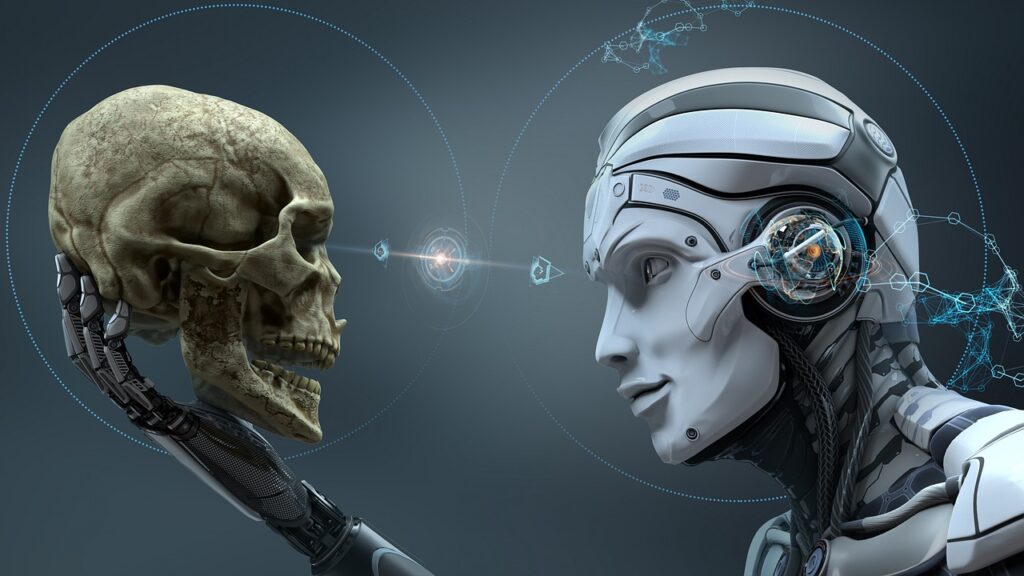
Artificial Intelligence is a science of making intelligent and smarter human-like machines that have sparked a debate on Human Intelligence Vs Artificial Intelligence. There is no doubt that Machine Learning and Deep Learning algorithms are made to make these machines learn on their own and able to make decisions like humans.

With an attempt of making smarter and intelligent machines, we are overlooking the real impact of Artificial Intelligence takeovers on our future careers? Will Human Intelligence face an existential crisis? To understand more about it, let us go ahead and check the entire post.

Various technologies such as Natural Language Processing, Neural Networks, Cognitive services, Robotics Processing, AR/VR, and many more make machine learning highly intelligent. Thus, machines systems will make a decision as we do in day-to-day lives. The decision-making system of this machine is increasing various debates like Artificial Intelligence Vs Human Intelligence!
Can Artificial Intelligence Replace Human Intelligence

Development of AI

Artificial intelligence is a simulation of human intelligence that is programmed in machines. It’s the ability of the robot or machine to do certain tasks that are generally done by humans as they need human intelligence. Whereas in a beginning Artificial Intelligence started as the machines performing just trivial human tasks as well as enhancing the speed of the production processes, and computers teaching themselves how to play games better, but, today it has evolved throughout the years.

Artificial Intelligence can be seen all over today, it has enhanced our phone cameras that give better pictures, manage our finances as well as are completely integrated into our day-to-day lives in several ways. However, besides helping us to automate the world and enhance our job efficiency, which “computer intelligence” can do, there’re examples of Artificial Intelligence coming much closer to human intelligence. With machines and robots participating in the conversations and quizzes, and producing music and paintings and exhibiting their creativity in various forms, now they are coming a bit close to mimicking human feelings and emotions, one may wonder what AI can bring on us.

Impacts of Artificial Intelligence on Future Jobs and Economy

Tasks Automation

One clean AI impact is an outcome of automation of tasks over the expansive scope of various businesses, which are changed to digital from manual. Tasks and jobs that include the level of reiteration and use or translation of huge measures of information can be conveyed or handled by the computer, and many times do not need human intercession.

Welcome Better Chances

As AI and ML perform the manual assignments for people to perform, this opens up as well as breeds many new businesses, they open doors for our labour force. One example is digital engineering that came because of the fast improvement of creativity and innovation, and it’s still developing. Therefore, old manual assignments will be out, professions and new openings are arising.

Economic Growth

Artificial intelligence or AI can open massive loads of chances and improve cooperation and efficiency inside an association. Thus, in return, this will bring about the expansion that is sought after for the items or administrations and it helps to drive the monetary development model, which improves and conveys the living nature.

Can Artificial Intelligence Replace Human Intelligence?

Coming to our question can artificial intelligence replace human intelligence, it is observed that AI achievements are actually imitating human intelligence very closely but it cannot go beyond our brains.

We acquire a huge amount of knowledge with a sense of understanding, learning, logic, experience and reasoning. In a way, we feel the entire thing, especially, the emotions that make us totally different from robotics, machines, the latest technologies, and much more.

Your brain makes the importance of our intelligence above Artificial Intelligence. But, with the growth of Artificial Intelligence, the risks of AI are increasing since we cannot use our hearts and brains at their complete capacity.

Although machines mimic our behaviour, their capacity to make rational decisions is still lacking. They need the next level of evolution where they should process their ‘common sense.

Such evolution can take many more years as common sense differs in every human! This means AI machines do not understand ‘cause’ or ‘effect’. Whereas we humans can do everything based on cause and effect with our decisions benefit some sections of our society.

The idea of making robots or machines that will think just like a human has arrived from its fiction world to our real world. Machines may do a certain task that was impossible before. We have endeavoured to get Intelligence in the Machines to make our work easy.

There’re bots, robots, humanoids, and digitalized people that outflank people and organize from various viewpoints. The AI-driven applications generally have higher and better execution speed, higher operational capacity, whereas huge in monotonous and dreary positions than with humans.

Human Intelligence can easily identify with versatile learning or experience. It does not rely on the pre-taken care for f information like the ones required for AI.

Artificial Intelligence Human Intelligence
Works on data stored in them Uses brain power to function
Uses 2 watts Uses 25 watts
Cannot multi-task Can multi-task
Machine can handle large amount of data much faster Humans cannot beat machine speed
Repetitive Innovative
Good in instruction Good in coaching
Fast response Plausible thinking

Conclusion

There is no doubt Artificial Intelligence will help to create various medicinal benefits, but it will not take over our healthcare industry. Yes, Artificial Intelligence can read the psychology book within microseconds, but it cannot detect the real cause of stress and depression. Indeed, AI can elevate designing to an unimaginable level, but emotions displayed through oil painting can be missed.

AI is one helping hand to people, letting it become a benefit or threat is on us.

The post Can Artificial Intelligence Replace Human Intelligence? appeared first on The Crazy Programmer.


from The Crazy Programmer https://ift.tt/3FufAfW
Learning coding can be a little tough initially, especially when you’re getting started, however when you get into the detail, it becomes very fun and enjoyable. Besides games are the best way you can do that.

Today, the gaming sector has undergone a huge change with new technologies such as Artificial Intelligence, Virtual Reality, IoT, etc integrated with video games.

Furthermore, it can help you empower your problem-solving and creativity skills as you want to solve different challenging problems and compete with different proficient programmers around the world.

Can Games Teach Coding?

Definitely! And for this, you do not need any science degree. You may just play coding games and learn coding skills – which includes all types of programming languages. With the best coding games, you can sharpen your programming and problem-solving skills, enhance your concepts, as well as enjoy your learning process.

Whereas the coding game probably will not teach you everything that you want to know about programming, these fun games are just an amazing way to practice these skills that you are learning. Suppose you are just like me, then you’ll realize you have spent your free hours reinforcing Python, JavaScript, and various other programming skills without realizing it. Let us check out some top games for programmers to improve programming skills that are personally picked by me.

Best Games for Programmers and Coders

Best Games for Programmers

1. Code Hunt

Code Hunt is one educational game launched by Microsoft Research that allows you to learn Java or C# languages. It’s a browser-based app. Learners have to go through the short tutorial for every section and set their code fragments and get passing scores.

2. Untrusted

This is yet another wonderful online adventure game that is made for people who wish to practice or test JavaScript skills. In Untrusted, you have to use various JavaScript commands that will help Dr Eval to go through the machine continuum & change his reality for getting freedom. This game offers you the rogue-like gaming experience and console window with JavaScript code generating every level. You can access all source codes and save yourself, but you have to make required changes to its source code.

3. Robocode

Robocode is one popular game that allows you to develop the robot battle tank by using programming languages such as Java and .NET to battle with other tanks. You have to write AI for the robot to make them understand what to do or how to perform various events that are happening in a battleground.

This game is quite useful to learn and practice many programming languages like Scala, Java, and C#. This helps you to get into the Artificial Intelligence domain. Furthermore, Robocode offers you the complete development environment as well as comes up with their installer, robot editor and Java compiler. Robocode is an Open Source programming project, so you can find your own modes and showcase your skills.

4. CodeMonkey

CodeMonkey teaches coding by using CoffeeScript — it is an open-source language, which compiles JavaScript — and teaches you to build your games in HTML5. This game is aimed at coding for kids, however, it is so much fun for adults, as well. There’re CodeMonkey Android & iOS apps too.

5. CodeGym

This is one gamified programming course made for the users to learn as well as practice coding skills in Java. Players do not have to know coding in Java to start playing this game, thus it is best for beginners.

6. CodinGame

Suppose you are looking to develop your own coding skills or learn new programming concepts but not through traditional tutorials, but something engaging and exciting, then CodinGame is the best option for you. It is an immersive & free game platform, which teaches more than 25 popular coding languages, which includes Ruby, JavaScript, Rust, Java, C#, and PHP.

7. Flexbox Froggy

This is one easy game made to help users to learn CSS code. The players need to bring their Froggy home just by mastering the layout module flexbox. This game is made particularly for beginners in the CSS flexbox so that you will learn the basics of CSS.

8. Code Combat

Students and teachers are the main target audience in Code Combat, however, everyone can take part. You will learn to script the games in JavaScript, Python, Lua or CoffeeScript. On a beginner Dungeon level, you will guide the Hero through this game by using simple commands, which are explained in this game’s tutorial.

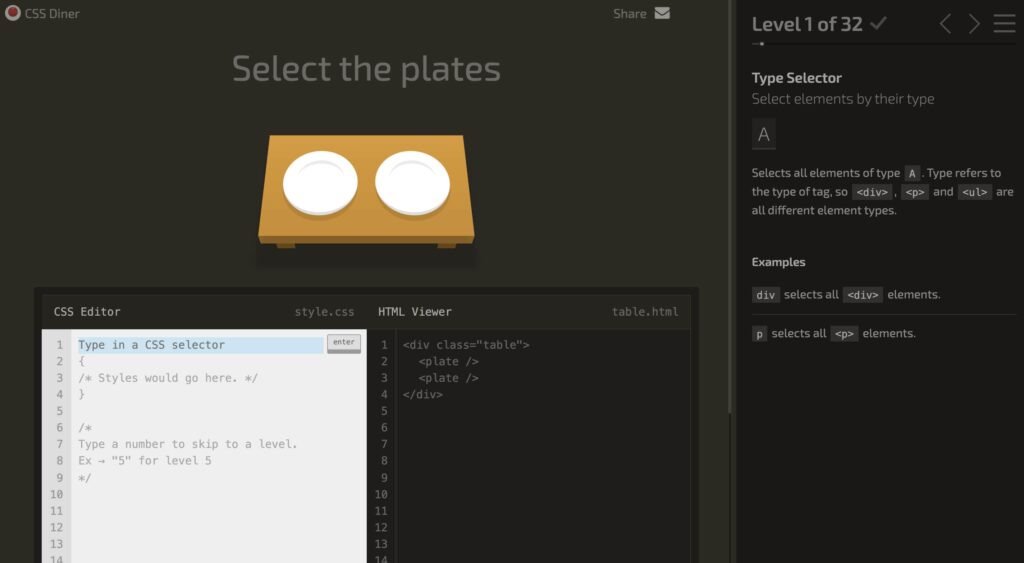
9. CSS Diner

This is one simple and fun way you can learn CSS for beginner coders. There’re over 32 levels that can teach you the basics of how CSS selectors will work. Every level of the free coding game will get more complex —just like the real video game — it helps in building over what you have learned in the previous lessons. By an end of this game, you will be called the CSS selectors expert.

Final Words

Learning and playing isn’t the new concept, these games are the tried and tested way to improve and learn your coding skill. Programming is no exception. There’re many amazing coding games that you can try and play. Doesn’t matter which programming language you want to and what is your mode, you will find the right game to enhance your coding skills, and have lots of fun too.

The post 9 Best Games for Programmers to Improve Programming Skills appeared first on The Crazy Programmer.


from The Crazy Programmer https://ift.tt/3HdySq6

Any real-world object with self-existence is considered an entity in the computer world. Like a car, any person, any book, painting, news, building anything which is available in this world can be considered as an entity.

Characteristics or specifications of any entity are known as attributes of that entity. Attributes are physical or virtual properties of an entity.

There are mainly 8 types of attributes, let’s discuss them one by one in detail.

Types of Attributes in DBMS

Different Types of Attributes in DBMS

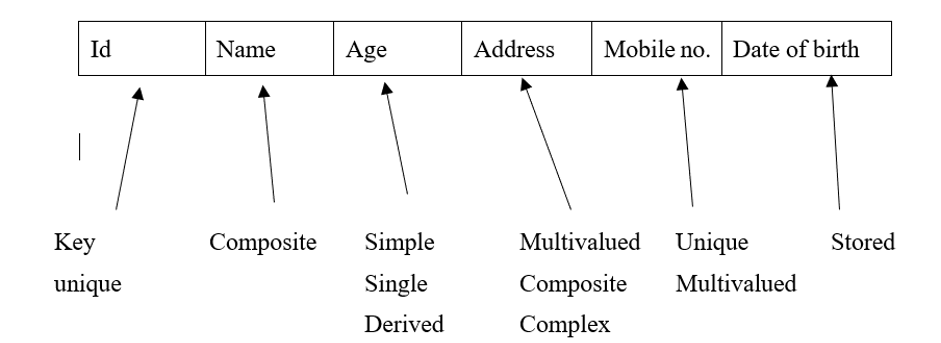
1. Composite Attributes

Those attributes which may have more than one section like name can be sub-divided in First, Middle, last name. Composite attributes can be filled in sub-sections but always show as a single attribute. Like you can enter your name in three sections but the display will be combined. These brackets “()” are used to represent composite attributes.

2. Simple Attributes

Those attributes which cannot be divided further like the age of any person.

3. Single-Valued Attributes

Those attributes whose values always remain the same like the name of any person.

4. Multi-Valued Attributes

Those attributes whose values have more than one entry like a person’s name is single valued but his/her number of degrees can be more then one. Like Under graduation and post-graduation. These brackets “{}” are used to represent multivalued attributes.

5. Derived Attributes

Those attributes whose value can be derived from other attributes like from date of birth we can derive age of a person.

6. Stored Attributes

Those attributes whose value remains constant are known as stored attributes. Derived attributes are derived from stored attributes.

7. Complex Attributes

It is a combination of the Multivalued and Composite attributes. These kinds of attributes have many sub-sections in their values. Like Degree of any person can be dived in graduation and Masters. These degrees are also subdivided into further details like name of degree, institute, year of passing, etc.

8. Key Attributes

Those attributes whose value is unique for that entity. Like registration number of any student or chassis number of any vehicle etc. These types of key attributes are used to create a different kinds of keys in relational data models.

The post Different Types of Attributes in DBMS appeared first on The Crazy Programmer.


from The Crazy Programmer https://ift.tt/3sgfapO

This error mainly occurs when a code is indented using both space and tab.

It is always preferred either to use tab or space and not both at the same time. Tab and space are two different things in Python. There is no specific rule for using tab. Python just expects the same number of space used in first line to be same for rest of the code.

So when a code is indented with space for the first line, tab with the second line, it throws a TabError.

m=int(input(“ enter a integer M:”))
                 n=int(input(“ enter a interger N:”))
 If (m>n)
              Print (“M is greater than N")
elif(m==n)
             Print(“M and N are equal") 
else  
          Print(“N is greater than M")

This code is one such example.

Ways to Solve Error

  • To fix this error, it is always preferred to make sure that the code has proper indentation. Another way to solve this is, select the entire code by pressing  CTRL+A key, then in idle go to format setting and select UNTABIFY REGION. This method is for IDLE.
  • Convert all the indentation either to tab or to space. Show all commands tab by pressing CTRL+SHIFT+P, select ‘convert indentation’. Convert all the indentation for space or tab. This method is for VS code.
  • Add this in the beginning of the code #!/usr/bin/python -tt
  • Select all code block, press Shift and tab to align code block to the left then hit the tab bar number of time you want to indent the code.

These are the several methods used for avoiding taberror.

Always check for the wrong white space or tab in your code. Check for the particular number of space to be used for every line.

The post Solved: “taberror inconsistent use of tabs and spaces in indentation” in Python appeared first on The Crazy Programmer.


from The Crazy Programmer https://ift.tt/3ysURX7

When programming and coding for a longer time frame, it is very important to have a comfortable monitor that does not strain your eyes much. It is very important to get the monitor that’s the right size, with sufficient screen size to have several windows open and work comfortably without any squint.

You must consider a flicker-free monitor since backlight flicker will cause eye strain and headaches with longer use. Generally, programmers prefer working with one or more monitors, since you will have the editor open at one and specifications open over another.

Things to Consider When Buying Monitor for Programming

Buying the right monitor for your programming and development needs is not very simple as visiting the local electronics shop and spending your money on the first one that you see. You have to consider certain things so that you are sure you will get the best programming monitor for the work. Here are a few things to consider before buying monitors for programming, check them out.

Screen Size

Many people think that the bigger screen size is better but thinking about it can help you determine the use of the monitor. Is it necessary to be big? Not exactly, you will save money by going for the smaller model. But, you have to consider how close you are going to be to the screen & for how long?

Resolution

The second important thing you must consider when buying a monitor is the resolution. Whereas most of the monitors nowadays are HD, and not all monitors are full 1080p —make sure you check it out before buying the monitor. You can also consider a 4K monitor for the ultimate viewing experience.

Extra Ports

Some of the top monitors have many HDMI-in ports. Choose a unit with enough HDMI ports that will plug in your equipment, and extras that include HDMI-out connections, DisplayPort, and USB hubs.

Stand and Flexibility

For each monitor, they have got their stand. The majority of the stands that come with the monitor will be angle-adjustable and vary in degrees and can easily be adjusted. Ensure you can adjust its height too.

Best Monitors for Programming in India

1. LG UltraWide Multitasking Monitor

LG 25-inch (64.5 cm) UltraWide Multitasking Monitor

The LG 25UM58 monitor is the best for its range. Because of the high resolution (size) and IPS panel, this monitor provides crisp details and vivid colours, and wide viewing angles with a fast response rate.

Performance:

The LG 25UM58 monitor for programming offers amazing and smooth performance. This has a low input lag of ~9ms, thus you will not notice any further delays when doing the coding. It has a very good performance.

Design:

The LG 25UM58 monitor has a tilt stand, thus you can’t adjust the height of the screen. But, there’re 75x75mm holes given for the VESA mount, thus you may attach a monitor to the 3rd party stand. The connectivity options have two different HDMI 1.4 ports & a headphones jack. There’re not any built-in speakers or USB ports with it.

Features:

Looking at the display features, this monitor offers many useful features that include On-Screen Control that allows you to adjust On-Screen Display in the desktop application with a mouse or keyboard.

Pros Cons
High pixel density Tilt-only stand
Vibrant colors & wide viewing angles No AMD FreeSync
Low input lag & fast response time Small and short screen
Many useful features –

buy now

2. LG Ultragear Monitor

LG Ultragear Monitor

The LG 24GL600F monitor is the most economical entry-level programming monitor, which includes everything that the professional coder may need, which includes quick response time, low input lag, Motion Blur Reduction and FreeSync.

Performance:

Performance-wise this monitor performance is high-quality with just ~4ms delay at 144Hz that will be perfect for the professional programmer. If you prefer a graphically oriented task, you may have to consider the higher resolution or lower refresh rate instead.

Design:

As you may see, the monitor has a design that is similar to the previous one. When compared to the current design trends, the design of LG 24GL650 is a bit dated, as the predecessor. It doesn’t have any borderless bezels and isn’t thin.

Features:

The features of this monitor have an advanced and organized OSD menu compared to the LG’s previous displays. Also, navigation is quite effortless because of the joystick, which is placed under the bottom bezel of the screen.

Pros Cons
Low input lag & quick response time Tilt-only stand
Motion Blur Reduction Dated design
Useful features like FreeSync –
Good value for price –

buy now

3. Dell 24 inch Full HD Monitor

Dell 24 inch (60.96cm) Full HD Monitor

Dell 24 Monitor is a 24inch professional monitor with an amazing port selection and an ergonomic stand. It is one of the best monitors in this range.

Performance:

By setting its ‘Response Time’ to ‘Fast,’ this monitor increases the speed of response time from its regular 8ms to 5ms with grey pixel transition. It helps to eliminate ghosting or trailing of the moving objects, but as the monitor is a bit limited to 60Hz, it won’t be of any interest anyway.

Design:

Despite the monitor being a larger one, its screen is lightweight and easy to move from one place to another. The ultrathin bezel is made for this screen to get combined with several monitors that will help to increase productivity by over 18%. There are no internal speakers available.

Features:

The On-Screen Display (OSD) menu includes standard adjustments like colour settings, brightness or contrast, hue or saturation, and even input source selection, however, there are not any gamma presets. Using the monitor’s hotkey, one can swap between various picture presets, which includes Standard, Movie, ComfortView, Warm, Game, Cool, and even Custom Color.

Pros Cons
Pivot control & use with multiple monitors No internal speakers
Small footprint Resolution limited 1080p
Compact –

buy now

4. BenQ GW2480T

BenQ GW2480T

The GW2480 monitor is quite an affordable piece with a 24″ 1080p monitor. It’s particularly good for office-related use because of the innovative eye-care features and technology.

Performance:

With an input lag of 10ms, there’s not any perceptible delay between the commands and results on a screen. The display of BenQ GW2480 IPS has a fast response time of 5ms that ensures no prominent ghosting or trailing of the moving objects.

Design:

The design of BenQ GW2480 1080p is quite modern with thin bezels & a premium textured finish. Furthermore, it has got a good cable management system; and an important part of the stand has to be removed for concealing its cables. There are headphones jack & 1W integrated speakers.

Features:

The BenQ GW2480 monitor stands out from other 24″ 1080p models with its amazing Brightness Intelligence Technology. The technology includes a built-in sensor, which will automatically tweak its screen brightness as per the ambient lighting.

Pros Cons
Good value for your price No AMD FreeSync
Low input lag & quick response time Tilt-only design
DisplayPort –
Unique Brightness Intelligence technology –

buy now

5. Acer Nitro VG240YS

Acer Nitro VG240YS

Are you looking to update your current monitor with a new and updated version? Acer Nitro VG240YS is the right choice for you.

Performance:

The Nitro VG240YS monitor has 1ms Visual Response Boost. This is the new technology, which creates the illusion of 1ms MPRT. It does it by turning off its backlight of black image over frames, it results in the less noticeable change of colour when the colours shift fast.

Design:

The Nitro VG240YS generally comes with easy looking design without several embellishing elements, besides the red highlight on its stand. These bezels are very thin that helps in increasing your viewing area and makes them suitable for the multi-monitor setup. The overall appearance of this monitor is simple and elegant.

Features:

The monitor comes with the IPS display and AMD Radeon SYNC Technology and supports the Nvidia G-Sync. This covers 100 per cent of the sRGB colour gamut & supports 8bit colour depth through dithering.

Pros Cons
Amazing color display Stand can just tilt
Great features Tilt-only design
Impressive IPS panel –

buy now

6. Samsung Curved Monitor

Samsung 59.8 cm (23.5 inch) Curved LED Backlit Computer Monitor

The LC24F390FHWXXL monitor is a 23.5” HD Monitor and has all the amazing qualities that a monitor must-have.

Performance:

There is an HDMI option available in the monitor and the VGA option is there too that will keep up with their customers demand in the market.

Design:

Samsung is known for providing an amazing design in all their monitors and the majority of them are very good in quality and LC24F390FHWXXL is among them. This quality monitor from Samsung has a full HD display and comes with a VA panel & black is a common colour.

Features:

The monitor has got LED-backlit display and has a resolution of 1920×1080 pixels. And 16.7m colours are accessible in the monitor and have 250 nits brightness.

Pros Cons
Great picture quality Not 3D monitor
Both VGA and HDMI options No inbuilt speaker
Curved monitor Build quality is average

buy now

Final Words

Just like other professions out there, being a coder or programmer needs to have the high-tech to make the job simple. With our selection of the best monitors for programming and coding, we are sure whichever monitor you select will work great for you.

The post 6 Best Monitors for Programming in India 2022 appeared first on The Crazy Programmer.


from The Crazy Programmer https://ift.tt/3ES0fFI

Some teams struggle to see eye to eye while working on projects or product launches. The disconnect between marketing and the dev team is one that pops up time and time again. This friction often relates to dramatically different working styles and priorities and can lead to project delays and costly mistakes.

Fortunately, there are many ways devs and marketers can come together. Here are some key overlaps to consider when breaking down barriers between these groups.

How Developers and Marketing Teams Can Work Together

Understanding Technical Challenges

Marketers are “ideas” people and tend to focus on quality communication that creates an emotional response with leads and customers. However, as the world continues its transition into digital marketing dominance, emotions and psychology are no longer the prime factors influencing communication; there is a lot going on behind the scenes.

Dev teams can work with marketers to understand the technical challenges they’re facing when communicating with an audience. A prime example is a shift toward privacy control in the digital ecosystem. Marketers can no longer add people to their lists without someone subscribing, and non-compliance could cause emails to get rerouted to spam or blocked entirely. Innovative developers put together verification software and an email verification guide to ensure continued audience engagement while reducing costs and errors.

While many marketers and developers still work in silos, the world of digital marketing creates an overlap that’s impossible to ignore.

Creating Custom Solutions

It’s rare to find a perfect solution for marketing and sales needs. For example, many gyms find success in using scheduling software with a PoS component, but it lacks data and reporting capabilities. Conversely, your business might find a simple e-commerce platform to integrate WordPress that doesn’t show adequate traffic and customer journey metrics.

These gaps and problems create an opportunity for marketers and dev teams to come together and create a solution. What might seem impossible to a marketing team could be a simple integration for the dev team.

Improving Data-Driven Decision-Making

Big data has become something of a buzzword in recent years; it’s an opportunity that businesses can’t afford to ignore. However, collecting big data and turning it into valuable information is a significant undertaking.

Dev and marketing teams can come together to capture and analyze big data to highlight new market expansion opportunities, overlooked demographics, and underlying influences on customer behavior to ultimately enhance the customer experience.

Tips for Improving Cross-Team Communications

Bridging the gap between marketing and dev-ops requires a trickle-down effect from the top. Leadership should take the initiative to create better communication and remove barriers in the work environment.

Take a Collaborative Approach

Rather than viewing the other department as something separate, consider a collaborative approach. Ensure that everyone has time to connect in settings that are unrelated to projects and deadlines to build a rapport. It’s also beneficial to create job shadowing opportunities so each group can see what the other group does during the course of a day.

The goal is to understand why things are done the way they are. Friction points due to misunderstanding often result in conflict and disrespect between teams with different priorities.

Listen to Understand

As humans, we’re conditioned to listen with the intention of responding. However, to successfully collaborate with different individuals and teams, we must learn to listen with the intent of understanding.

Take an emotionally intelligent approach by giving your full attention and asking questions for clarification. Put your learnings in the context of the bigger picture, and remove your priorities and ego from the analysis. Keep these strategies in mind whether you’re having an in-depth conversation about a major project or a quick update on an outstanding task.

Manage Expectations and Timelines

Another aspect of clear communications between cross-functional teams is managing expectations and setting clear timelines. If your team is committing to a timeline, ensure it’s realistic. If it isn’t, explain what barriers are preventing you from accomplishing your goal. It’s also important to have clear communication about overarching project timelines so everyone understands the bigger picture of their personal delays and challenges.

Marketers and developers may speak two different languages, but there are plenty of opportunities to collaborate and communicate successfully.

The post How Developers and Marketing Teams Can Work Together? appeared first on The Crazy Programmer.


from The Crazy Programmer https://ift.tt/3y9rc51

Cybercriminals are acknowledging package sniffing attacks to steal customers’ data. These attacks are a significant threat to cyber security. Packet sniffing is a crucial thing in network management. And network managers use the practices of sniffers to analyze the threats or any underlying technical issues.

However, now cybercriminals are also using this strategy to conduct illegal activities. Hence, it is crucial to understand packet sniffing attacks in detail. Thus, in this article, we will analyze what package sniffing attacks and their other aspects are. Therefore, stick to this crucial article if you belong to the IT industry or are interested in knowing the same.

What is Packet Sniffing Attack?

What is Packet Sniffing Attack

Image Source

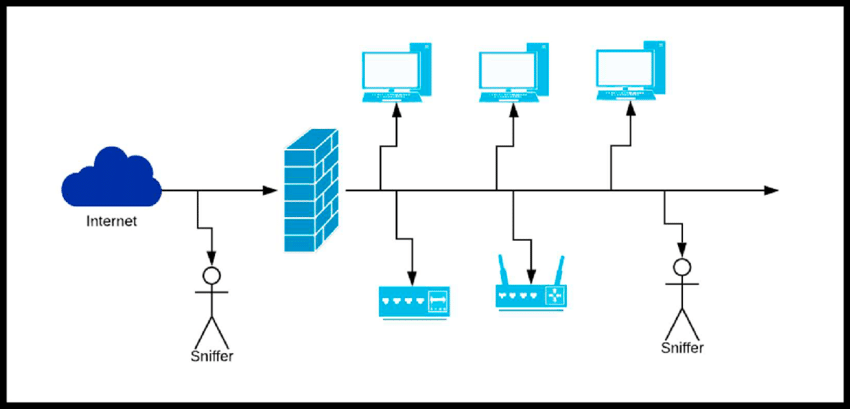
Packet sniffing attack is checking and analyzing the data packets that pass through the network. And these packets are mainly moved over the network using sniffing, which is a specialized tool. The data can contain information about wealth or other information, all of which are in data packets. And these packets proceed inbound or outbound traffic.

However, the sniffing attack takes place when the cybercriminals execute criminal activities using this technique. In this, they extract the packet data by making it unencrypted when it passes through the network. In short, these are cybercrimes where the criminal captures the traffic using packet sniffers. And by doing this, they extract all unencrypted data from the packets.

Therefore, if any organization gets caused by sniffing attacks, they can meet significant loss. Hence, it is essential to use best practices to prevent packet sniffing attacks.

Legal and Illegal Use of Packet Sniffers

There can be legal and illegal use of packet sniffers by the IT professional. When IT professionals and networking experts use packet sniffers to analyze traffic and security analysis, it’s called legal packet sniffers. And by using it, they can find the troubleshooting network issue of the organization as well.

It can also be used for the information security context. However, this tool can also be misused if the wrong person gets such tactics. Sniffing tools can be illegally used for stealing the data of customers. It can discover the passwords and bank details of the user as well. The hackers can also execute other malicious activity using sniffers.

Some packet sniffer tools are BetterCAP, WinDump, Wireshark, and Ettercap. Most people do not know sniffer attacks can cause them if they use an unsecured WiFi connection. By using such tools, the hackers can execute DDoS or MitM attacks as well. Hence, these factors must be considered because they can be a threat to businesses.

Are Packet Sniffing and Spoofing Both Same?

Most of you may not know that spoofing and sniffing are different. Mainly these two phrases are used interchangeably among businesses. But both are entirely different from each other because sniffing has the direct involvement of the hackers. Because here, hackers intercept the network to obstruct traffic and gather unencrypted data.

Whereas in spoofing, there is no direct involvement other than the man in the middle attack. In this method, the hacker impersonates the other person to execute the same malicious goal. They intercept the traffic having packets and gain access to the targeted or sensitive data of the organization.

Types of Packet Sniffing Attacks

There are mainly two types of packet sniffing attacks such as mentioned below.

1. Active Packet Sniffing Attack

An active packet sniffing attack is a cyber-attack where hackers manipulate the switch-based network. And nowadays, most networking components are switch-based, and they connect with sports. Hence, by using switches, they forward the data to other predefined ports to control the port’s MAC. Here MAC represents the media access control of the port connected to pass the data. Some common examples of active sniffing attacks are MAC fooling, ARP spoofing, and DNS spoofing.

2. Passive Packet Sniffing Attack

The cyberattack takes place by using a bunch of networks, and here hackers use MAC addresses to understand the destination port of the data. Here you will not see any direct connection with the target as like an active sniffing attack. Therefore, these attacks are complex to detect and prevent because these attacks are passive in nature.

How to Prevent Packet Sniffing Attack?

There are many preventative ways to stay away from packet sniffing attacks. However, these methods do not guarantee but help you build a healthy ecosystem to secure your organization; sensitive data.

1. Prevent Using Unsecured Networks

Have you ever heard bank data has leaked and the user lost his credit card details? These are general examples of packet sniffing attacks. And mostly, it happens because such users use unsecured WiFi networks. Also, such hackers or attackers may use the vulnerable network for installing their offers to monitor, analyze, ready, and steal the data. Many hackers also create fake public WiFi networks to harm innocent people by getting their sensitive data. Therefore, it is crucial to avoid using unsecured WiFi networks because they may harm you.

2. Start Using Vpn To Make Messages Encrypted

Mostly, attackers gather unencrypted data from the network’s traffic. Hence, if you want the most effective way to prevent sniffing attacks, you should use VPNs to make your organization’s message encrypted. It will help you to enhance your virtual privacy and also prevent cyber attacks on your device. Therefore you can also consider using a virtual private network or VPN for your organization’s devices.

3. Use Networking Monitoring and Scanning Activities

You can also hire network administrators and IT professionals. They will scan and monitor the data traffic that happens from the network. Also, they will help you by monitoring the bandwidth and device auditing to find any suspicious thing. However, it is a must-use activity for you to secure yourself from sniffing attacks. Because most networks are unsafe and might have some harmful elements. Therefore, with an excellent team of qualified, ethical hackers and IT professionals. You can make more secure network strategies to keep your and your customer’s data safe.

So, these are just a few ways to prevent sniffing attacks in your organizations. However, there might be some other ways, but these three are crucial to implementing.

Conclusion

Now you know “what is package sniffing attack,” and you also have learned its types with examples. Now only sniffing attack types, we also discussed ways to prevent sniffing attacks. Hence, we hope you liked this great post and shared it with your friends as well. If you keep wanting to learn such excellent technical terms in a simplified manner. You can stay tuned with our blog and another post as well. So, let’s know your thoughts on the package sniffing attack in the comment box.

The post What is Packet Sniffing Attack? – Types and How to Prevent It? appeared first on The Crazy Programmer.


from The Crazy Programmer https://ift.tt/3Dz2uwg

Welcome to JSON minifier online free tool. This awesome tool will help you to minify your JSON data. All you need to do is just paste your data in the below box, click on the button, after that you will instantly get the compressed JSON. For making your work easier we have also provided a copy and a clear button.

JSON Minify Online

  • It helps you to compress or minify JSON.
  • It simply removes all spaces and tabs to make JSON take the least space.
  • This minify tool also checks JSON data is valid or not before minifying.
  • Our JSON minifier works with all platforms and browsers.

Here is an example of how data looks after minifying.

Original JSON String:

{
  "student": {
    "name": "Neeraj",
    "branch": "science",
    "rollno": 21
  }
}

Compressed JSON Data:

{"student":{"name":"Neeraj","branch":"science","rollno":21}}

If you are facing any difficulty then please mention it in the comment box below. We will try to solve your query.

The post JSON Minify Online appeared first on The Crazy Programmer.


from The Crazy Programmer https://ift.tt/3lsHYa3

Want to know what tailgating is in cyber security? Tailgating or piggybacking is one of the hacking techniques hackers use. The main goal of tailgating is to enter the local place with no proper authentication. So, do you want to know more about tailgating in-depth?

You must read this article because here I have explained it in detail. You will also understand various ways to prevent such hacking efforts from hackers. Thus, read this essential article to get fresh updates on the same.

What is Tailgating in Cyber Security

What is Tailgating in Cyber Security?

Tailgating is the most common way hackers use to get access in a minimal place. This approach of hacking is also known as piggybacking in cyber security. In this, the hackers follow the authorized person to enter in very restricted place of the organization. They may arrive as the delivery men to deliver the bunch of boxes and wait to open the door of the targeted location.

So, they can get access to the electronic access control unity of that place. Therefore, it is considered a social engineering cyberattack as it is always an electronic component. And using this technique, they perform crimes like phishing, whaling, and spear phishing.

How Does Tailgating Work?

It mainly includes following the authorized person at the restricted place to access the door by lock code. So, to get the lock’s code, the fraudsters can trick the authorized person using various ways. They may arrive as repairmen, men struggling in handling boxes, and delivery men. These are just a few lists, and all the time, hackers try different approaches to use this technique.

Hence, you need to stay up to date with cyber security awareness training to keep yourself safe. However, it is a simple technique that mainly relies on human decisions. And if such fraudsters trick the bug in the human hardware, they might succeed in getting access to that restricted place.

Psychology of Tailgating?

Tailgating is the technical name of the psychological manipulation of the human. And there, your brain considers that hacker as a victim and asks you to help them. But if you get tricked, you may suffer from the loss of money, reputation, and confidence. It is an information technology technique similar to phishing and built to fool people.

If you haven’t had any idea about the same, you might be at significant risk of getting tricked into this dangerous thing. Hence, you need to know about the consequences you may face due to tailgating.

Who is At The Risk in Tailgating?

Nowadays, you can see several cases of tailgating where hackers and fraudsters steal the organizations’ assets. They might steal costly equipment including laptops and other costly things. They may even install spyware in the computer devices of the organizations.

However, some hackers also steal the sensitive data of the companies to harm them. You may even see some try to access the company’s server room by making a backdoor. And all these activities are more than sufficient to cause a significant loss to the company. In reality, it has become a severe challenge for a large organization to deal with.

Most businesses have faced the loss of reputation damage, financial loss, and even loss of their sensitive data. Therefore, companies, influential organizations train their employees about the responsibility and these threats. So, they can prevent such harmful activities in their organization.

How to Prevent Tailgating?

There is not any guarantee that by using some technique, you can stop tailgating. Because every time hackers come with a new approach to harm such organizations. But still, there are some crucial things to know to prevent or minimize the chances of being a victim of tailgating.

Firstly, companies need to make strong policies in the workplace and use advanced access control at the entrance. They should make the place restricted by using advanced security features.

Also, companies can train their current and new staff with the latest cyber security training. They can be aware of the employees about such crimes, solutions, and the consequences.

Primarily the large organization becomes the victim of tailgating. Because they have many contractors for every different task. And they also have large business areas with many floor buildings.

They might even be working with freelance or remote professionals. Hence, they need to give more attention to implementing essential ways to prevent such activity. Because for hackers, even a small loophole can be a great way to execute their harmful intentions.

Therefore such companies can use the below-mentioned things.

#1. They can allow intelligent ID cards for every employee and give different badges.

#2. Hiring security guards is also a preventative idea to cope with tailgating.

#3. Such companies can also start using biometric access control at restricted places.

#4. Some companies can also consider access controls that require a unique PIN.

#5. They make it compulsory to wear badges for every visitor in the workplace.

#6. Install cyber security tools at various sections of the server areas.

#7. They can even hire cyber security experts or a team of experts.

These are just a few things that a company can do from its side. And they can even train their employees to prevent such situations. Because there is not any benefit of using expensive tools if the employees are not well trained.

Hence, look below-mentioned points that will highlight how the employees can prevent tailgating in the organization.

#1. Tell them if they are in the office uniform and they need to help others. They must not hold the door for anyone entering the workplace, especially at restricted places.

#2. Tell employees to stop the people if they are coming with them to the restricted place.

#3. Give them such confidence and power to ask or challenge suspicious people in the workplace.

#4. Guide all employees to tell the visitors to visit the reception area for any query.

#5. Be aware of the repairmen, delivery person, and other outsiders as they can be hackers.

Conclusion

Tailgating can seem a simple thing, but many organizations have faced huge losses. Hence, you must be aware of tailgating and use the best ways to prevent tailgating at your workplace.

So, to prevent such consequences, use some key things we discussed in the article. Because if you stay tuned with cyber security, you can surely get much help in preventing tailgating efforts from hackers.

We hope you liked this article and found it very useful. So, please share it with your friend as well so they can know about this exciting thing.

The post What is Tailgating in Cyber Security appeared first on The Crazy Programmer.


from The Crazy Programmer https://ift.tt/3IekDml

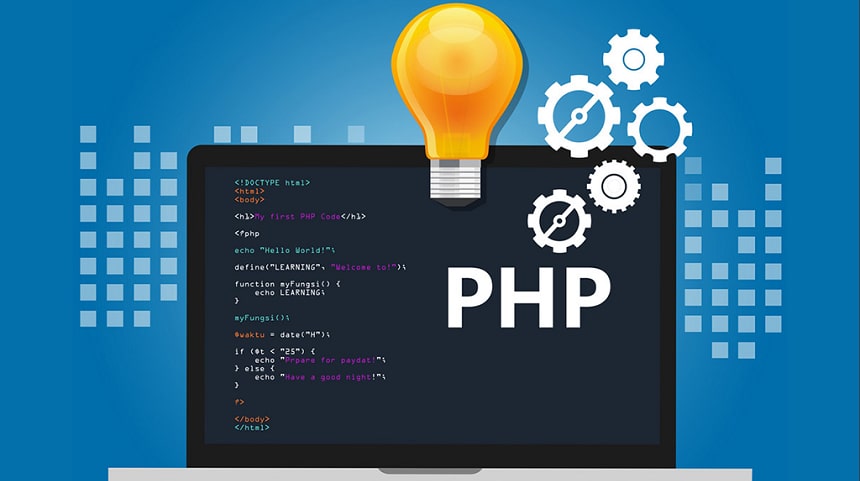
PHP is known as Hypertext Preprocessor. It is an open-source, server-side scripting language embedded in HTML used to manage databases, development of web applications, session tracking, build e-commerce sites, etc. It is kind of a programming language that is used for writing automated tasks. Many databases such as PostgresSQL, Oracle, Informix, MySQL can be integrated with PHP.

It supports a large number of protocols such as POP3, IMAP, and LDAP. PHP scripts are interpreted only on a server that has PHP installed in it. Since PHP is a server-side scripting language, it gets executed first on the server and then it gets to the web browser to the user.

Why is PHP so Common?

  • Versatile:- PHP is platform-independent and can be run on multiple platforms such as Mac OS, Windows, Linux, and multiple browsers are also supported.
  • Speed and Security:- PHP uses its memory for its overall functioning and hence has a good operational speed. Moreover, it has many new tools and frameworks are there in the market to protect against cyberattacks.
  • Compatibility:- It is compatible with all the servers such as Apache, etc.
  • Legacy Code:– Many websites are written with PHP, which gives an edge to make updates in the existing code rather than rewriting the new code.
  • Open-Source:- PHP can be installed for free and quickly. This feature helps companies in controlling the cost of web development.

Uses of PHP

Uses of PHP

Image Source

Encryption

PHP can be used to encrypt data. It assists with several extensions, like OpenSSL and Sodium, which eventually cover a wide variety of encryption algorithms. Before inserting the data into the database scripts encrypt it and decrypt it before retrieving it.

File Manipulation

It helps in creating, writing, deleting, opening, closing, and reading files on the server. Various commands are used for file manipulation which is listed below:

  1. PHP Read File:- The command is fread(). This function is used to read the content of the file.
  2. PHP Write File:- The command is fwrite(). This function is used to write the content of the string into a file.
  3. PHP Open File:- The command is fopen(). This function is used to open a file.
  4. PHP Close File:- The command is fclose(). All the open files are closed with the help of this function.
  5. PHP Delete File:- The command is unlink(). This function is used to delete files.

Handling Databases

Data can be added, deleted, modified within the databases using PHP. It gives the freedom to the developers to connect it securely with any kind of database. This gives them the freedom to choose which database is best suited for the application to be developed.

Dynamic Content

PHP helps in creating dynamic page content. Majorly, there are three types of dynamic information on the web which are stated below:

  1. Dynamic Web Pages:- A full web page is generated.
  2. Dynamic content:- Only a certain portion of web pages are generated.
  3. Dynamic Data:- Variables on a web page are generated.

Dynamic handling of web pages is a bit complicated if the scope of the information to be generated is vast. But, with the help of two PHP functions, include() and require() it has become easier.

Controlling Access

It helps in restricting and allowing access to the users for accessing the pages on the website. Various roles will be assigned to multiple users in an application. Accordingly, an access control system is designed. It can control user permissions based on the PHP pages or database records.

Cookies

PHP can set cookies and receive cookies. setcookie() function is used for creating cookies. isset() function is used to check if the cookie is set. There are other manipulations that can be done with PHP cookies such as Modify Cookie, Delete Cookie and check if Cookies are enabled.

Form Handling

It can handle form manipulation, i.e., collect data from files, send the data through email, return data to the user. Also, it can save data to the file.

Conclusion

Programming for the web is altogether a different experience than traditional programming. Web development is meant to ensemble multiple resources together, which in turn requires more tools. Multiple languages mean higher maintenance. To avoid such a situation PHP is the correct tool for in fact a complete package for web development.

The post PHP Uses – Applications of PHP appeared first on The Crazy Programmer.


from The Crazy Programmer https://ift.tt/30WgW3O

CSS is another thing you may learn just after understanding HTML. CSS stands for the cascading style sheets, which Hakon Wium Lie created in 1994. Hakon Wium Lie is considered the father of CSS as he created this amazing thing. And he used to work with the father of HTML, Mr. Tim Berners-Lee, when he was working in CERN.

CSS was offered as the web styling language to make it appealing. And it was the solution that most of the users of HTML were looking at that time. When it launched, the users could use HTML 4.01 and CSS together to make their web pages more attractive.

Hence, if you want to know about the history of CSS from its origin to now. Then read this essential article because it has several things that will help you understand CSS. You will also understand how CSS won over other styling languages of that time.

History of CSS

What Does CSS Stand For?

CSS is mainly used for web development or page design. It refers to the cascading style sheets that can format the web page layouts using many features. It can style the text, manage table size, and edit other aspects of the web pages to make them attractive. By using CSS, the user can give a uniform look to the website and its several pages. It does not only define the table but also meets other design needs of the website.

With the help of CSS, the user can make changes in several pages just at once. Suppose, if you need to make the text bigger of all the web pages, then by changing the font size in CSS, you can make the text size bigger. And there are many other things that you can do easily using cascading style sheets. And because of these features, CSS has become a crucial language for web design and development.

Origin of CSS

CSS came into existence in 1994, so it can provide a standard way to design the pages on the world wide web. And Mr. Lee developed a cascading style sheet for the same purpose. Because by this time, there was an immense demand for such a solution as HTML 4.01 was unable to give an appealing web page on its own. However, by seeing it, many people offered different styling sheets, but none of them succeeded as CSS. In its initial stage, it was primarily used for making websites accessible and appealing.

Brief History of CSS

Along with HTML, CSS is also standardized by W3C that controls the web standards. CSS is free to use, independent and it is also an open-source standard. And users can use HTML and CSS together with the W3C.

If we look at the history of CSS, we will find it has seen mainly three updates. CSS level 1 was launched in 1996, and it came again in 1999 with some improvements. However, CSS level 2 or CSS2 came in 1998 with media support. In this version, the user can utilize the other media elements. And finally, its latest version, CSS level 3, launched, and currently, we use this version only. The latest version of CSS allows us to take advantage of separation that helps in saving time.

If you need to make some critical changes on a large website with hundreds of pages. Currently, CSS comes with over 60 modules with different features. In recent years, most developers and designers have tried a variety of browsers to see the effects of CSS on web pages. But most of them found Firefox as the most helpful for the same concern.

History of CSS Versions

We have understood a brief introduction of CSS’s history and learned it has mainly three versions. So, now let’s discuss these three versions of CSS in more detail.

CSS 1

CSS 1 is the very first version of the cascading style sheet and recommendation of W3C. It was launched in 1996 with the capabilities of font properties. It is also used for adding color to the background and text side. In CSS 1, there were text alignment functionalities. It also has capabilities of padding, positioning, and generic classifications. But now, this version is outdated and not maintained by W3C.

CSS2

W3C developed the next version of CSS and named it CSS2, and launched it in 1998. It has more features and functionalities than the previous version. And now users could use new features like relative, absolute, and also fixed positioning. There were media types, and bidirectional text features were also there. This version also saw many revisions in the same, and updates came as CSS2.1.

CSS3

CSS3 is the latest version of CSS officially by W3C, and it was launched in 1999. It has a vast collection of font types, and you can use any font type from Google and Typecast. Also, this version is divided into many modules that make it easy to handle, and it also saves time formatting the web pages. Currently, most companies and organizations use CSS3 and HTML5 for their web development and designing tasks. Hence, if you also wish to learn such a skill, then make sure you will learn the latest launch of such technology.

Future of CSS

Earlier, we used to use only the primary website that has no visual effect. But after the launch of CSS, web design experts have taken this technology to the next level. Hence, without a CSS website would not look appealing and engaging to the users. Also, in the past, we have noticed many updates and changes in the same. Thus, in the future as well there can be some exciting updates. But currently, CSS3 is the latest version and allows users like us to add some creative elements to the web pages.

Conclusion

So, in this article, we learned about the history of CSS and understood how it developed. Moreover, we also learned about its critical versions that the world has noticed in the past. Thus, we hope now you have foundational knowledge about the history of CSS. Hence, if you need to learn something like this, then check our other articles as well.

The post History of CSS appeared first on The Crazy Programmer.


from The Crazy Programmer https://ift.tt/3HJKYbZ

MKRdezign

Contact Form

Name

Email *

Message *

Powered by Blogger.
Javascript DisablePlease Enable Javascript To See All Widget