Latest Post

SQL Server database is a term you’re probably already familiar with. When it comes to storing large amounts of data, databases are extremely useful. And as you’ve figured out, SQL Server’s default settings aren’t always the best. When working with new user databases, this is the case. We can define a database as, In SQL Server, a database would be composed of a set of tables that store a particular set of structured data.

Introduction

SQL Server can be installed on a computer in one or more instances. Each SQL Server instance can have one or more databases.

Basically, a database table is made of rows, which are also called records or tuples, and columns, which are also called attributes. Every column in a table is made to hold a specific type of data, such as names, dates, and numbers. Every SQL Server database should have at least two operating system files: a data file and a log file. The information necessary to restore all transactions within the database is stored in log files. For allocation and management purposes, data files can indeed be clustered together in filegroups.

To improve I/O performance, SQL Server helps to create supplemental filegroups to disperse data and indexes across multiple discs. Today we are going to discuss these filegroups and when to use the multiple filegroups. Explore SQL Server Tutorial for more information.

What is Filegroup?

In a database, a filegroup is a rational approach for grouping objects. Filegroups should not be confused with actual files (.mdf, .ddf, .ndf, .ldf, etc.). Per database, you can even have multiple filegroups. All system tables will be stored in one filegroup, which will be the primary. Then you create more filegroups. You can set one filegroup as the default, and objects that aren’t assigned to a filegroup will be placed in it. You can just have multiple files in a filegroup.

  • The primary data file is in this filegroup, as are any secondary files that aren’t in other filegroups.
  • For administrative, data allocation, and placement purposes, user-defined filegroups could be formed to group data files together.

If we talk about an example- On three different disc drives, Data1.ndf, Data2.ndf, and Data3.ndf could be created and allotted to the filegroup fgroup1. The filegroup fgroup1 could then be used to create a table. The table’s data queries will also be scattered out across three discs, resulting in improved performance. A single file formed on a RAID (redundant array of independent discs) stripe set can achieve the same performance improvement. Files and filegroups, on the other hand, make it simple to add new files to new discs.

The following table lists the filegroups where all data files are stored.:

Primary: The primary file is contained in this filegroup. The primary filegroup contains all system tables.

Memory optimized data: The filestream filegroup is the foundation for a memory-optimized filegroup.

User defined: Any filegroup made by the user once the database is first created or later modified.

When to Create Filegroup?

  • SQL Server accesses data using threads; each thread is responsible for retrieving or updating data on specific pages at specific locations on discs; if you have multiple filegroups and data is spread across the disc, SQL Server can take advantage of parallel threads, which improves database performance.
  • If you’ve had a join operation that involves multiple tables in a database, putting them all in one filegroup will keep SQL Server running in parallel (for the most part); however, putting the tables in different filegroups and placing them on different discs or luns will increase operational efficiency against strongly accessed tables in different file groups because SQL Server can use parallel threads.
  • While preparing or updating the database, your database performs poorly. Multiple threads can work together to retrieve data from different file groups at the same time.
  • You have quite a table with several years of data, but you are only using a few recent years of data; that’s very helpful when partitioning the table and indexes.  It also makes it easier to archive data and avoids unnecessary scanning of records that are not currently important.
  • You have a large database, and full or disparity backup recovery times are unacceptable; if you discover database corruption of objects related to a specific filegroup, users could really restore just that file group to restore files quickly.

Learn more about SQL from this SQL Server Training to get ahead in your career.

How to Create Filegroup?

Method 1: Using T-SQL (Transact-SQL)

APPLY master
GO
SQLAge ALTER DATABASE
FILEGROUP SQLAgeFG1 ADD
GO

Method 2: Using Studio for Management

  • Go to properties by right-clicking on the database you want to create a filegroup in.
  • Select Filegroups from the drop-down menu.
  • Select “Add” from the drop-down menu.
  • Give the filegroup a suitable name and click OK.

Why Does one Need to Make Multiple Filegroups?

Effectiveness and recovery are the two main reasons for creating filegroups.

Disk performance issues can be alleviated by using filegroups that contain files created on specific discs. For example, your database might have one very large table with a lot of read and write activities, such as an orders table. You can make a filegroup, put a file in it, and then move a table to it by moving the clustered index. (I’ll show you how to do it later in this article.) You will get better performance if the file is created on a separate disc from other files. This is similar to the logic used in databases to separate data and log files. Once you spread files all over multiple discs, performance improves. Because instead of one person doing all the work, you have numerous heads reading and writing.

Filegroups can also be backed up and restored independently. In the event of a disaster, this could allow for faster object recovery. It can also aid in the management of large databases.

How to Create Multiple Filegroups?

The filegroups can be specified in the CREATE DATABASE statement when creating a new database.

We are going to make a database called FilegroupTest. PRIMARY and FGTestFG2 are the two filegroups. FGTest1 dat, which is assigned to PRIMARY, and FGTest2 dat, which is assigned to FGTestFG2.
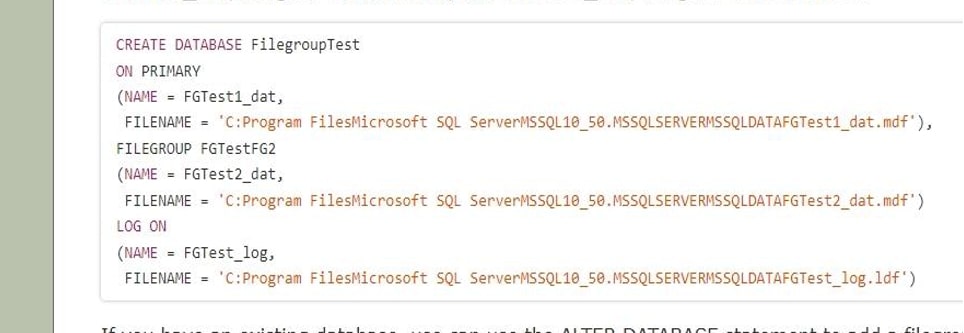
Filegroups 1

If you already have a database, you can add a filegroup with the ALTER DATABASE statement. FGTestFG3 will be added to FilegroupTest.

Filegroups 2

Using sys.filegroups, you can see the filegroups in a database.
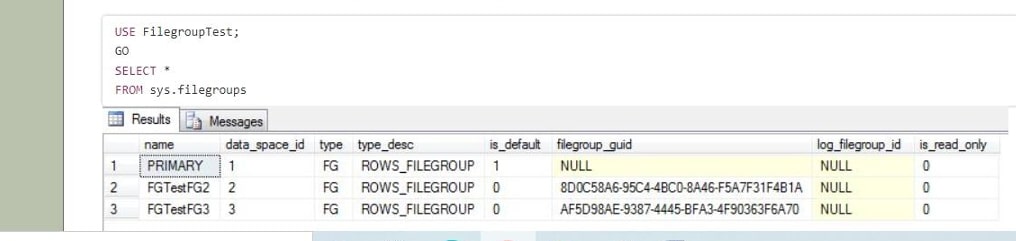
Filegroups 3

you can use ALTER DATABASE to create a new file, FGTest3 dat, and assign it to FGTestFG3.
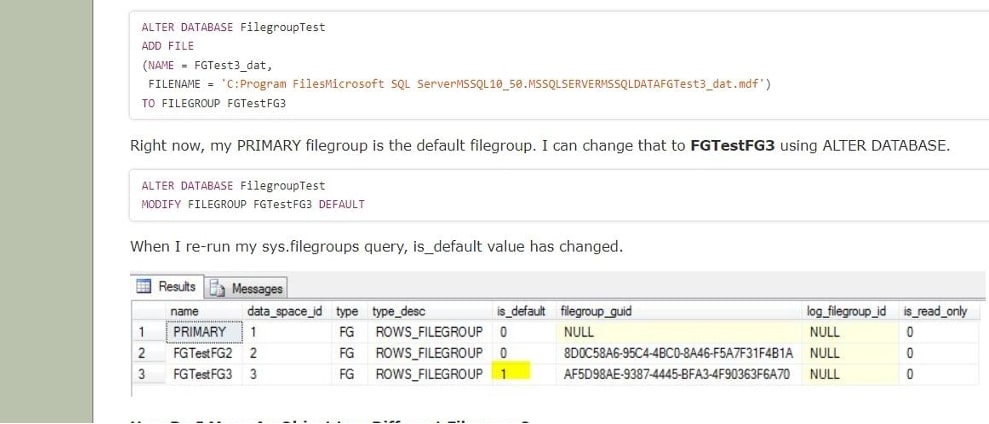
Filegroups 4

Benefits of Using Multiple Filegroups

  • You can take full advantage of the I/O bandwidth for every physical device/path to see you’ve positioned filegroups onto by splitting a database across multiple filegroups. Multiple filegroups on the same physical disc / LUN would provide no benefit, but multiple discs / LUNs can provide you with a multiple of the bandwidth of a single disc / LUN.
  • You can go into great detail, storing parts of the database that are accessed less commonly on slower “nearline” media and maintaining the higher-activity pieces (heavily used indexes, tables, and so on) on the more expensive, faster storage.
  • A decent indexing tactic can enable the ground states to grow while query times remain relatively constant. If you find that the I/O that hosts your filegroups is becoming saturated, you can improve performance by creating additional filegroups on additional discs / LUNs. Monitoring I/O performance is the key to determining if multiple filegroups will benefit you. If you’re CPU-bound or RAM-constrained, multiple filegroups won’t help you. I/O utilization is only one axis of comprehensive performance monitoring, and filegroups only help with that.

Conclusion

Filegroups are really a great way to manage your data while also improving performance and adding disaster recovery. It’s ideal if you can do this during the planning stages, but keep in mind that you can also add filegroups later. Piecemeal restore can be used to restore SQL Server databases with multiple filegroups in stages. The piecemeal restore actually does work in the same way as a standard restore, with three phases: data copy, redo and undo. Whereas your database and other filegroups continue to stay online, you can reinstate one of your filegroups. Please remember that your database ought to be offline when recovering the PRIMARY filegroup.

Author Bio:

I am Sai Priya Ravuri and I’m the content creator at MindMajix Technologies. I hold in-depth knowledge of Programming, Technologies, Business Intelligence, Analytics, Project Management and Methodologies, Business Process Management, Content Management systems, Enterprise Resource Planning, etc.

The post What is Filegroup in Sql Server? When & How to Create? appeared first on The Crazy Programmer.


from The Crazy Programmer https://ift.tt/bDUVBlr
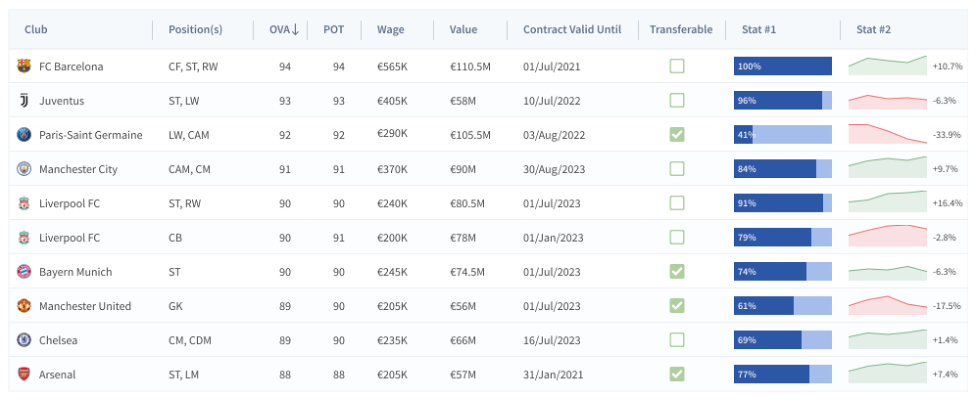
Since its inception in 2002, the developers at FusionCharts have worked hard to secure the computational resources in multi-institutional surroundings for their geographically dispersed users.

The current improvements to their grid security have streamlined the administration and usage of various resources.

More than just increasing the security, the advances have made security simpler for the resource administrators and fusion scientists that use FusionGrid and make them get their work done with the lesser inconvenience.

The fusion scientists welcome enhancements in authorization, authentication, and data handling and assure to ease any burden by adding new and unique resources to a grid.

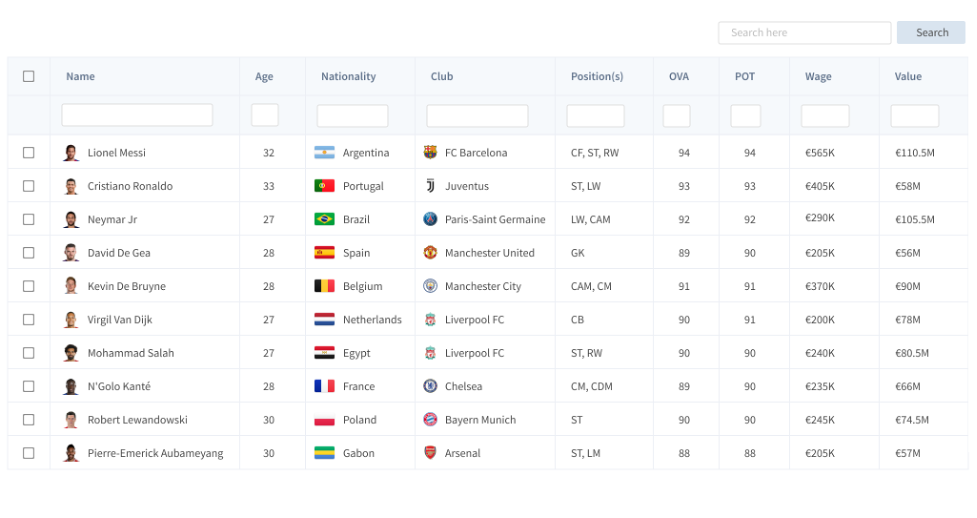
FusionGrid 1

What is FusionCharts?

FusionCharts is a highly-advanced JavaScript charting library, especially for your web & enterprise applications, their products are used by more than 27,000 firms and 750,000+ developers globally. It includes more than 90 charts and 1000+ maps that can transform your data into the most interactive dashboards.

More than 800,000 developers trust FusionCharts programs and apps over 28,000 companies, including Google, Apple, Facebook, Oracle, Microsoft, IBM, Adobe, Caterpillar, Intel, Vanguard, Walmart, and many more.

What is FusionGrid?

FusionGrid is an easy-to-learn, advanced, responsive, mobile-friendly, and rich free and open-source JavaScript grid components library that helps in speeding up the web application development.  It is a customizable JavaScript grid component for mobile and desktop applications.

The idea is to facilitate the implementation of grids with FusionCharts dashboards with powerful features.

This allows you to build the data grids with simplicity and elegance. For customized, responsive, and quick data tables and grids, FusionCharts has come up with their new offering FusionGrid which can render well in almost all browsers, over tablets, desktops, and smartphone devices.

FusionGrid is a licensed product with these options: Basic, Pro, and Enterprise Packages.

Why Choose FusionGrid?

FusionGrid 2

More than 800,000 developers from over 28,000+ companies prefer FusionCharts products over other Open source and paid libraries. Given some top reasons, you must choose FusionGrid:

  • Less learning curve.
  • Amazing performance; draw charts with one million data in just 2 seconds.
  • Simple to integrate with tech stack.
  • Fast and responsive.
  • Negligible maintenance charges.
  • Great customer support.

Top Features of FusionGrid

Editing

FusionGrid has built-in support and in-cell editing. It is easy to customize data stored in the FuisonGrid, like pop-up editors, data validation, and custom editors.

Adaptability

The FusionGrid was developed with smartphone devices in mind.

Thus, it allows you to deliver better user experiences, which adapt to various screen resolutions — from the web to smartphones and tablets.

Column & Layout Customization

FusionGrid comes with fixed column support that helps you improve the data readability.

Additionally, you will have countless runtime layout choices that can reorder, resize, display, and hide individual columns.

Selection

Like Excel, the FusionGrid JavaScript platform allows you to select a wide range of cells on multiple rows & columns. It allows you to modify the selection marquee and set selection by using Selection API.

Mobile Optimized & Touch-friendly

With a highly responsive layout & optimized design for touch screens, desktops, and smartphones, this program works well on almost types of mobile phones using Android, iOS, and Windows 8 OS.

FusionGrid 3

Advanced FusionGrid Features

  • Load millions and millions of records in a second.
  • Mobile design that adapts perfectly to any given resolution.
  • Flexible editing & intuitive recording API selection modes.
  • Advanced Excel-like grouping and filtering options.
  • Endless column customizations & data summaries.
  • Smooth data exporting.

FusionGrid allows you to render grids in modern browsers, over desktops, smartphone devices, and tablets, as given in the table.

Browser

Version

Internet Explorer

11.0+

Firefox

26.0+

Chrome

31.0+

Safari

7.0+

Opera

18.0+

iOS (Safari)

7.1+

Android Browser

4.4+

To learn more about FusionGrid visit its official website here www.fusioncharts.com/fusiongrid.

The post FusionGrid – Javascript Grid Library to Speed Up App Development appeared first on The Crazy Programmer.


from The Crazy Programmer https://ift.tt/aH7e0rb

This is a capability of a computer that it can be attached to another computer and both can work as one single unit. This connectivity is called networking. So, in simple words computer network is a group of at least two and more computers attached in a well-defined manner. This network shares a common communication path for sharing resources like data files.

Types of computer networks are basically depending on the number of computers or devices (like servers), the location of devices along with their respective distance in between. We can term this all as the size of the network. A computer network is mainly of 12 types as given below.

  • WAN (Wide Area Network)
  • MAN (Metropolitan Area Network)

We all are aware of these three but as the result of development in technology now we have more types as given below:

  • PAN (Personal Area Network)
  • Wireless Local Area Network (WLAN)
  • Campus Area Network (CAN)
  • Storage Area Network (SAN)
  • System-Area Network (SAN)
  • Passive Optical Local Area Network (POLAN)
  • Enterprise Private Network (EPN)
  • Virtual Private Network (VPN)
  • Home Area Network (HAN)

Let’s discuss them one by one in detail.

Types of Computer Network

Types of Computer Network

1. Local Area Network (LAN)

  1. It is a network created in a small area such as a building, or office.
  2. Number of devices depends on the network size. It maybe 2 or 2000.
  3. Little costly.
  4. Hardware such as hubs, network adapters, ethernet cables, twisted pairs, coaxial cables, etc. is used.
  5. Provide high bandwidth for a fast transmission rate with high security.
  6. Ethernet and Wi-fi are two famous examples.

2. Wide Area Network (WAN)

  1. This network covers a large geographical area like cities or states. The internet service worldwide is provided with this network with the help of cables, often going through the sea and oceans.
  2. We can also call it a group of lots of LAN or MAN.
  3. It’s not location oriented, geographically it is everywhere. We can add any place in a running WAN.
  4. A Wide Area Network consists of huge amount of telephone lines, fiber optical cables or satellite links.
  5. This network maybe a private or public network. This means if a single organization creates its own WAN, then only the authorities approved by the organization can use this Private WAN.
  6. On the other hand, anyone can access a public WAN. Public WAN are created and provided by telecom or internet service provider on free or chargeable basis.
  7. The Internet itself is an example of WAN.

3. Metropolitan Area Network (MAN)

  1. This network covers a larger geographic area like a city or state sized area.
  2. We can call it a group of lots of LAN.
  3. Bigger than LAN but smaller than WAN.
  4. In MAN, various LANs are connected to each other through telephone exchange lines or fiber, optical cables.
  5. It’s not limited to a building.
  6. Speed of MAN depends on the speed of the attached LAN.

4. Wireless Local Area Network (WLAN)

  1. Wireless LAN is similar as a small size LAN.
  2. Its wireless so the limit is quite wide but when we go far from the source network provider (Router or modem) the speed gets low.
  3. Used in Homes, schools, or small office building.
  4. At least 2 or multiple devices including peripheral devices like smartphones, printers, projectors, and smart assistant devices can be associated.
  5. currently WLAN systems are based on IEEE 802.11 standards.

5. Personal Area Network (PAN)

  1. It is the smallest and most basic network formation.
  2. It covers a very small area (maximum a room or a house).
  3. PAN is user-oriented means a single person can have their own PAN, or members of a home or small business team upto 20-30 members can have their combined PAN.
  4. In today’s time, we use WIFI at our home, through which we and other family members can join our smartphones, laptops, desktop, virtual assistant, and other devices as well.
  5. Bluetooth is a kind of PAN.
  6. PAN has very short-range support maximum upto 10 meters.
  7. It supports limited numbers of devices at once.
  8. The router is connected to the internet with the help of wire or becomes wireless.
  9. The router creates a WIFI environment for hassle free connectivity.
  10. If we connect our devices to each other with cables then it is also considered PAN.
  11. So, a PAN can be wireless or wired.
  12. The maximum hardware used is a router and cables.
  13. Car multimedia connectivity, Bluetooth connectivity, Hotspot connectivity, and WIFI connectivity are counted as PAN.

6. Storage Area Network (SAN)

  1. SAN is also a type of LAN.
  2. A SAN provides access to block-level data storage. Means data can be stored in fix size blocks in storage devices over a network itself.
  3. Mainly used for handling large data transfers and storage.
  4. This network is dedicated to moving larger, more complex storage data to move or being transmitted over a specific predefined path.
  5. It is a high-speed network that connects groups of storage devices to several other servers worldwide.
  6. Instead of using LAN, a SAN moves the storage resources from the network to its own high-powered network configuration.
  7. SAN controls easy retrieval and storage of the data.
  8. SAN also manages the storage space in network as it frees up space and improves the overall performance of the network.

7. Virtual Private Network (VPN)

  1. VPN is like a Private Area Network over a WAN, MAN, or LAN.
  2. It means whenever we use a large internet network, we can run our own small size PAN on this network.
  3. The reason behind using a VPN is to increase security and privacy while accessing any network.
  4. it encrypts our data and hides our identity.
  5. By this we can avoid hacking, cyber threats and attacks.
  6. This is a great option for sending and receiving confidential information.
  7. VPN are virtual means no hardware is used instead some specific types of software are used to create VPN.
  8. VPN runs in sessions. This means once we create a VPN it will exist till we close the session. Once we close the session the VPN got terminated. If we want to start another session then we need to create another VPN.

8. System Area Network (SAN)

  1. A SAN consists of multiple computers or devices and pretends as a single computer.
  2. This group of multiple computers or devices is known as clusters.
  3. It is similar to Storage Area Network, but its support applications as well like server-to-server application and processor-to-processor applications.
  4. This network is useful for processing applications that require high network performance.
  5. It works on the LAN concept.
  6. It provides high-speed connectivity. It handles high amounts of information in large requests generated simultaneously in between the connected devices of the network.

9. Campus Area Network (CAN)

  1. Campus refers to a fixed limited sized geographical area. For example a school or college premises.
  2. CAN is bigger than a LAN but smaller than a MAN.
  3. Multiple routers are used to receive internet and enhance the transmission speed.
  4. A CAN could be spread across several buildings within the campus.
  5. Examples of CAN are networks that cover schools, colleges, buildings, hotels, resorts etc.

10. Passive Optical Local Area Network (POLAN)

  1. A POLAN is a technology that is used to distribute the single LAN signal into multiple small LAN.
  2. It is a point-to-multipoint LAN architecture. It generally uses optical splitters for splitting an optical signal from one strand of single mode optical fiber to multiple signals for serving users and devices.
  3. This means one LAN signal as input and creates multiple Small LAN signals. Example Water Showers used in Bathrooms, where single pipeline connectivity acts as a LAN input and small tiny holes which sprayed water as output acts as a small distributed LAN signal.
  4. Numbers of cables are used to router equal to a required internet connection.

11. Enterprise Private Network (EPN)

  1. This network often consists of WAN or MAN.
  2. It is like a worldwide spread Private Area Network specially designed for an organization.
  3. Such organizations want a secure connection over various locations to share computer resources but in the limit of the organization.

12. Home Area Network (HAN)

  1. Similar a Private area network but covers a home only.
  2. Works on LAN structure.
  3. Limited devices can be attached at once.

Conclusion

A computer network is a group of interconnected computers. Through which we can access the data and resources available on another connected computer. This thing makes the whole world feels like at our doorstep. One can use the network for online data transmission, video sessions and virtual meetings, learning, etc. Each network type has its own configuration, requirements, and usefulness along with its limits. One can choose the best suitable model from the above mentioned.

The computer itself is a good smart device but single or offline computer offer very less utilization. A network of computers also called as the Internet gives the computer its actual strength and 100 percent utilization. So, it’s good to use the network facility per your own requirement.

The post 12 Different Types of Computer Network appeared first on The Crazy Programmer.


from The Crazy Programmer https://ift.tt/djvNap4

According to the Statista study, Python was the most used programming language in the whole world in 2021. Almost half of the responders admit its popularity keeps growing. So it’s no surprise that developers want to improve their skills and complete Python projects successfully.

As a hard-working programmer, you want to do your job like a pro. It means completing projects fast and avoiding common mistakes. If you desire to reach such a goal and enhance your performance then you need to take into account top Python web frameworks. Thanks to such a collection of modules, professional property management software development can automate the execution of certain tasks. As a result, they get an opportunity to clear their schedule from routine actions and focus on truly important tasks.

Popular Python Frameworks to Use

Top 5 Python Frameworks You Must Know in 2022

In short, a framework is a collection of packages to use during the app developing process. Every framework contains several Python web library options. Wise programmers understand the importance of such tools and try to extend their skills by learning more frameworks. Such an approach helps them to make workflow simpler and more efficient.

As you can see, frameworks are extremely useful in the Python programming language. On the one hand, a developer gets an opportunity to simplify the working process. Python frameworks are much more beneficial compared to libraries as well.

On the other hand, such an approach excluded an issue when another developer can’t work with an app made by another developer. If a programmer knows the exact framework then he is able to continue the work that was started by someone else.

Overall, there are many types of frameworks you may be interested in. Here are 3 major categories for developers: 

  • full-stack framework. Such tools are quite complex but allow using comprehensive solutions in programming;
  • micro framework Python. These options are much easier in usage so a developer gets simpler features;
  • Python asyncio web framework. By using this tool an expert will be able to launch concurrent connections in large quantities.

So by developing your skills and knowledge in this field, you level up your perspectives with this programming language. So let’s mention and explain several top Python frameworks that are essential for decent developers.

Django

Django belongs to full-stack frameworks and is known as a highly demanded tool among Python developers. It is based on the idea of not repeating the same things, so-called a “DRY” position (Don’t repeat yourself). Using Django, a programmer has access to Oracle, SQLite, MySQL, and other libraries. Thanks to this, you can change databases during your work.

The huge popularity of this framework is caused by its particularities. For instance, the key benefit is a strong focus on security. Django is known as the most reliable and secure solution among many Python frameworks. In addition, it follows an architecture called MVC-MVT, which has authentication support, URL routing, and other important features.

Flask

Flask is a very lightweight and adaptive framework. It belongs to the category of micro frameworks so isn’t as functional and featured as Django. But programmers often use it because in this case, they are capable of developing decent software basics without facing common issues. After this, you can use extensions and improve your app.

Flask is a very demanding Python API framework because of its significant features. It is Unicode-based and has an opportunity to plug in any object-relational mapping. Developers highly anticipate the in-built server and debugger, unit testing, cookies support, and so on.

Bottle

This is another Python framework that belongs to the micro category. It is a perfect choice for prototyping because Bottle has got more than 73 updates in the past years. Programmers can find support and discuss issues at the Bottle community and specific forums.

The very important particularity of Bottle you must mention is its limits. You can use it to develop a Python based web application with a shortcode. It means your code can contain up to 500 lines and no more. Also, this is a great tool for software that isn’t required to have many features.

Tornado

This is one of the most popular asynchronous frameworks. Its specialization is to help developers focus on speed and huge traffic. It makes this Python framework highly anticipated for developing applications for big audiences. Experts say that software developed with Tornado can handle approximately 10 thousand connections.

Among the most important features of Tornado are real-time servers, an ability to process huge amounts of concurrent connections, non-blocking HTTP client, featured options, etc. Nowadays this framework is as popular as Django and Flask. It is more complicated but allows you to achieve better app performance.

CherryPy

CherryPy is quite an old, open-source, minimalistic framework. No one can call it the fastest Python web framework but it is still popular among programmers. What is more important – it can work with different extensions and includes opportunities for using them. By having its own server, CherryPy becomes more featured in the end. 

For instance, it’s great that you can create an application compatible with any operating system. CherryPy software supports Linux, Windows, macOS, etc. At the same time, experts say that this tool may be improved and be easier to use. 

Final Thoughts

Actually, the number of decent and useful Python frameworks is much bigger. There are many other options to try to improve your work and final results. The listed above examples are very popular and well-known among most developers.

Experts say that beginners in Python should pay extra attention to Django and Flask. Both tools are simple and bring programmers useful benefits. Step by step, you can master more tools in programming and level up your professionalism. While you are growing as an expert in programming, you will learn more frameworks to create better Python web apps.

Anyway, there are many other tools beyond this list you need to know. Just begin to improve your skills and keep evolving your profession in the future!

The post Top 5 Python Frameworks You Must Know in 2022 appeared first on The Crazy Programmer.


from The Crazy Programmer https://ift.tt/Gi5Mn0b

With an increasing demand for software engineers and programmers comes to demand to get educated in this programming field. Hence, many different platforms have actually surfaced that have helped coders and programmers to reach their goals as well as maximize their abilities.

In this post, we are going to look at two platforms Codecademy vs freeCodeCamp, and study some special features of both to reach a strong conclusion about which appears to be the right choice to use.

What is freeCodeCamp?

freeCodeCamp

freeCodeCamp is a donor-supported, nonprofit organization that includes an interactive online learning platform, a community forum, Medium publications, chat rooms, and organizations that help to make online learning accessible to anybody. Their primary goal is to help people to learn code for free. And they achieve it through articles, videos, lessons, and study groups across the world.

  • Front-End Development: Suppose your primary goal is creating the browser-based system, then freeCodeCamp provides the program for educating their users in the front-end development. The front-end developers have to handle web browsers & often interact with their user base and client, which results in the long-term project.
  • Programming Languages: An important lesson for aspiring developers and programmers, freeCodeCamp has got lessons in coding languages important to create proper functioning programs. Courses available at freeCodeCamp include Cascading Style Sheets, Hypertext Markup Language, JavaScript and Python.
  • API: freeCodeCamp offers an application programming interface or API certification. The application programming interface is an intermediary course that allows 2 different apps to communicate with each other for better and concurrent use.
  • Data Visualization: Writing a code is one of the important skills to learn and freeCodeCamp gives you an option of expanding important skills & delve into some interdisciplinary skills. Through the data visualization, developers and programmers will be able to learn and create graphical representations of the code for presenting it to prospective customers and clients.

freeCodeCamp provides various certifications courses that are geared towards software and web development. This allows a huge deal of freedom for developers and programmers by letting you experiment with various coding skills without taking any help.

freeCodeCamp Pros:

  • Get certifications 
  • Get experience in coding for the non-profits
  • Free to use

freeCodeCamp Cons:

  • Learning material isn’t in-depth
  • The offline version is not available

What is Codecademy?

Codecademy

Codecademy is an interactive online platform that provides coding classes for free in 12 programming languages. Codecademy can be a perfect platform for you. It provides various courses in different programming languages and subject areas. Most of the courses are for beginners and has had more than 45k users that have enrolled in their courses & paths.

  • Web Development: Codecademy has got lesson plans that are geared toward teaching a professional programmer and developer with a long-term goal to generate the front-end application.
  • Programming Languages Offered: Codecademy instructs students who have enrolled in their program to learn CSS, HTML, JavaScript and Python. But, it is worth noting that Codecademy provides lessons in Structured Query Language, C++, PHP, and many coding languages not easily available in the freeCodeCamp’s curriculum.
  • Developer Tools: Codecademy provides a course highly dedicated to educating developers in using toolkits while writing code. Just building a little familiarity with the tools, simplifies creating code functioning.
  • Data Science and Machine Learning: Codecademy provides the course focusing mainly on data science and focuses on comprehension and interpretation of code whereas teaching the related hardware to make some informed judgments from the data. This is a professional course geared toward the development of smart programs.

Codecademy offers some necessary curricula for teaching the next generation of web developers and programmers. But, it provides many other courses that focus on software and hardware simultaneously, designing smart machines being an important example.

Codecademy Pros:

  • Share repositories to GitHub.
  • Active forums
  • Has professional advisors to help the students in their learning process

Codecademy Cons:

  • Courses are under paywall – over $20 /month
  • No certifications given

Who Are These Courses Made For?

freeCodeCamp and Codecademy both are online platforms to learn and execute code right from beginners to advanced who wish to expand their learning skills. No matter whether you want to learn game development, web development, programming and data science, or Computer Science, you will not be limited here. For beginners who do not have any budget set aside, both these platforms have the right course for you too. Try it now!

Best Platform For Beginners

With a wide range of information about the comprehensiveness of lesson plans that are offered by both Codecademy and freeCodeCamp, it is tough to decide which is the right choice for beginners.

freeCodeCamp provides an interactive and intensive lesson program that offers prospective developers an ability to try coding & make their mistakes when offering the advanced and comprehensive curriculum. It makes the freeCodeCamp course the best selection for people who are looking to improve their skills and get a deeper knowledge of this coding world. Unluckily, it will be very confusing and intimidating to those without any cursory knowledge of web development and programming.

Codecademy vs freeCodeCamp

Codecademy freeCodeCamp
Codecademy offers less detailed lesson plan freeCodeCamp offers intensive lesson plan
Codecademy offers lessons in tier system, Basic Tier, Pro tier, and Team tier. freeCodeCamp offers curriculum for free
Codecademy lesson plans can be shorter or longer freeCodeCamp course consists of 300-hour curriculum
CodeCademy has a higher paywall freeCodeCamp is a free & open source platform
No certifications available Certifications available

Final Thoughts

Both CodeCademy & freeCodeCamp are amazing platforms that you may leverage and kickstart your programming career. freeCodeCamp is totally free whereas CodeCademy has got the subscription service, which is a bit costly but again it is worth paying if you want it that way. However, paid service proves much better than the free service. In such a case, we can’t confirm otherwise. CodeCademy has in-depth teaching about the courses. Also, CodeCademy’s premium members will get feedback from the experts on the projects that makes the learning experience feel better.

The post Codecademy vs freeCodeCamp 2022 – Which is Better? appeared first on The Crazy Programmer.


from The Crazy Programmer https://ift.tt/3IfaqN6

Data Science has become quite an attractive field today. Not just is it very profitable, but it also provides huge utility to many other fields. Besides, data science can also be used to predict possibilities, determine new trends, prescribe behaviour, and make any predictions based on hidden patterns.

Among researchers and students, there is huge interest in the field, for this reason, so many courses are available online. Thus, in this post, we will check out the difference between Datacamp and Dataquest, these are two solid choices for data science. Now, let us compare to check out which is a better learning platform for you.

Dataquest vs Datacamp is self-learning data science class, which run on monthly and yearly subscriptions. Their courses are entirely delivered on the internet platform. Both the schools provide multiple career tracks that include a focus on Python or R and portfolio projects. Suppose you complete your course completely, then the tracks take students to complete the beginner’s course to Data Scientist or Data Analyst. But, the question is which is the best school to choose –Datacamp or Dataquest? Let us break down how Datacamp and Dataquest compare to one another in the terms of curriculum, career focus, learning style, and cost.

What is Dataquest?

dataquest

Dataquest is a self-paced learning course providing 24-week online data science courses for aspiring data scientists and data analysts. Dataquest mainly focuses on R and Python with a bit more emphasis on the data analysis.

Being an online learning resource, Dataquest is dedicated to teaching candidates data science. This has different skill and career paths, letting you choose the learning plan that is modified to your individual requirements.

An objective of this online platform is to offer you with best learning resources and tools that are equipped with some helpful information, which can give you the skills you need to become a professional in data science.

Courses Offered

Dataquest provides a wide range of courses, and some of them are focused on:

  • Python
  • R
  • Git
  • SQL
  • Kaggle
  • Machine Learning

You have access to specific paths. Dataquest provides these 4:

  • Data Analyst (Python)
  • Data Analyst (R)
  • Data Engineer
  • Data Scientist (Python)

Dataquest has got the benefit of offering several courses all along with the hands-on approach for ensuring students know what they are learning. With Dataquest, one biggest priority is the application, thus there are various opportunities you can apply what you have learned. They offer office hours so that you will reach out to the data scientists for any kind of help, and be an important part of the active Slack community.

Make a note that the beginner courses are offered for free, however, Dataquest has got two paid plans. Their first deal is around $29 per month, and the second one is $49 per month.

Dataquest Pros

  • Best-quality content
  • Great for beginners
  • Convenient interface for the practice
  • Possibility to switch from a particular course 
  • Active and large community

Dataquest Cons

  • Less content 
  • A bit expensive 
  • System bugs
  • Might not be very good for the middle and advanced users

What is DataCamp?

datacamp

Just like Dataquest, DataCamp is the self-learning online platform made to teach various data skills and provides you with a wide range of skills and career paths. But, on DataCamp, the paths are known as tracks. This platform has video tutorials, more than 50 curated learning paths, as well as real-life projects that offer better knowledge and understanding.

DataCamp begins courses with the instructional video explaining in detail the concepts you will use in an accompanying exercise. Additionally, DataCamp instructors are experts in the field and educators at the master’s or PhD level. With an exciting pedigree of instructors, DataCamp can be the best choice for you if you are more of a visual learner.

Courses Offered

Available courses cover the following disciplines:

  • SQL
  • R
  • Python
  • Shell
  • Spreadsheets
  • Git

Their R courses are highly detailed and comprehensive, offering you access to everything that you will need to know, though for the SQL there is just an introductory one, and a highly desired one. With Datacamp school, you can use career tracks. They are specifically designed syllabuses to accommodate users with specific goals. At present, there are seven available paths:

  • Data Scientist (R)
  • R Programmer
  • Quantitative Analyst (R)
  • Data Analyst (R)
  • Data Analyst (Python)
  • Data Scientist (Python)
  • Python Programmer

Datacamp Pros

  • Better content 
  • Constant updates of their content
  • Can switch from one course to another like SQL to Python
  • Higher projects 
  • Convenient interface for practice and no special program is required
  • Great for beginners
  • Free plan accessible & cheaper premium plan
  • Active and large community

Datacamp Cons

  • Might not be very good for middle and advanced users
  • Customer support isn’t helpful

Dataquest vs Datacamp

Dataquest Datacamp
Languages supported 2: Python, R Languages supported 3: Python, R, SQL
Text-based Video-based
Dataquest focuses on basic graphs DataCamp moves on complex graph types
Dataquest offers active Slack community Datacamp has a community page, and Slack chat comes with paid plans
Dataquest prepares their students for career change Datacamp offers upskilling & career tracks
Dataquest teaches autonomy while pointing students to documentation and concepts Datacamp’s curriculum has short video lessons & tutorials, later moving to project work

Signing up with the Datacamp is very rewarding as all their lessons are made to be very simple and interactive. Videos are provided that will help you know more easily. The video lectures are not very long. They’re relevant and short to their given exercise. Every lesson has got intuitive examples that are incorporated to deepen your knowledge. Their $29 price point makes it quite an affordable choice.

However, there is a problem that you must know about: there is not much additional assistance beyond what’s offered in a lesson. Datacamp’s assignments are not open-ended which means there is no incentive to devise any creative solutions.

The post Dataquest vs DataCamp 2022 – Which is Better? appeared first on The Crazy Programmer.


from The Crazy Programmer https://ift.tt/oSz7lgT

Suppose you call your friend for some help and at that time he is busy with some work. He told you that he will callback you after some time. This process is called callback and when it comes to programming, the process of calling back a function from another function is called callback.

To understand this let us suppose there is a function A doing some work, and there is a function B doing some other work. When we call function A in our main code and in function A we also called function B then it is called callback function because here function A is calling function B in its code.

Calling of function from a function is done by using function pointers. Function pointers are pointers that hold the address of execution of another function.

We will see some examples to better understand this.

Example 1:

#include <stdio.h>
#include <stdlib.h>

// Function 1
void func1 () {
    printf("I am in function 1\n") ;
}

// Function 2
void func2(void (*fptr) ()) {
    printf("I am in Function 2\n") ;
    fptr() ;  // Callback function 
    printf("I am again in Function 2\n") ;
}

int main() {

    // Declare a function pointer
    void (*ptr) ;

    // Assign func1 to ptr
    ptr = func1 ;

    // call the func2
    func2(ptr) ;
    return 0 ;
}

Output:

PS C : \ Users \ ASUS \ Desktop \ Crazy Programmer Work > cd " c : \ Users \ ASUS \ Desktop \ Crazy Programmer Work \ " ; if ( $? ) { gcc test.c -o test } ; if ($?) { . \ test }
I am in Function 2
I am in function 1
I am again in Function 2

Here we can see that in function 2, first we are printing some statements and then we are calling function 1 in it. This process is called the callback function where an existing function calls another function in it. We can see that after function 1 is executed, execution control again comes to function 2 and executes all the remaining statements in function 2.

We can use callback methods for writing some efficient programs.

Now let’s see another example where we are going to see some functions and how we are calling another function in that function and we will see how the callback method helps us in writing a smaller number of codes for the same problem statements.

Example 2:

#include <stdio.h>
#include <stdlib.h>

// Function to return the sum of 2 numbers
int sum(int a, int b) {
    return a + b ;
}

// function to greet hello to user and call the sum function to 
// print the sum of two numbers. It implements the callback method.
void greetHello(int (*fptr) (int, int)) {
    printf("Hello from Crazy Programmer\n") ;
    printf("Sum of 7 and 5 is %d\n", fptr(5, 7)) ;
}

// Function to greet Good morning to user and call the sum function
// to print the sum of 2 number. It implements the callback method.
void greetUser(int (*fptr) (int, int)) {
    printf("Good Morning from Crazy Programmer\n") ;
    printf("Sum of 7 and 5 is %d\n", fptr(5, 7)) ; 
}

// main function
int main() {

    // Declare a function pointer to store the address of another function
    int (*ptr)(int, int) ;
    // assign sum function to function pointer
    ptr = sum ;

    // call the greethello function and pass ptr as argument in it.
    greetHello(ptr) ;
    printf("\n") ;
    // call the greetUser function and pass ptr as argument in it.
    greetUser(ptr) ;
    return 0 ;
}

Output:

PS C : \ Users \ ASUS \ Desktop \ Crazy Programmer Work > cd " c : \ Users \ ASUS \ Desktop \ Crazy Programmer Work \ " ; if ( $? ) { gcc test.c -o test } ; if ($?) { . \ test }
Hello from Crazy Programmer
Sum of 7 and 5 is 12

Good Morning from Crazy Programmer
Sum of 7 and 5 is 12

In this example, we can see that we have used 3 functions to demonstrate to working of callback method. In function greethello we can see that we have called the sum function to print the sum of 2 numbers.

In greetUser function, we are calling the sum function to print the sum of 2 numbers.

In both of the functions, we are demonstrating the callback method.

Let’s suppose that you want to implement a feature in which a function greet hello and print the sum of 2 numbers to any user and in another scenario a function greet good morning and print the sum of 2 numbers to the user.

Generally, to implement the above scenario we have to write 2 different functions. Both of the function contains some code that will be similar in it. To overcome this problem, we are using callback function so that no function contains duplicate code. And the implementation can be seen from the above example.

Conclusion

Callback function in c programming means that we want to call a different function from another function. This will help us to write clean and non-duplicate code. The callback method is very useful when we want to use a function in another function and avoid the rewriting of the same function.

The post Callback Function in C appeared first on The Crazy Programmer.


from The Crazy Programmer https://ift.tt/QS4ALue

ETL (Extract, Transform and Load) pipeline process is an automated development. It takes raw data files from multiple sources, extracts information useful for analysis, transforms it into file formats that can serve business analytics or statistical research needs, and loads it into a targeted data repository.

ETL pipelines are designed to optimize and streamline data collection from more than a  source and reduce the time used to analyze data. They are also designed to convert these data into useful formats before transferring them to a targeted system for maximal utilization.

Regardless of the efficiencies ETL pipelines offer, the whole purpose is lost if they cannot be built quickly and subtly. This article gives a quick guide on the necessary steps needed to build an ETL pipeline process.

Building an ETL Pipeline Process

ETL Pipeline Process

When you build an ETL pipeline, the process must be in the ETL order, i.e.

Extraction is the act of extracting data from a data pool, such as an open-source target website.

Transformation is a stage where extracted data collected in multiple formats is structured into a unique format and then transferred to a target system.

Loading is the final stage where data is uploaded to a database to be analyzed to generate an actionable output.

The ETL pipeline process is all about data extraction, copying, filtering, transforming, and loading. But when building the process, we must go through some essential details, which are as follows:

Create and Copy Reference Data

Having available raw data at your disposal can aid your vast data sourcing and solve problems in a shorter time. But if raw data is not available, you will have to create a set of data called your ‘reference data’, including a set of restricted values that your data may contain. For example, in a geographic data field, as you will specify the countries allowed, copy those data as raw records to work on while keeping the source/reference data.   

Dedicate Specific Connectors and Extract Data from Available Sources

Distinct tools that establish the connection are required for data extraction from sources. Data can be stored using file formats like JSON, CSV, XML, API, etc. To systematize processing correctly, you must extract it all from a range of relational/non-relational database file format sources and convert it to a specific format to succeed in the ETL pipeline building process.

Cross-check and Filter Data

Keep relevant data and discard data that exceeds the required data range. Analyze rejected data to identify causes for rejection and make necessary adjustments to source data. For example, if you need data from the past 12 months and reject data older than 12 months to validate data, filter data by extracting off inaccurate records and null columns, etc.

Data Transformation

Data transformation is the most crucial part of the ETL pipeline process, especially when it is not automatic. The transformation process entails translating data into the desired form according to individual data use. Data must be cleansed of duplicates, checked for integrity of data standards, aggregated data, and made ready for use. Also, functions can be programmed to facilitate automation during data transformation. 

Stage and Store the Transformed Data

Though It is not recommended to load transformed data into target systems directly for storage or use, instead, take the necessary step of data staging. The staging level is where data diagnostics reports are generated, and data is enabled for easy data recall in case of any havoc or malfunction. When that data is ready, it can be transferred to a target database.  

Sequential Data Scheduling

Scheduling is the final stage of the ETL pipeline building process. For effective automation, it is crucial to schedule the data sequentially to load monthly, weekly, daily, or any custom time range. The data loading schedules can include a sequential time stamp to determine the load date quickly for record purposes. For efficient task automation, scheduling should be done to avoid performance and memory issues.  

Conclusion

In building an effective ETL pipeline process, there is more than one method (batch processing and real-time stream processing) and data integration software that can be used. Whichever method you choose, building the ETL pipeline process in the above-listed order is the way to guarantee a successful operation.

The post Quick Guide to Building an ETL Pipeline Process appeared first on The Crazy Programmer.


from The Crazy Programmer https://ift.tt/myVFaSg

Since 2015, the Software as a Service (SaaS) industry has grown to an estimated value of $31.5 billion. In 2022, it is expected to grow by up to $171.9 billion, according to the research. This means more companies are building SaaS products. After all, cloud computing makes SaaS products cost-efficient, scalable, and reliable. Are you looking to create Software as a Service (SaaS) products for your company? Then, this blog is for you. Read on.

What is a SaaS Application?

How to Build a SaaS Product from Scratch

A SaaS application refers to a software licensed Software as a Service application. Using the SaaS approach, companies can market their applications as a service where customers can subscribe. These services are hosted with the help of the cloud, which means the application or customer data doesn’t have to be physically installed on the computer. 

Here are some key benefits of SaaS applications:

  • There is no need to buy expensive hardware, which makes it very cost-efficient.
  • SaaS applications can be upgraded or even downgraded, making SaaS applications scalable.
  • Cloud service providers ensure customers’ data is stored in a safe and secure place using encryption strategies.
  • Since the cloud is a network of various servers, even if one server goes down, the app won’t shut down. 

Here are some more benefits of SaaS architecture for companies and developers:

  • Lower up-front costs mean developers can attract a large customer base.
  • As potential customers subscribe to the product regularly, developers can make consistent revenue. 
  • Companies can offer a trial period, allowing customers to identify if the application can fulfill their needs. 
  • Users can get new features and updates without purchasing new versions of the applications.

Tips for Building SaaS Products Efficiently

A SaaS application allows service developers to gain a stable source of income through user subscriptions, which allow them to regularly update their applications. But this doesn’t mean customers will be willing to subscribe to any SaaS product. 

Some products might be able to cater to only a specific group of consumers, such as industry professionals. Other products might have subscription-free alternatives. 

This is why many companies wonder how to build a SaaS product that not only operates well but also fulfills its purpose. Are you also wondering how to make Software as a Service product and tap into cloud technology? Below you will find some tips for building result-driven cloud-based applications:

1. Offer a Service that Your Customers Want

With so many SaaS products available in the market, customers simply won’t sign up for every application. This is why companies should identify what their customers want and optimize their service accordingly. 

For instance, if a customer wants to edit an Instagram image, they won’t subscribe to an application because they might only want to do it one time. Plus, there are many free online tools that offer the same service.

But if a customer wants to edit a video using complicated tools as part of their job, they would be willing to make monthly payments for a SaaS product. 

This shows that a SaaS business model works best when the application:

  • Help customers save money
  • Provide recurring services
  • Supports a larger user base

2. Do Market Research

You might have a revolutionary idea, but it is possible someone else has already worked upon it. Instead of getting swept up in the SaaS hype, you should conduct market research and identify your competitors to ensure your service is unique and innovative. 

Are your competitors wondering how to develop SaaS product? Are they providing exactly the same services as you want to offer? Your product can only stand out in the market if it offers far more benefits than those offered by your competitors. 

3. Choose the Right Technology Stack

Obviously, you can’t ignore the technical steps for developing a SaaS product. And the first step to building a Saas product is to select a technology stack to run the web app. To do this, you will need various tools for the front-end application, such as JavaScript or HTML. For the server-side, your team will have to employ programming languages like PHP, JavaScript, or Ruby. 

A SaaS product is incomplete without a proper database. You can choose either MySQL or PostgreSQL as your back-end storage. Finally, you will have to choose a server for your application, such as Nginx or Apache. Your choices will depend upon your product’s scalability, potential profits, and costs. 

Final Takeaway

By relying on cloud applications and building SaaS products, many companies have managed to grow significantly. However, before developing the product, you should conduct all the required research, test the product, and ensure it is profitable in the long run.  

The post Tips for Building SaaS Products Efficiently appeared first on The Crazy Programmer.


from The Crazy Programmer https://ift.tt/VaRfSAC

In python, we can have many types of errors in our code. One of the most common errors is TypeError: list indices must be integers or slices, not str. In this article, we are going to see what causes this error and how can we fix this error.

This error mostly comes when we are working with lists in python. Whether we are printing the contents of a list or modifying any value at a particular position in the list. In this article, we will discuss some points to remember when working with lists so that the probability of occurring these types of errors will be much less.

Case 1:

# Declare a List
l1 = [10, 20, 30, 40, 50]

# Get Index input from User
index = input("Enter the Index at which you want to change value: ")

# Get the number from user
number = int(input("Enter the final value you want in list : "))

# Update the value in list
l1[index] = number

# Print the list after updation
print(f"Updated list is : {l1}")

Output:

PS C : \ Users \ ASUS \ Desktop \ Crazy Programmer Work > python -u " c : \ Users \ ASUS \ Desktop \ Crazy Programmer Work \ test.py "
Enter the Index at which you want to change value: 3
Enter the final value you want in list : 76
Traceback (most recent call last):
  File "c : \ Users \ ASUS \ Desktop \ Crazy Programmer Work \ test.py ", line 13, in <module>
    l1[index] = number
TypeError: list indices must be integers or slices, not str

In the above example, we have initialized a list of five numbers and we want to change the value of a particular index. We get out the index and value entered by the user and in the last operation, we are going to print the updated list. When we run the code and enter the respective value then we are getting the error. It states that the list indices must be integers or slices, not str it means that the index value we have passed in our code should be an integer.

We often make this mistake because we all know that the input function takes input as a string and if we want to use it as an integer then we have to convert it into an integer first, then we can use the index value and we will be able to perform our operation successfully.

Solution:

# Declare a List
l1 = [10, 20, 30, 40, 50]

# Get Index input from User and convert it to integer
index = int(input("Enter the Index at which you want to change value: "))

# Get the number from user
number = int(input("Enter the final value you want in list : "))

# Update the value in list
l1[index] = number

# Print the list after updation
print(f"Updated list is : {l1}")

Output:

PS C : \ Users \ ASUS \ Desktop \ Crazy Programmer Work > python -u " c : \ Users \ ASUS \ Desktop \ Crazy Programmer Work \ test.py "
Enter the Index at which you want to change value: 3
Enter the final value you want in list : 76
Updated list is : [10, 20, 30, 76, 50]

As we can see that after converting the index value into an integer, we are successfully able to perform the desired operation. We can see that the value at 4th index has been changed to 76.

Case 2:

We are given with a list of words and we want to create a new string with all the words from the list and create a proper sentence and then print it.

# initialise a list of words
list1 = ["This", "article", "is", "written", "by", "crazy", "programmer"]

# initialise an empty string
new_string = ""

# initialist index with 0
index = 0

# run a loop through the list and add all the words in a string
while index < len(list1):
    new_string = new_string + " " + list1[new_string]
    index = index + 1

# print the new combined words
print(new_string)

When we run our code then we will get some error.

Output:

PS C : \ Users \ ASUS \ Desktop \ Crazy Programmer Work > python -u " c : \ Users \ ASUS \ Desktop \ Crazy Programmer Work \ test.py "
Traceback (most recent call last):
  File "c : \ Users \ ASUS \ Desktop \ Crazy Programmer Work \ test.py ", line 70, in <module>
    new_string = new_string + " " + list1[new_string]
TypeError: list indices must be integers or slices, not str

Here the same error occurred. It means we have to re examine the index value passed to the list in our program. We have to make sure that the index value should be in an integer only, to run our code perfectly. In line 70 we can see that the index we have passed to our list is a string. At this point, many programmers does not realize the mistake in the code and they spend 1 to 2 hours in debugging it. In our program, we know that new_string is a string so we cannot pass it as an index. We have identified the error.

Solution:

# initialize a list of words
list1 = ["This", "article", "is", "written", "by", "crazy", "programmer"]

# Initialize an empty string
new_string = ""

# initialize index with 0
index = 0

# run a loop through the list and add all the words in a string
while index < len(list1):
    new_string = new_string + " " + list1[index]
    index = index + 1

# print the new combined words
print(new_string)

Output:

PS C : \ Users \ ASUS \ Desktop \ Crazy Programmer Work > python -u " c : \ Users \ ASUS \ Desktop \ Crazy Programmer Work \ test.py "
 This article is written by crazy programmer

We can see that our program is running successfully. We have fixed our code.

Conclusion

Whenever we see that error named TypeError: list indices must be integers or slices, not str. Then without making any changes in the code, firstly we have to figure out the uses of lists in our program, after that, we have to figure out where we are going to print the content of the lists or we are going to make any changes in the list.

If either of the cases is happening we have to check whether the index value passed in the list is an integer or not. It will give the error when the index value passed in the list is a string type. So we have to check it and fix it if it is not integer type.

The post Solve TypeError: list indices must be integers or slices, not str in Python appeared first on The Crazy Programmer.


from The Crazy Programmer https://ift.tt/oZNjmXW

In any programming language loops play an important role in building our logic and successfully implementing it. In this article, we are going to see nested for loop in C++.

Nested for loop means a for loop inside another for loop. Let’s see the syntax first and after that, we will some examples.

Syntax:

for ( size_t i = 0; i < count; i++ )
    {
        for ( size_t i = 0; i < count ; i++ )
        {
            /* code */
        }
    }

Here we can see the syntax of nested for loop. We can modify the inner contents as per our wish but the main structure of the for loop should remain the same.

Let’s see some examples of nested for loop.

Example 1:

In the first example, we are going to print a 5 x 4 matrix using a nested for loop, which we often see in mathematics.

#include <iostream>
using namespace std; 

int main(){

    int n = 5;
    int m = 4;

    for (int i = 0; i < n; i++){       // printing the row
        for (int j = 0; j < m; j++)    // printing the column
        {
            cout << j << " ";
        }
        cout << endl;

    }
    return 0;
}

Output:

PS C : \ Users \ ASUS \ Desktop \ Crazy Programmer Work > cd " c : \ Users \ ASUS \ Desktop \ Crazy Programmer Work \ "  ; if ($?) { g++ test.cpp -o test } ; if ($?) { . \ test }
0 1 2 3
0 1 2 3
0 1 2 3
0 1 2 3
0 1 2 3

Example 2:

In this example, we will be going to see how to take inputs using nested for loops and we will store the inputs in 2 dimension arrays. After that, we will print the 2 dimension array using nested for loop.

#include <iostream>
using namespace std;

int main(){

    int row = 3;
    int col = 3;
    int arr[3][3];
    int num;

    // Taking matrix input
    cout << "Enter Matrix Elements" << endl;
    for (int i = 0; i < row; i++){
        for (int j = 0; j < col; j++){
            cin >> num;
            arr[i][j] = num;
        }
    }

    // Printing the matrix
    cout << "Printing the Matrix : " << endl;
    for (int i = 0; i < row; i++){         // printing the row
        for (int j = 0; j < col; j++){     // printing the column
            cout << arr[i][j] << " ";
        }
        cout << endl;
    }
    return 0;
}

Output:

PS C : \ Users \ ASUS \ Desktop \ Crazy Programmer Work > cd " c : \ Users \ ASUS \ Desktop \ Crazy Programmer Work \ "  ; if ($?) { g++ test.cpp -o test } ; if ($?) { . \ test }
Enter Matrix Elements
1 2 3
4 5 6
7 8 9
Printing the Matrix :
1 2 3
4 5 6
7 8 9

We can take inputs for any matrix using nested for loop. It helps us to easily demonstrate the internal working of how input is taken and stored in the array.

We can also write any conditions in the nested for loop, for example, let’s suppose we want to print only even numbers from the matrix or we want to print only odd numbers from the matrix.

We can also use break and continue statements in our nested loop.

If the break statement is in the inner for loop then it only stops the execution for the inner for loop. It will not affect the outer for loop.

The same happens with the continue statement also, if we have used the continue statement in the inner for loop then it only affects the inner loop, it has nothing to do with the outer for loop.

Example 3:

In this example we are going to see the use of break statement and continue statement in nested for loop.

Let’s suppose we want that while printing the array, if a number is negative then our loop stops and if a number is 0 then our loop excludes the number while printing.

Make sure to see the serial wise execution of the program, because in this example we are going to see the use of break and continue statements simultaneously.

#include <iostream>
using namespace std;

int main(){

    int row = 3;
    int col = 3;
    int arr[3][3];
    int num;

    // Taking matrix input
    cout << "Enter Matrix Elements" << endl;
    for (int i = 0; i < row; i++){
        for (int j = 0; j < col; j++){
            cin >> num;
            arr[i][j] = num;
        }
    }

    // Printing the matrix
    cout << "Printing the Matrix : " << endl;
    for (int i = 0; i < row; i++){   // printing the row
        for (int j = 0; j < col; j++){   // printing the column
            // break the loop if a number is negative
            if (arr[i][j] < 0)
                {
                break;
            }
            // Do not print the element if it is 0
            if (arr[i][j] == 0)
                {
                continue;
            }
            cout << arr[i][j] << " ";
        }
        cout << endl;
    }
    return 0;
}

Output:

PS C : \ Users \ ASUS \ Desktop \ Crazy Programmer Work > cd " c : \ Users \ ASUS \ Desktop \ Crazy Programmer Work \ "  ; if ($?) { g++ test.cpp -o test } ; if ($?) { . \ test }
Enter Matrix Elements
10 20 -54
14 0 -12
-18 87 0
Printing the Matrix :
10 20
14

As we can see in the output, we have used break and continue statement in the program, break statements stop the execution of inner loop that why in the case of third row we did not get any output.

Conclusion

Nested for loop means that a for loop in another for loop. We have seen the syntax of nested for loop and we have seen 3 examples on it. We have seen how to take inputs in nested for loop and print that input. Nested for loop is very useful when we are working with any type of matrices or we are trying to print any patterns. Nested for loop will be useful when we are working with any sorting algorithms.

The post C++ Nested for Loop appeared first on The Crazy Programmer.


from The Crazy Programmer https://ift.tt/FyqzrTt

MKRdezign

Contact Form

Name

Email *

Message *

Powered by Blogger.
Javascript DisablePlease Enable Javascript To See All Widget