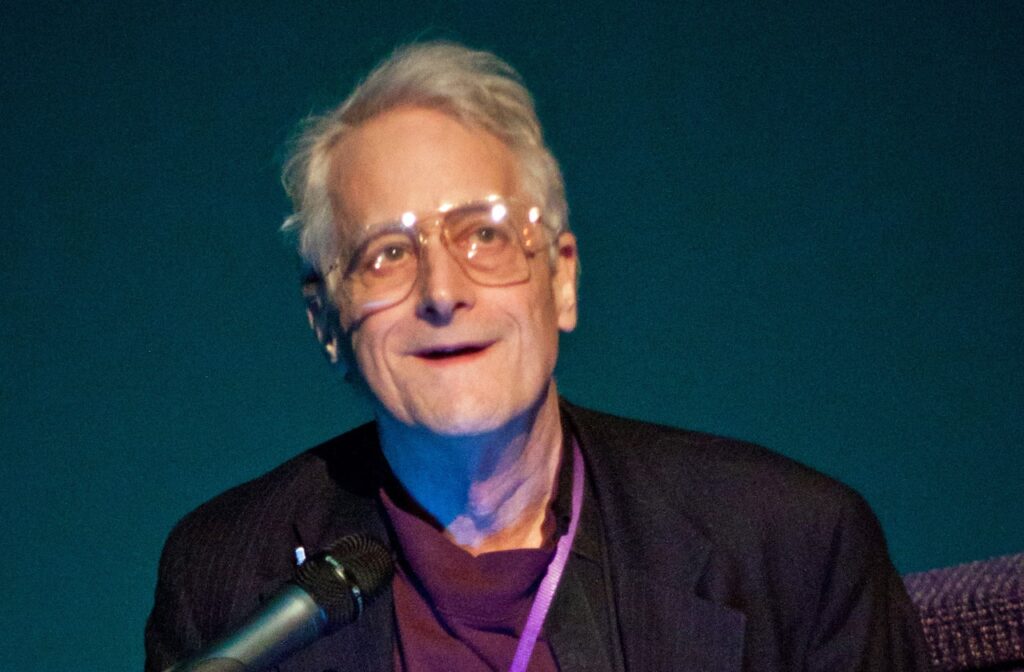
Theodor Holm Tedson aka Ted Nelson was born on June 17, 1937, in Chicago Illinois, United States. He is a cyber philosopher, computer scientist, and IT specialist.
Name
Theodor Holm Tedson
Father
Ralphan Nelson
Mother
Celeste Holm
Birth Date
June 17, 1937
Birth Place
Chicago Illinois, United States
Awards
Yuri Rubinsky Memorial Award
Known For
Hypertext
Early Life
Ted’s parents are responsible for his productive and creative work. His father’s name was Ralphan Nelson who was a famous film director and won the Emmy award. His mother’s name was Celeste Holm, she was an actress who won an Oscar. Mostly he lived with his grandparents first in Chicago but later in Greenwich Village. At a young age, he used to go on the sets with his father. He used this experience later to make an experimental student short film when he was studying for his graduate degree.
In 1959, he earned his bachelor’s degree at Swarthmore College, Chicago. Ted went to Harvard University to complete his master’s. Later in 2002, he earned his Ph.D. degree at Keio University in media and governance. Seeing the array on the computer screen at Harvard University, it first occurred to him that the monitor could be used for much more than this.
In the 1960s, hired by a dolphin researcher Lilly and he spent one year working at Lilly’s communication research lab. Ted worked here before seeking his career in information technology.
Career
Ted opened a retail cozy shop in the year 1977, called itty bitty machine Company that sold the computer and its component. It was the only computer store that sold the first Apple I machine.
Later in 1979, he started working on a new conceptual structure for software that was his own idea. He named it as software Xanadu. This name is referenced in a city from ‘Kubla Khan’ which was a poem written by Samuel Taylor Coleridge.
Hypertext and Hypermedia
In the year 1962, he came up with the idea of hypertext and hypermedia. Hypertext allows for easy navigation b/w interlinked digital paper. After several years hypertext system was practically implemented.
Before this idea, to find the data you wanted, you had to know where it was saved.
In the year 2011, he started working on the new project information structure known as Zig Zag. It is described on the Xanadu project and also hosts two versions of the Xanadu code.
Publications
Ted wrote many books that are published by his own company named Mindful Press.
Life, Love, College, etc in 1959.
Computer Lib
Literary machine
Geeks Bearing Gifts
My computer life and Fight for Civilization (2011)
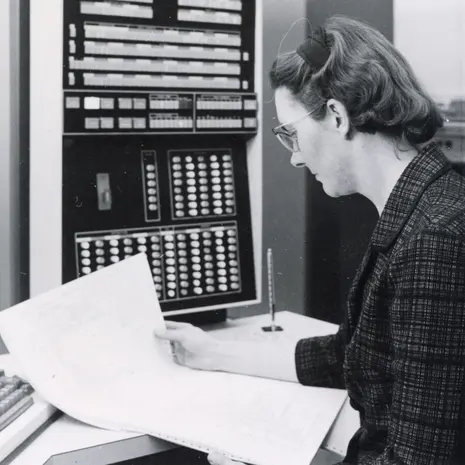
Kathleen Hylda Valerie Booth was born on 9 July 1922 in Stourbridge Worcestershire, England. She was a British computer scientist and mathematician and she wrote the first assembly language.
Name
Kathleen Hylda Valerie Booth
Birthday
9 July 1922
Birthplace
Stourbridge Worcestershire, England
Father
Fedrick Jhon Bitter
Mother
Gladys Kitchen
Husband
Andrew Donald Booth
Field
Computer Science
Institution
Birkbeck College
Died
29 september 2022
Early Life
Her father’s name was Fedrick jhon bitter he was a tax inspector and her mother’s name was Gladys Kitchen. Kathleen was the second child among their three children. In the year 1929, she started her schooling at St Poul’s convent in Sutton Coldfield. She completed her primary education at this institution. She started her secondary education at St Poul’s high school in the year 1932 which was founded in 1929. After studying for one year at St Poul’s high school she entered King Edward VI’s High School for Girls, Birmingham in 1934. In the year 1939, when war was declared girls were gone at Pates grammar school, Cheltenham. There she completed her schooling.
She earned her bachelor’s degree in mathematics in the year 1944. She got married in 1950 with her colleague Andrew donald booth and she had two children. In the year 1951, she won a scholarship of 40 pounds at Royal Holloway College, London.
Career
She started working on the development of the first commercial computer, Ferranti Mark 1 in the 1950s. And she was also part of the team who were creating the first assembly language. This made coding easier for programmers because they can use mnemonic symbols instead binary numbers. After that, she was involved in the development of COBOL, a programming language that was designed for business applications. COBOL is still used in many financial and administrative systems.
The contribution of Booth’s work to the development of programming languages made programming more accessible and easier. Her work in the field of computer science played a vital role in the evolution of the field.
She worked at Royal Aircraft Establishment as a junior scientist in 1944. Later she worked as a research scientist at the British rubber producers research association from 1946 to 1962. From 1952 to 1962 she worked as a research fellow and as a lecturer at Birkbeck College.
In the year 1958, she wrote her first book and described how to program APE(X) computer.
Death
Kathleen died on 29 September 2022, several weeks after her 100th birthday. She celebrated her last birthday on 9th July 2022. On the day of 9th June 2022, a memorial lecture of both Kathleen and Andrew was given at Birkbeck College.
Awards
In the year 1970, she was elected as a fellow of the computer society.
She got the Ada Lovelace Award in 1988.
She was awarded an honorary degree by Berkbick College for her contribution to computer science in the year 2013.
In the year 2016, she was inducted into the Women in technology international hall of Fame.
Web scraping technique is used in various industries for different purpose like data mining, competitive analysis, price tracking, etc. Web scraping APIs can be really handy for building an efficient web scraper tool for various use cases. In this article, I will be reviewing one such web scraping API that comes with great features and can be really helpful for developers in their web scraping projects. We will be exploring about ScrapingBee web scraping API features, pricing models, and pros and cons in detail.
ScrapingBee was founded in the year 2019 by Kevin Sahin and Pierre de Wulf. Their first two products were ShopToList and PricingBot, which were price monitoring tools. While working on these tools they gained a lot of experience in web scrapping which led to building ScrapingBee. As this web scrapping API comes with great features so it gained a lot of popularity in a very short time. It is used by big companies such as SAP, Zapier, Deloitte, Zillow, etc.
ScrapingBee Features
ScrapingBee API is capable of handling headless browsers. Getting blocked while scrapping the web is a common issue that we face. ScrapingBee solves this problem by using rotating proxies. It provides various other awesome features that are explained below.
General Web Scraping: It can do common web scraping tasks like retrieving data from the internet, monitoring prices, and extracting reviews, all without facing blocking issues.
Headless Browsers Handling: You can render web pages like a real browser. This is done with the help of thousands of headless instances using the recent Chrome version.
JavaScript Rendering: This feature allows you to render javascript for scraping any website. Even applications with a single page can be scraped using various libraries like AngularJS, React, etc.
Rotate Proxies: They have a large proxy pool that hides your bots which reduces the chance of getting blocked.
No Code Scarping: Even if you have no coding experience you can use the Make integration feature to build custom web scraping engines.
Screenshots API: This feature allows you to take screenshots of any website with a single API call.
Languages: It supports various programming technologies including Python, JavaScript, Java, Ruby, PHP, and Go.
ScrapingBee Pricing
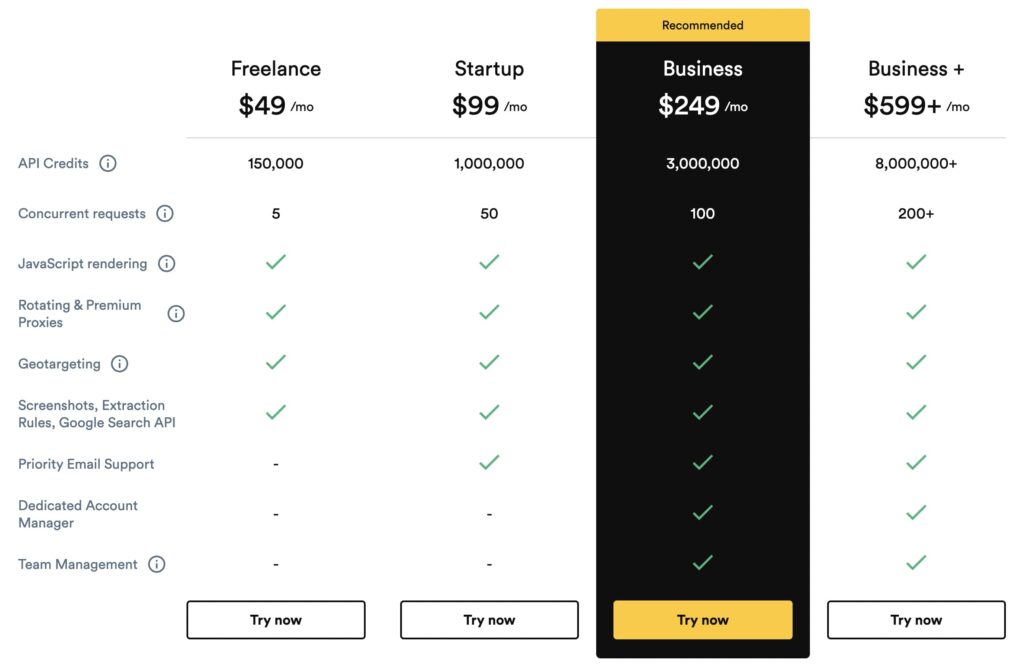
ScrapingBee provides various pricing options that are mentioned below. If you are not sure which plan to use or want to try the service then you can use their free plan that provides 1000 API calls. You are not required to give your credit card details for using free credits.
There are various good things about ScrapingBee that are given below.
Low API response time as compared to other services in the market.
Comes with detailed documentation that is really helpful for beginners.
Provides free API calls for testing the service without giving credit card details.
Supports mindblowing features such as headless browser handling, javascript rendering, rotating proxies, etc.
Bad Things:
ScrapningBee does not have any big issues but still, there are some minor cons that I collected from users reviews on various platforms.
Some of you may find the pricing to be on the higher side.
Some people complained about not being able to scrape some websites.
Even though it provides proxy rotations but still sometimes your scarping bots can be blocked.
Final Words
ScrapingBee API works great for general web scraping, data extraction, and javascript rendering. It is capable of handling headless browsers with the proxy rotation that prevents rate limiting and the chance of getting blocked. With lots of amazing features, this API helps programmers and businesses ability of easy web scraping. ScrapingBee offers flexible pricing plans along with some free API credits to try their service.
In conclusion, I can say it’s one of the best web scraping APIs currently available in the market. Do share in the comment section if you have any queries regarding this API.
A computer is an electronic machine that stores and process data and information and give result in the form of output. It consists of some components which help to manage the storage of data and information and process properly. These components make the working of a computer faster and smoother.
Input devices are hardware devices that are used to enter data and information in the computer system. Users can instruct and give commands to the computer system with the help of input devices. This data or information can be in text form, images, or numbers. It converts them into digital format.
Here are commonly used input devices:
Keyboard: In the computer keyboard is a primary input device. It helps users to communicate with the computer system. By pressing the keys of the keyboard user can type numbers, instructions, etc. Mainly it is used for typing documents, sending emails, and helping to interact with the computer.
Mouse: It controls the cursor on the screen of the computer system or any other electronic device. It is an input device and plays an important role in computer systems. Generally, it is used for choosing options or scrolling pages.
Touchscreen: It allows users to enter commands and information by touching the screen with their fingers. The Touchscreen system is also available in smartphones and tablets. Ex. ATM machine.
Some other input devices are listed below:
Joystick
Light Pen
Track Ball
Scanner
Graphic Tablet
Output Unit
It includes output devices that show results in the form of hardcopy or soft copy after processing the command or instructions. When we give a command through the input unit, the result we get after processing is the output. There are many output devices such as printers, speakers, monitors, etc.
Monitor: The monitor is an output device that is also known as the visual display unit (VDU). It shows a softcopy after processing the commands. It looks like television. It is an essential output device for computer systems.
Printer: The printer is a Hardware computer device. It is an output device that converts softcopy into hardcopy or we can say used to print anything on paper.
Speaker: The speaker is also an output device that is used to listen to sound by connecting to the computer.
There are several other output devices but we have covered only popular ones.
Central Processing Unit
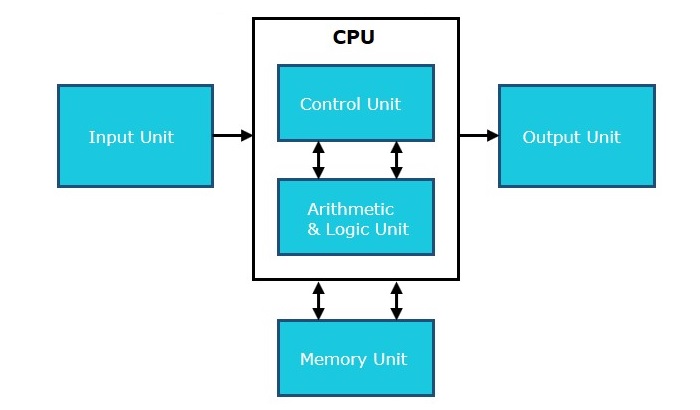
CPU is the brain of a computer that performs all the operations. Its work is to fetch instructions and data from memory and perform operations according to that. CPU consists of mainly three parts that are explained below.
Control Unit
The control unit is one of the main components of the central processing unit. CU directs the operation of the processor. It controls the flow of information. It works by receiving the input instruction after that it converts them into signals and sends them to the processor.
Memory Unit
Memory unit allows the data and information to be stored in the computer system, making it accessible to the software. Generally, it is used for storage work.
Arithmetic and Logical Unit
The arithmetic logic unit is part of the central processing unit that performs arithmetic and logical operations. It can also perform bitwise operations on binary numbers. The arithmetic logic unit consists of two parts, one is AU (arithmetic unit) and the second is LU (Logical unit). ALU can perform addition, subtraction, multiplication, and division. The result of the division operation can be in a floating point unit.
Barbara was born on November 7, 1939, in Los Angeles, California. She has done great work in the field of programming languages. In 2008, she received the prestigious Turing Award in computer science. She is the second woman to receive the Turing Award. The Liskov Substitution Principle, developed by her, states the basic nature of data abstraction and is used in type theory and object-oriented programming.
Bachelor’s degree in Mathematics from the University of California, Berkeley; Ph.D. from Stanford University
Notable Positions
NEC Professor of Software Science and Engineering, Ford Professor of Engineering, MIT Institute Professor
Key Contributions
Liskov Substitution Principle, Venus Operating System
Notable Awards
Discover Magazine’s 50 Most Important Women in Science, IEEE John von Neumann Medal (2004), A.M. Turing Award (2008)
Early Life
Barbara Jane Huberman was born on November 7, 1939, in Los Angeles, California. She comes from a Jewish family. She was the daughter of Jane and Moses Huberman. She was the eldest among her siblings. In 1961, she completed her Mathematics degree at California University, Berkeley. She had only one female classmate in her class at Berkeley. At Berkeley and Princeton, she applied to graduate mathematics programs, but Princeton was not accepting female students in mathematics at that time. As a result, she was accepted at Berkeley. Around the same time, she began working at the Mitre Corporation for one year and later started working as a programming language translator at Harvard.
She decided to return to school and applied to Berkeley, Stanford, and Harvard. She became one of the first women in the US to be awarded a Ph.D. at Stanford University in March 1968. She worked with John McCarthy at Stanford and was involved in artificial intelligence research.
Career
After graduation, she returned to the Mitre Corporation to work as a research staff. She has led many projects, including the Venus operating system. She worked as an NEC Professor of Software Science and Engineering (1986-97), a Ford Professor of Engineering in 1997, and an MIT Institute Professor in 2008. In 2009, she served on the inaugural Engineering and Computer Science jury for the Infosys Prize.
Awards
Discover magazine recognized her as one of the 50 most important women in science. Liskov won the IEEE John von Neumann Medal for fundamental contributions to programming languages in 2004. She received the most prestigious award in computer science, the A.M. Turing Award, in 2008.
Nikalus Emil Wirth was born on 15 February 1934 in Winterthur, Switzerland. He is a Swiss computer scientist. In the year 1984, he was honored with the Turing Award, the highest honor in computer science for developing a sequence of innovative computer languages like EULER, MODULA, ALGOL-W, and Pascal.
He completed his Bachelor of Science (B.S.) in electronic engineering from the Swiss Federal Institute of Technology (ETH) in 1959. And he earned a master’s degree in electronic engineering from Laval University, Canada in 1960 and a Ph.D. in computer science in 1963 from the University of California, Berkeley. He worked as an assistant professor of computer science at Stanford University from 1963 to 1967. In the year 1968, he became a professor at ETH Zurich taking two 1-year sabbaticals at Xerox PARC. He worked at ETH Zurich till his retirement in 1999.
He was associated with developing international standards in programming and informatics as a member of the International Federation for Information Processing (IFIP) on algorithm language and calculi which support the programming languages ALGOL 60 and ALGOL 68.
He was made a fellow of the Computer history museum in the year 2004.
Programming Languages
Wirth was involved in designing the programming languages Euler (1965), Oberon, Oberon-2, Oberon-07, Modula, Modula-2, Pascal, Algol W, and PL360. He was the chief designer at that time. He was also part of designing operating systems Medos-2, Oberon, and Lola. For the development of these languages, he received Turing Award the highest honor in computer science in the year 1994.
Publications
He wrote the book ‘The Pascal User Manual and Report’ with Kathleen Jansen.
Algorithms + Data Structures = Programs was written by him in 1975 that got a lot of popularity. The first edition consists of examples written in Pascal. Later its new editions were published with examples of Oberon and Modula-2.
Wirth’s law states that software is getting slower more rapidly than hardware becomes faster.
In this article, I will show you the working way to download and install Turbo C++ for Mac Intel as well as M1 chip system.
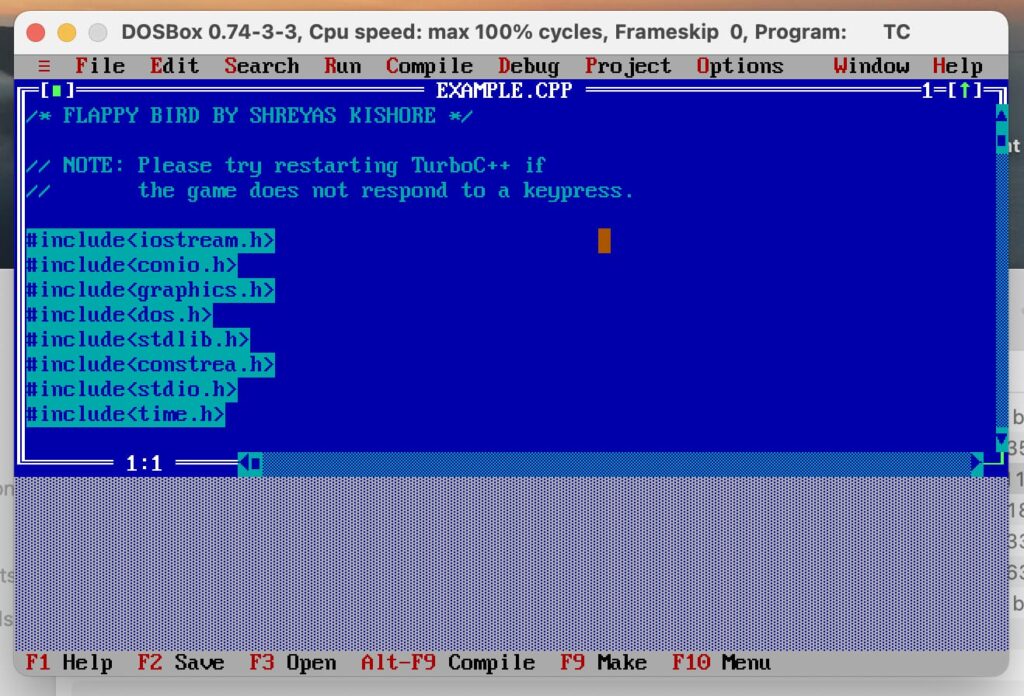
Turbo C++ was a popular compiler developed by Borland. Although it’s a really old compiler still lots of people use it to do programming in C and C++. It’s easily available for the Windows platform but for Mac we have to go through various steps to make it run.
How to Install Turbo C++ on Mac?
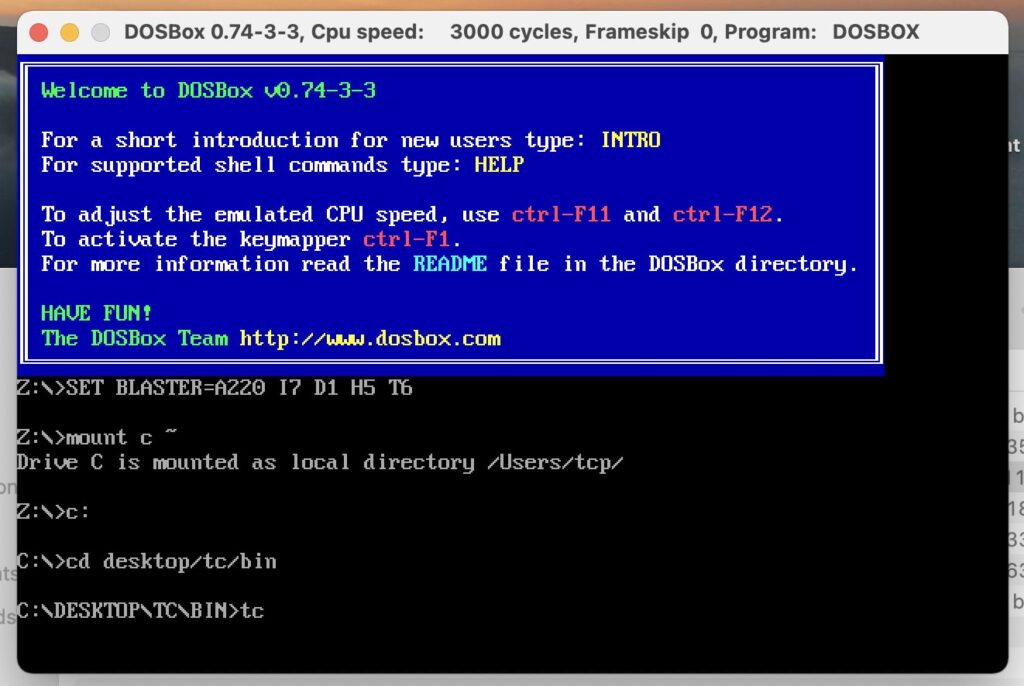
Turbo C++ was not originally made for Mac, so for running it on Mac os we need two things one is DosBox and another is the C++ compiler itself. Let’s have a look at how to install them on Mac.
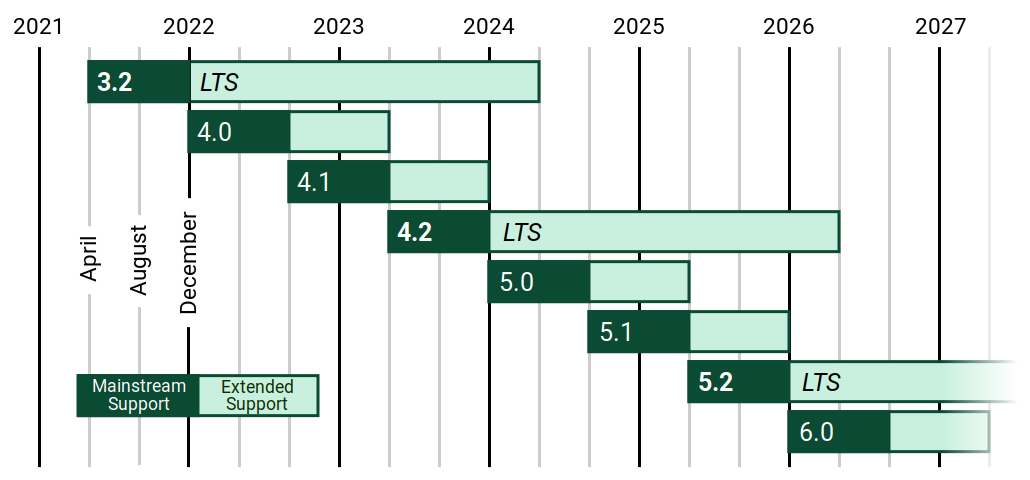
The Django team has recently announced about Django 4.2 release as a long-term support (LTS) version that will receive data loss and security fixes for the upcoming 3 years.
Support for asynchronous streaming responses and async interfaces for related managers and models.
LTS Support
As an LTS release, Django 4.2 will receive fixes for crashing bugs, major functionality bugs, and regressions from older versions of Django for the next eight months until December 2023.
End of Support for Django 4.1 and 4.0
After the release of the new version, Django 4.1 will not get mainstream support. Users of this version are advised to upgrade to Django 4.2 to receive security fixes. However, Django 4.1 will continue to receive data loss and security fixes till Dec 2023.
It’s also important to note that the extended support for Django 4.0 has ended. Users of this version are advised to update to the 4.1 version or later.
The Django team has provided a supported versions table and future release schedules on their downloads page, which can be accessed to find more information.
Overall, the release of Django 4.2 is an exciting development for users of the popular web framework, providing new features and long-term support for the next three years. As always, users are encouraged to upgrade to the latest version to ensure they receive the latest security and bug fixes.
SQL is a language that is used to manage relational databases. It provides a facility for easily declaring and using variables. We can use variables for storing temporary values in memory for performing calculations. In SQL variables can be used in the same way we use in any other programming language.
SQL Declare Variable
In SQL we use DECLARE statements for declaring variables. Let’s see its syntax:
Syntax:
DECLARE @variable_name data_type;
The above syntax is self explanatory so no need to explain.
Example:
DECLARE @marks int;
Here I have declared a variable with the name marks and type int.
SQL Assign Variable
I hope you got the idea about declaring variables now let’s have a look at how to assign some value.
Syntax:
SET @variable_name = value;
The SET statement is used for assigning some value to a variable in SQL.
Example:
SET @marks = 80;
As we declared a variable and assigned a value to it, now let’s take a look at how to use it with a SELECT statement.
SELECT * FROM Student WHERE total_marks > @marks;
Here we are fetching data of students from the table Student whose total_marks are more than marks i.e. more than 80.
Please note that the variable declared inside a stored procedure can be used in that procedure only.
So we can say DECLARE and SET statements are used to declare and assign a variable in SQL. Below I have mentioned a video that can help you understand the concept easily.
In today’s era Network or Internet is used to send and receive data worldwide. As we know the network is a complex structure consisting of lots of computers and networking devices.
The system which seeks data is known as the Client and the system which provides the data is known as Host.
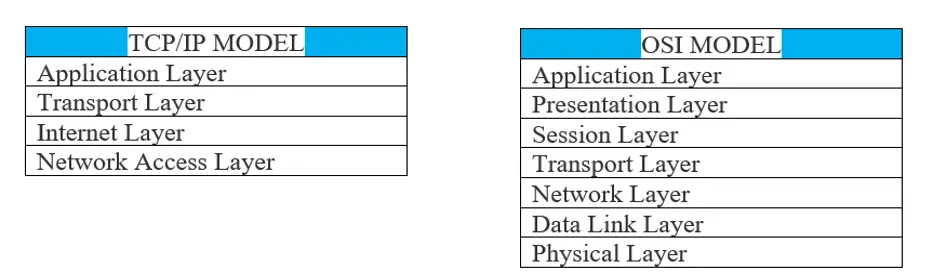
Also, we know that the TCP/IP and OSI models are the models which are used most. Both use layer architecture.
Layer Architecture of TCP/IP and OSI Model
Before transmission data moves between these layered architectures. Encapsulation and decapsulation are two processes used in this layered architecture. It’s like Boxing and Unboxing a real-world object for sent over courier.
We can’t send any data directly on the internet. There are lots of things to do before transmission, like establish host to host communication, provides source and destination IP addresses etc. Fortunately, we as a user do not need to do any chores. The Network model does the credits. All we need to do is to just select the data and press “send or upload”.
Encapsulation
It is a process in which additional information is added with the original data packet which is required for accurate and safe transmission of data over the Internet.
Here encapsulation could be described as a method of designing modular communication protocols. These protocols are used to create Protocol Data Unit (PDU). These PDU are being attached with the original data packet, which is forwarded over the internet. These PDU are created by the layers of the network model such as TCP/IP and OSI. Each layer has its own unique PDU and performs the task as per the layer’s functioning.
When we select data for transmission, the layers start their work step by step. The selected data move downwards in these layers. At every layer some new kind of data (Not the user data, the system data like IP addresses, frame size etc.) also known as PDU, is added with the original data packet (Selected by user). So, this whole process in known as Encapsulation.
Let’s take an example.
Encapsulation in TCP/IP Model
Here in this example, the user uses TCP/IP model.
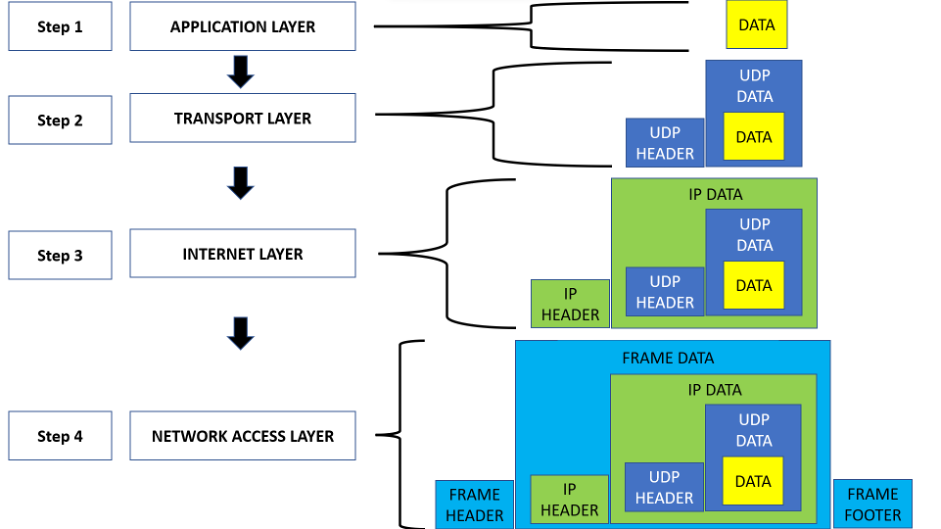
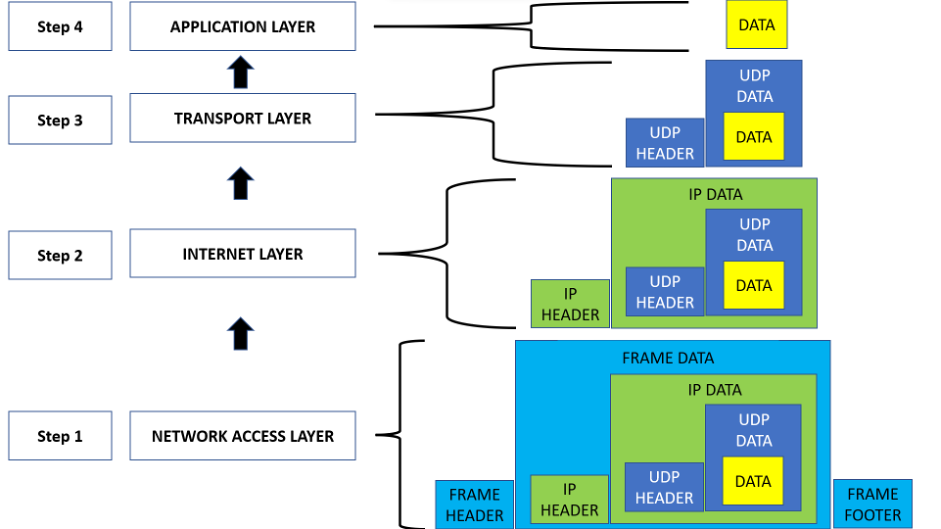
Here in above mentioned diagram, the yellow-coloured box is user data, which he/she wants to send over the network. When the user press sends or upload from his device, the data is forwarded to the Application layer.
This is step 1. Here Data itself is a PDU in this stage. The application layer shows the data to the user, received from the network in a format, which is easy to understand for the user. Every facility like email service, internet surfing l, online shopping, etc is falling into this category.
In step 2, the data packet is forwarded to the transport layer, where the data is encapsuled by the UDP (User Datagram Protocol) data. As you can see in the above diagram. Also, the UDP header is attached for identification of UDP data packet. Here this PDU is known as a segment.
In 3rd step, the segment is sent to the Internet layer. Here the segment is encapsulated by the IP data and the IP header is attached. This is the PDU of this layer.
This PDU is known as Packet. Each and every device or system in the network has an individual and unique IP address. IP header is responsible for containing source and destination IP addresses. These details are used to search and find out the location of the client and host in the network.
In 4th step this packet is sent to the Network Access Layer. Here the received data packet is encapsulated by the MAC address. Now this PDU is called Frame. Each frame has Frame Header and Footer. MAC Address or Media Access Control actually represents a real-world hardware or physical address of the Network Adapter or system like the computer of a host. This address or hardware ID is allotted by the Manufacturer of the NIC (Network Interface Card).
Once the 4th step is completed the frame is sent over the network. So, as we can see in the above diagram the original data is encapsulated by much additional information in each stage. This data or information addition is known as Encapsulation.
Each layer encapsule the original data with its own PDU, and this whole PDU is again encapsulated in a new PDU at the next stage. The process continued till the last layer arrived.
Decapsulation
This is the reverse process of encapsulation. In this, the additional information is plucked out from the original data. Once the frame reached at its destination or the host system, the reverse process is started. This is down to top approach, where the frame is received by the network layer first and then after decapsulation, it is sent to the upper layer such as Internet layer.
Similar to Encapsulation each layer has its own Decapsulation format. For example, take the above-mentioned figure but this time it will be in reverse order such as given below:
Decapsulation in TCP/IP Model
At 1st step the frame is sent from the client, and received by the network layer of the host computer. This PDU or frame is removed, and only this PDU Packet is forwarded to the Internet layer.
In step 2 the packet is decapsulated and the Packet PDU is removed and now it is the segment PDU. This is forwarded to the Transport layer.
In step 3 the segment is again decapsulated and the PDU segment is removed and finally, the original data is forwarded to the Application layer.
In step 4 the original data is shown to the user.
Both processes are related and necessary for smooth and secure data transmission over the network.
Difference between Encapsulation and Decapsulation
Encapsulation
Decapsulation
It follows Top to Down approach; the data moves in sequence between layers but goes down layer from the recent upper one.
It follows Down to TOP approach; the data moves in sequence between layers but goes upward layer from the recent down one.
In each layer the additional information is added with the original data.
In each layer the additional information is removed till the original data is decapsulated.
At each step the size is increased.
At each stage the size is decreased.
The encapsulation technique and Decapsulation technique are used to secure the original data and provide 100% secure and successful data transmission.
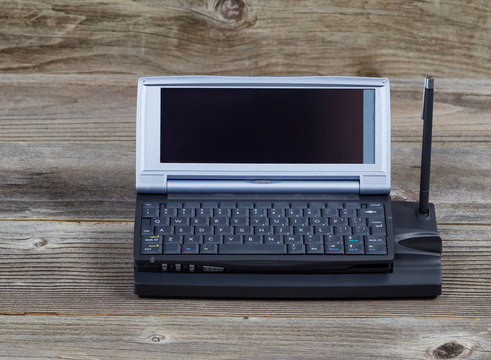
Computers are designed for specific work and are developed in different sizes and shapes depending upon the requirement. There are many different types of computers, some are designed for personal use and some are made for business and scientific purposes. Here we will explore the different types of computers.
Personal Computers (PCs)
Personal computers are the most common type of computer. It is also known as PCs. These computers are designed for personal use, such as for home, school, office work, and more. PCs come in two forms one is the desktop and the second one is the laptop. Desktop computers are designed for regular use at a single location on a table due to their size and power supply. While laptops are portable and easy to use and carry. Personal computers can be used for a wide range of tasks, including browsing the web, word processing, gaming, and multimedia.
Workstation
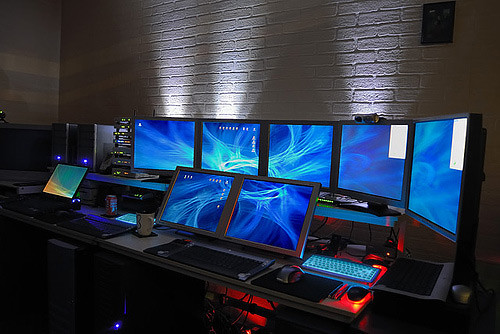
Workstation computers are designed for technical or scientific applications. These computers are high-performance computers used by engineers, architects, graphic designers, scientists, etc. It can be used in animation, video editing, and data analysis. These computers are expensive and made for complex tasks purposes. It is designed for a single user or professional use. Workstations are mainly used by single users, they are basically connected to LAN (local area network). They are able to handle huge amounts of data and can process complex calculations quickly.
Mainframe computers are used by large organizations such as banks, the telecom sector, and government agencies. These computers are designed to support hundreds or thousands of users at the same time. Mainframes are known for trustworthiness, security, performance, ability to protect data, and more. It can process a huge amount of data quickly. There is very less chance of error during processing. If any bugs or error occurs, it can fix them quickly. These mainframe computers are expensive. It is used in defense departments to share huge amounts of sensitive data or information with other branches. Mainframe computers have also been used in the field of healthcare, education, the retail sector, etc.
Supercomputers
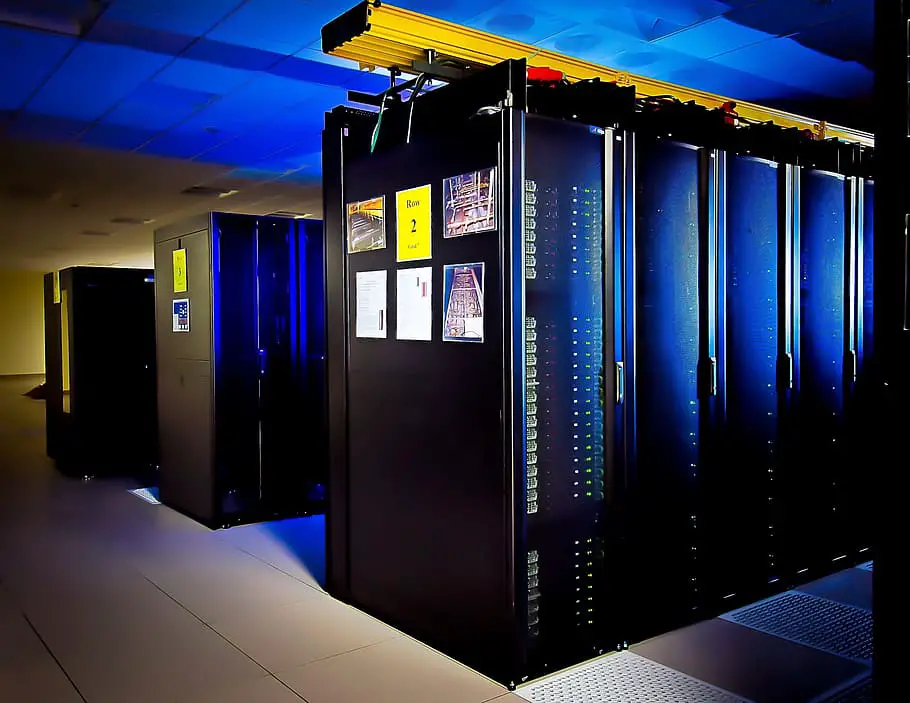
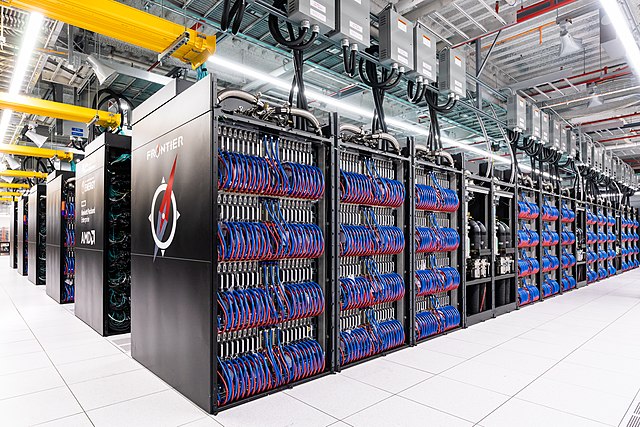
The supercomputer is designed to perform large and complex calculations in seconds. The first supercomputer was developed in 1976 by Roger Cray. These are the fastest, biggest, and most powerful computers. They are mainly used for scientific and engineering applications. They have large amounts of memory and processing power and can perform trillions of calculations in seconds. It can decrypt your password to increase protection for security purposes. Supercomputers are used in the field of weather forecasting, and molecular dynamic simulation.
Minicomputers
Minicomputers were developed in the mid-1960s. These are midsize computers with multiprocessing. They are smaller than mainframe computers and larger than microcomputers. It is mainly used in institutes and departments for work such as billing, accounting, and inventory management. These computers are lightweight and less expensive than mainframe computers.
Embedded Computers
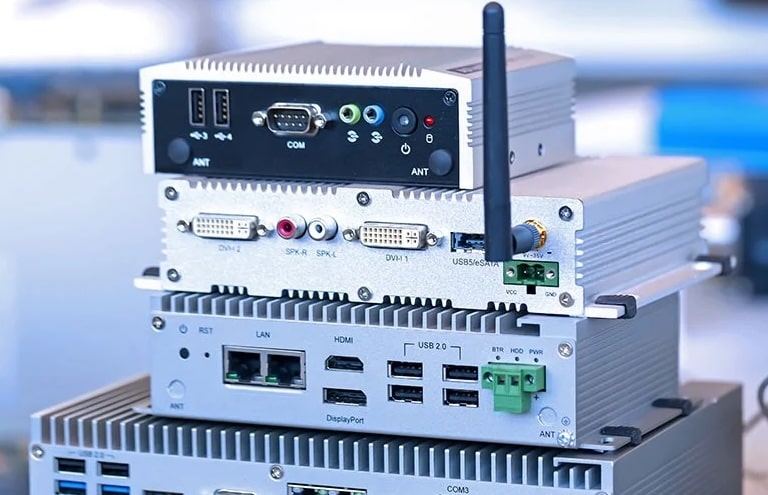
A computer system that is integrated into another device to perform a specific function is called an embedded computer. It is designed for only limited operations. For example, the type of embedded computer in a car will not be the same for a washing machine or other items. Embedded computers are found in daily items such as smartphones, toys, cars, and more. It is used to control and monitor the device’s functions. Embedded computers are used for small devices such as fitness trackers to large device aircraft control systems.
Tablets
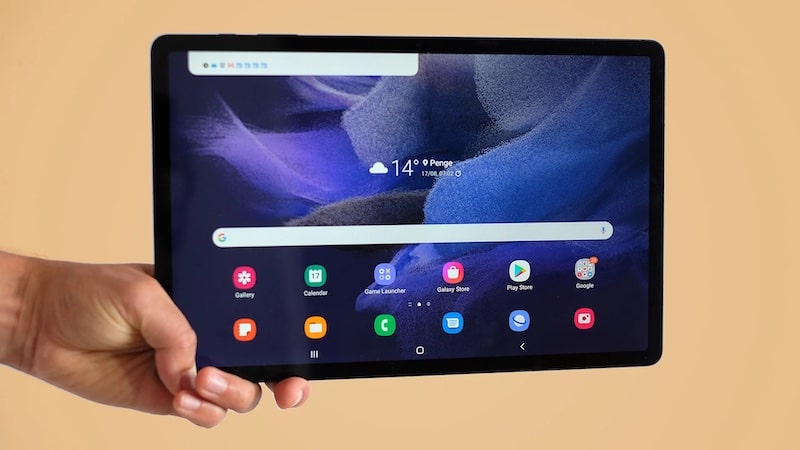
Modern technology had developed pocket-friendly computers such as tablets and smartphones. It has a sensitive touch screen and is very lightweight. These are designed to be portable and very lightweight and used as an alternative to laptops for some tasks. They are also used for gaming, watching videos, studying, browsing the web, etc. Now tablets have powerful graphics and processing capabilities.
Conclusion
The different types of computers are designed to complete the specific needs and requirements of organizations. There are personal computers for homes and individuals. On the second hand, there is also a supercomputer for scientific computers. There are different types of computers available today. By understanding the type of computers, it will be easy for us to decide which computer will be suited to our needs.